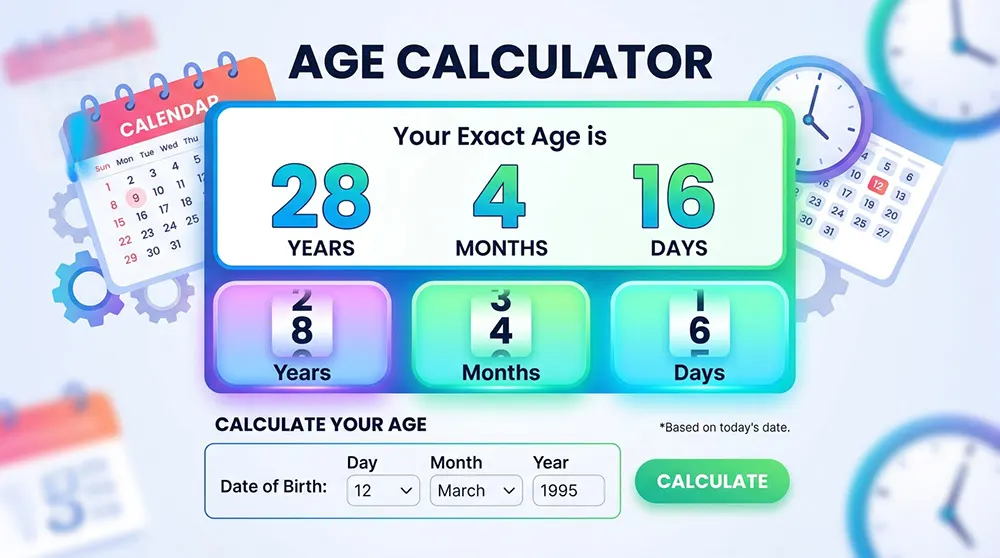
Find Your Exact Age in Years, Months, and Days
A woman filling out a visa application pauses at the field asking for her exact age in years, months, and days. She subtracts in her head, second-guesses herself, and does it again. Then she opens a browser and types three words: age calculator. The result comes back in under a second: 34 years, 2 months, 17 days. She copies it, pastes it, moves on.
That is the everyday version of this tool. But the same calculation runs in hospital systems when a pediatric nurse enters a patient's date of birth, and the dosing software returns the child's age in days, not years, not months, days, because that level of precision affects how much medication is safe. It runs in genealogy databases when a researcher enters a death date and an inscribed age from a tombstone and works backward to a probable birth year. It runs in HR systems, pension platforms, school enrollment portals, and immigration forms.
The math looks simple. Subtract one date from another. But the Gregorian calendar makes that surprisingly tricky: months have different lengths, February shrinks and expands, and leap-year rules have exceptions that catch even experienced developers. A reliable age calculator handles all of that without making the user think about any of it.
What Is an Age Calculator
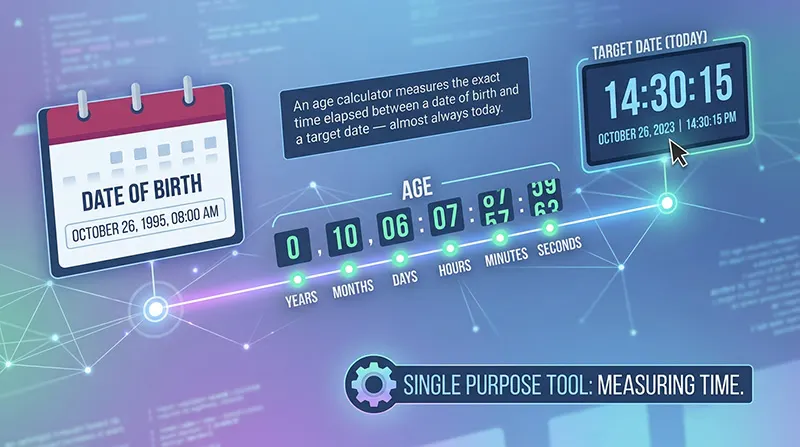
An age calculator measures the exact time elapsed between a date of birth and a target date, almost always today. That's the whole job.
It does not predict lifespan or assess health. It does not determine legal rights that are set by statute, not arithmetic. It simply performs calendar math with a level of precision that is easy to get wrong manually, and returns the result in a format the user actually needs: years and months for a job application, months only for a pediatric visit, total days for a milestone calculation.
The distinction worth knowing is between an age calculator and a general date difference calculator. A date difference tool will calculate the gap between any two arbitrary dates: the start of a project to its deadline, a historical event to today. An age calculator is purpose-built for birth dates. It applies the correct calendar rules for that specific use case, including leap year handling and the adjustment for whether the current birthday has occurred yet this year. Those two tools look similar on the surface. They are not the same underneath.
The Problem It Solves
Manual age calculation fails at the edges. For a round number, how old is someone born in 1990? The mental math is easy. But precision requests expose the gaps quickly.
Consider someone born on January 31. Today is March 1. How many months old are they? The intuitive answer is two months. The correct answer is one month, one day because February only has 28 or 29 days, and the calculation has to cross from a 31-day month into a short one. A naive system that just adds one to the month number will produce February 31, a date that does not exist. Proper calendar arithmetic caps the day at the target month's maximum and carries the overflow forward.
Leap years add another layer. Someone born on February 29 has a birthday that literally does not appear on the calendar three years out of four. Legal systems handle this inconsistently: the UK recognizes March 1 as the official birthday in non-leap years; New Zealand uses February 28. Some U.S. state statutes are ambiguous. A calculator has to make a choice about which convention to follow, and ideally it tells the user which one it made.
These are not edge cases that affect only a handful of people. Leap day births, month-end births, and near-birthday calculations happen every day. A tool that gets them right earns trust. One that gets them wrong goes back in the browser tab.
How to Use the Age Calculator
Most online age calculators work the same way. Enter a date of birth, get back an age. The steps below cover what the better tools offer beyond that minimum.

- Step 1 — Enter the date of birth. Use the calendar picker if one is available. Typing dates manually introduces format errors: a person accustomed to DD/MM/YYYY entering a date into a field expecting MM/DD/YYYY will get a wrong result and may not notice. A visual picker eliminates that.
- Step 2 — Set a target date if needed. The default is today, which answers 'how old am I right now.' But many use cases need a different reference point: how old will this person be on their retirement date, how old was the patient on the date of their last check-up, how old was this ancestor on the date of a census. A quality tool lets the user set any target date, past or future.
- Step 3 — Read the output in the format that matters. For most purposes, years-months-days is the right output. For infants, months only. For neonatal records, weeks or days. For a milestone celebration, total days lived. A well-designed tool presents the primary result clearly and puts the extended formats hours, minutes, seconds, total weeks one click away rather than front and center.
No registration is required for any reputable age calculator. Date of birth is personal data, and a tool worth using processes it locally in the browser; nothing leaves the device. If a tool asks for an account or an email address just to calculate an age, close the tab.
Key Features of a Reliable Age Calculator
Not all age calculators are built equally. The minimum viable version takes a birth date and returns years. The tools worth bookmarking do considerably more.
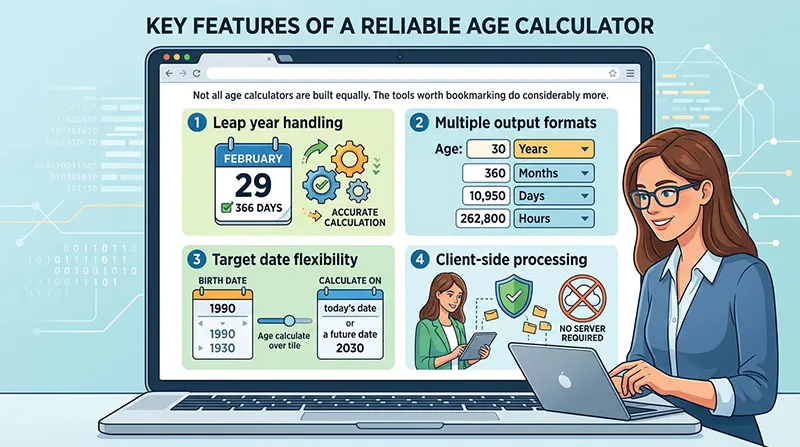
- Leap year handling is non-negotiable. February 29 births, calculations that cross February in a leap year, and cumulative day counts that span multiple leap years all require explicit handling. A calculator that ignores this will be systematically wrong for certain birth dates.
- Multiple output formats matter because the answer looks different depending on who is asking. A parent tracking infant development needs months. A medical professional calculating medication timing needs days. A genealogist working from a tombstone needs years, months, and days simultaneously. The best tools return all of these without requiring separate calculations.
- Target date flexibility separates a utility tool from a novelty one. Anyone can build something that tells you your age today. The professionally useful version calculates age on any specified date, which is how pension eligibility, school enrollment cutoffs, and retrospective medical records actually work.
- Client-side processing means the calculation happens in the browser, on the user's device, without sending the date of birth to any server. For a tool that handles genuinely personal data, this is the right architecture. Users should look for tools that state this explicitly.
The features that separate a good tool from a great one are smaller. A next-birthday countdown. A 'day of the week you were born' output something people are always curious about. An age difference mode that compares two people's dates of birth. A decimal years output for scientific contexts where 25.34 years means something more precise than '25 years old.' None of these are essential. All of them are useful to the right person at the right moment.
Who Actually Uses an Age Calculator — and Why
The casual user someone who has simply lost track and wants a quick number — is the most visible audience but not the most important one. The more consequential use cases are in contexts where precision matters.
Parents and Pediatric Care
For children under two, age is measured in months, not years. A pediatrician asking how old a child is wants to hear '14 months,' not '1 year.' Developmental milestones first steps, first words, weight-for-age percentiles are calibrated to monthly intervals during this period. Vaccine schedules are the same: the timing of the 12-month, 15-month, and 18-month visits is not approximate.
Parents who track this manually often make small errors. An age calculator that outputs months only, with an option to switch to weeks for newborns, removes the mental arithmetic from a period of parenting when cognitive bandwidth is already stretched thin.
Legal and Administrative Use
Age determines eligibility for an enormous range of things: driving, voting, drinking, consent, employment, retirement benefits, school enrollment. Each of these has a cutoff date that is enforced to the day.
The school enrollment case is one where the stakes are more visible than people expect. Many school districts set a September 1 cutoff: children must turn five by that date to start kindergarten that year. A child born September 2 waits a full additional year. An age calculator with a target date feature answers this question instantly: enter the date of birth, set the target to September 1 of the enrollment year, read the result.
Medical Dosing
This is the use case where errors have direct physical consequences. Pediatric drug dosages are frequently weight-based and age-based simultaneously, and age in this context means days or months, not years. A child who is 11 months old and a child who is 13 months old are in different dosing categories for several common medications. The margin is not large. The precision matters.
Medical professionals do not rely on mental arithmetic for this. They use systems that calculate from date of birth. The underlying mechanism is the same as a standard age calculator; the stakes are different.
Genealogy and Historical Research
Family historians regularly encounter ages without dates, and dates without ages. A census record from 1880 lists a child as 'age 7.' The census was taken in June. If the child turned 7 in December, the birth year is 1872, not 1873 as a simple subtraction would suggest. Getting the direction of that error wrong means connecting to the wrong ancestors.
The reverse calculation is equally valuable. A tombstone reads: 'Died March 7, 1826, aged 61 years, 8 months, 11 days.' Working backward from that inscription gives a birth date of June 24, 1764. An age calculator that supports reverse lookup of a known age on a known date, returning a birth date range, is an indispensable tool for this community.
Retirement and Financial Planning
Pension eligibility, Social Security claiming age, and Medicare enrollment all hinge on exact dates. The difference between 64 years 11 months and 65 years 0 months can be financially significant: benefits may change, early withdrawal penalties may apply, or employer contributions may vest differently. Retirement planners calculate age on a specific future date as part of standard financial modeling. An age calculator with a target date field handles this directly.
How Age Calculation Actually Works
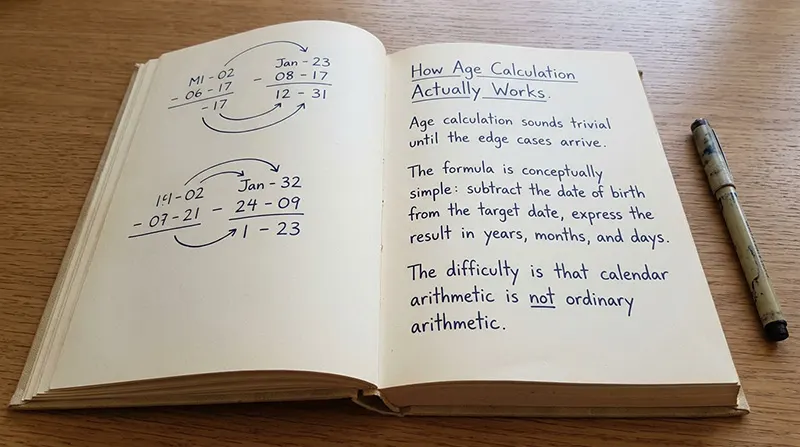
Age calculation sounds trivial until the edge cases arrive. The formula is conceptually simple: subtract the date of birth from the target date, express the result in years, months, and days. The difficulty is that calendar arithmetic is not ordinary arithmetic.
The Basic Formula
Start with the year difference: target year minus birth year. Then check whether the birthday has occurred yet in the target year; if not, subtract one from the year count. That gives the completed years.
For months: count full months from the last birthday to the target date, using the same 'has the day occurred yet this month' logic. For days: count the remaining calendar days after the last full month. The result is the three-part answer: years, months, days.
What trips up manual calculation is that each of these steps depends on the others, and the calendar complicates each step. Month lengths vary. February varies. Borrowing days across month boundaries requires knowing how long the previous month was.
Why February Is the Problem
March 31 plus one month is April 30, not May 1. April only has 30 days, so a system that naively increments the month and keeps the day produces an impossible date. The correct behavior is to cap the day at the target month's maximum and note the overflow.
This means calculating the age of someone born on March 31 on April 30 returns exactly one month. Calculating it on May 1 returns one month and one day. That one-day gap is mathematically correct, but it surprises people who expect the numbers to be more symmetric.
The same logic applies when crossing into February. Someone born October 31: how old are they on December 1? One month, one day, because November has 30 days, so 'one month after October 31' lands on November 30, and December 1 is one day past that. The calculation works, but it requires the algorithm to know the lengths of the specific months involved, not just the month numbers.
Leap Year Logic
Earth's orbit takes approximately 365.2422 days. The Gregorian calendar corrects for this by adding February 29 every four years except in years divisible by 100, except again in years divisible by 400. That last clause is why the year 2000 was a leap year (divisible by 400), and 1900 was not (divisible by 100 but not 400).
For people born on February 29, the practical consequence is that their exact birth date does not exist in three out of every four years. Most age calculators treat the birthday as March 1 in non-leap years for the purposes of completed-years counting, while preserving the actual day count for total-days-lived calculations. That is the correct approach, but the calculator should say so; a person born on a leap day has a reasonable interest in knowing which convention the tool is using.
A worked example: a person born March 15, 1990, calculated on April 10, 2026. Year difference: 36. April comes after March, so no year adjustment; still 36. Month difference: April is month 4; March is month 3, one month. Day difference: 10 minus 15 is negative, so borrow one month. March has 31 days, so 10 plus 31 minus 15 equals 26 days. Final answer: 36 years, 0 months, 26 days. That kind of step-by-step calendar borrowing is what a reliable age calculator runs automatically.
Age Output Formats
Most people give their age as a single number: the completed years. That works for casual conversation. It fails for most professional contexts, and it fails interestingly for some cultural ones.
Years, Months, and Days
This is the standard format for official documents, medical records, and legal forms. The precision matters because a year alone leaves a range of up to 364 days of ambiguity. Someone who is '25 years old' could be three days past their birthday or three days before their next one; a year's difference in precision can determine eligibility for age-specific services.
Total Days Lived
The cumulative day count shifts the framing from calendar age to experienced time. The number of days lived grows continuously; there is no rounding, no 'almost,' and milestone numbers like 10,000 days (roughly 27.4 years) or 20,000 days (roughly 54.8 years) have taken on cultural significance in some communities as a different way to mark the passage of time.
For infants, total days is the clinical standard in the first weeks of life. A newborn in neonatal intensive care is tracked by day of life, not by months or weeks.
Running Age vs. Completed Age
Two conventions produce different numbers for the same person on the same day. Completed age is the Western legal standard and counts only fully elapsed years. Someone born December 31 is zero years old for the first 364 or 365 days of their life.
Running age counts the current year as soon as it begins. In some traditional East Asian counting systems, a person is considered one year old at birth and gains a year at the Lunar New Year rather than on their birthday. A baby born one day before the New Year would, by this reckoning, be two years old two days after birth. Modern East Asian countries have largely moved to the international completed-age standard, but the distinction remains relevant for historical documents, family records, and anyone trying to reconcile ages across different recording systems.
A reliable age calculator states clearly which convention it uses. The difference matters.
Baby Age Calculation
The standard years-months-days format does not serve parents of young children well. Pediatrics uses a different unit system for the first two years of life, and a good age calculator accommodates this.
In the first four weeks, age is measured in days. After that, through the first two years, it is measured in months. A parent who says their child is 'one and a half' has told a pediatrician something that needs to be converted; the clinician wants to know that the child is 18 months old, because that is the unit the growth charts and milestone checklists use.
After 24 months, the convention shifts to years. That transition is not arbitrary: most of the rapid developmental benchmarks tracked in pediatric practice occur within the first two years, and monthly resolution is needed to detect delays or regressions in time to intervene.
For parents, the practical value of an age calculator with a months-only output is simply this: it removes a small but recurring source of mental arithmetic during a period when sleep deprivation and cognitive load are already high. Well-baby visits, vaccination schedules, introduction of solid foods, and sleep training guidelines all of these are expressed in months. The calculator should be too.
Chronological Age vs. Biological Age
Chronological age is what an age calculator measures: the time elapsed since birth. It is objective, verifiable, and consistent. Two people born on the same day have the same chronological age, regardless of how healthy or unhealthy either one is.
Biological age is different in kind. It is an estimate of how well the body is functioning relative to its chronological age, assessed through biomarkers such as telomere length, DNA methylation patterns, cardiovascular fitness, and inflammatory markers. A 50-year-old with the cardiovascular profile of a 40-year-old has a lower biological age than their birth certificate suggests.
The reason this distinction matters in a guide about age calculators is that it comes up constantly in search queries, and the confusion is genuine. An age calculator cannot measure biological age. No arithmetic can. Biological age assessments require laboratory analysis or validated clinical tests. The two concepts share the word 'age' and nothing else.
Some online tools market themselves as 'biological age calculators' based on lifestyle questionnaires. These are not measurements; they are estimates, and their accuracy varies widely. A standard age calculator reports chronological age. That is a fact. A biological age estimate is a model output. Treating one as equivalent to the other is a category error.
Age Calculation in Code
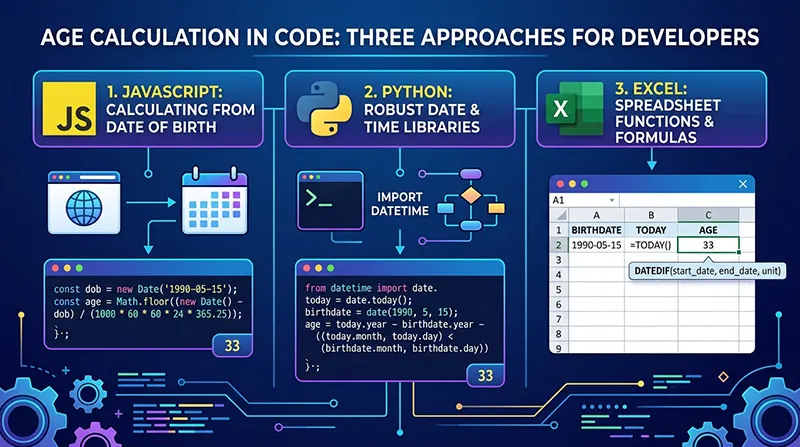
For developers building systems that need age calculation patient management software, HR platforms, school enrollment tools the implementation details matter more than they might appear on first reading.
The Core Pattern
The safest approach in any language is to use a purpose-built date library rather than writing calendar arithmetic from scratch. Libraries that handle date arithmetic have been tested against exactly the edge cases described in this guide: February 29 births, month-end calculations, time zone edge cases. Rolling a custom implementation will produce subtle errors that are hard to catch in testing because they only manifest on specific birth dates.
JavaScript
The basic structure looks like this:
function calculateAge(birthDate) {
const today = new Date();
let years = today.getFullYear() - birthDate.getFullYear();
const monthDiff = today.getMonth() - birthDate.getMonth();
if (monthDiff < 0 || (monthDiff === 0 && today.getDate() < birthDate.getDate())) {
years--;
}
return years;
}
This handles the birthday-not-yet-occurred adjustment correctly. For year counts, it works. For year-month-day precision, use a library like date-fns or dayjs that provides relativeDifference or duration methods; these handle month-end borrowing correctly, which the snippet above does not attempt.
Python
from dateutil.relativedelta import relativedelta
from datetime import date
def calculate_age(birth_date):
today = date.today()
return relativedelta(today, birth_date)
The relativedelta function from python-dateutil is the right tool here. It returns an object with years, months, and days attributes, all correctly calculated with calendar arithmetic. Do not use timedelta and divide by 365.25; that approach accumulates rounding errors and is silently wrong for certain birth dates.
Excel
=DATEDIF(A1,TODAY(),"Y")&" years, "&DATEDIF(A1,TODAY(),"YM")&" months, "&DATEDIF(A1,TODAY(),"MD")&" days"
DATEDIF is one of the more useful hidden functions in Excel. It exists and works, but it does not appear in the formula autocomplete list and is not documented in the function library. The "YM" argument returns months excluding completed years; "MD" returns days excluding completed months. Combining the three gives the standard years-months-days breakdown.
Common Age Calculation Mistakes
Most errors in manual age calculation come from the same small set of oversights. Knowing them makes it easier to spot when a tool or a person has made one.
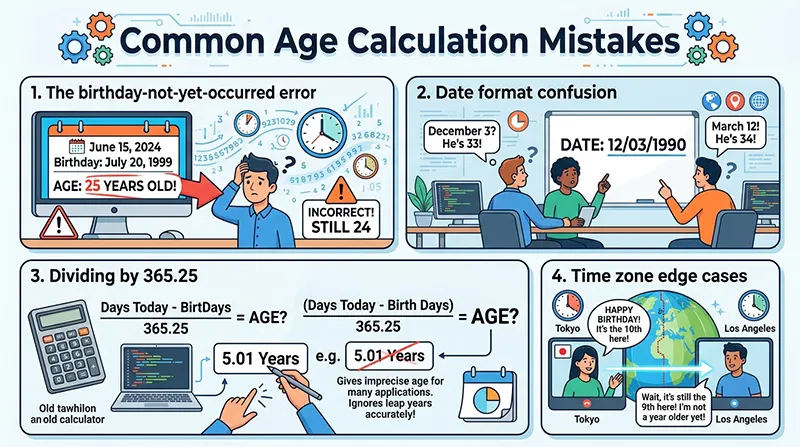
- The birthday-not-yet-occurred error is the most frequent. Subtract 1990 from 2026 and get 36. But if the person's birthday is in November and today is March, they are still 35. The year difference has to be adjusted downward whenever the birth month-day combination has not yet passed in the current year. Automated tools do this automatically; mental arithmetic often does not.
- Date format confusion is the most common data entry error. March 4 written as 03/04 is April 3 in European notation. That transposition produces a birth date that is off by a month, which cascades into a wrong age. A calendar picker removes this problem entirely by making the selected date visually unambiguous.
- Dividing by 365.25 is a shortcut that sounds reasonable and produces slightly wrong answers. The 0.25 accounts for leap years on average, but average is not the same as accurate. For someone born on February 29, or for calculations that cross February boundaries, the rounding error becomes a real error. Use calendar-aware arithmetic, not division.
- Time zone edge cases affect systems that use timestamps rather than dates. A person born at 11:30 PM in Tokyo on January 1 was born on December 31 in UTC. A system logging birth events in UTC will record the wrong date for that person. For most age calculations, this does not matter; the calendar date is sufficient. For systems that need hour-level precision, the birth time zone must be stored and applied.
Privacy
Date of birth is personal data. In most privacy frameworks GDPR in Europe, CCPA in California, and others it qualifies as sensitive personal information because it is a component of identity and can be combined with other data to narrow down or confirm a person's identity.
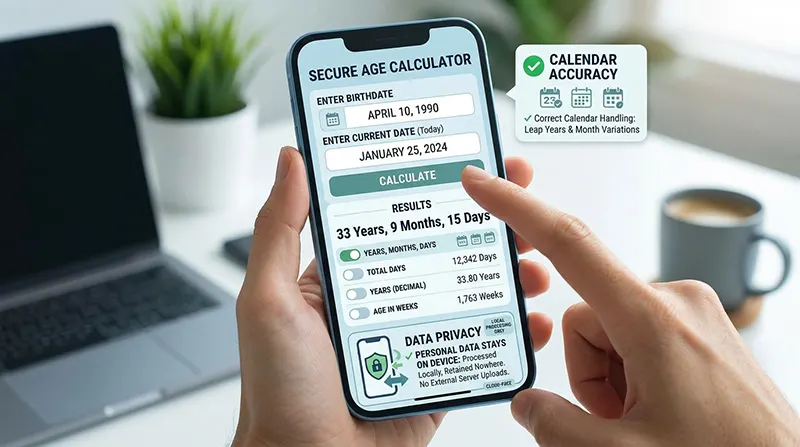
A well-designed age calculator processes the date locally in the browser. The calculation runs in JavaScript on the user's device; nothing is transmitted to a server. After the tab is closed, no record of the input exists anywhere. This is the correct architecture for this type of tool, and reputable calculators say so explicitly, usually with language like 'your data never leaves this device' or 'all calculations are performed locally.'
If an age calculator asks for registration, logs activity, or shows targeted advertising related to the entered birth date, those are signals that the tool is collecting data it does not need in order to perform its stated function. The calculation itself requires no data to be retained.
Age Difference Calculator
An age difference calculator takes two dates of birth and returns the exact gap between them in years, months, and days. It identifies which person is older and by how much.
The most common use is couples checking a significant age gap, but the tool has less romantic applications too. Genealogists use it to verify sibling relationships from historical records: if two children listed under the same parents in a census are fewer than nine months apart, something in the record is wrong. Researchers use it for generational analysis. HR professionals use it when comparing retirement eligibility dates across a workforce.
The calculation is the same calendar arithmetic as a standard age calculation, applied to the difference between two birth dates rather than between a birth date and today. Most age calculators include this as a secondary mode, either as a separate input section or a tab.
Age Calculator vs. Date Difference Calculator
These two tools look identical on many websites: two date fields, a calculate button. The difference is in purpose and implementation.
An age calculator is built specifically for birth dates. It applies birthday-occurrence logic (has the birth day-month combination passed yet this year?), handles leap day births, and outputs results in age-appropriate formats. A date difference calculator works between any two arbitrary dates and typically returns a raw count of days, weeks, months, or years without the birthday-specific adjustments.
The practical consequence: if someone uses a date difference calculator to compute their age, they will get a result that is correct for some birth dates and off by one year for others, specifically when their birthday has not yet occurred in the current year. The tool will not warn them. An age calculator will not make that error.
Internationalization
Date formats are not universal. The United States writes March 4, 2000 as 03/04/2000. Most of Europe writes it as 04/03/2000. Japan writes it as 2000/03/04. A tool that accepts text input and assumes any particular format will misread dates entered by users from other regions and may do so silently, returning a plausible-looking but wrong result.
The cleanest solution is a calendar picker that removes format ambiguity by design. For text input, the tool should detect or ask for locale, or display the expected format unambiguously next to the field.
Beyond date formats, some contexts use calendar systems other than the Gregorian: the Islamic Hijri calendar, the Hebrew calendar, the Persian calendar, the traditional lunar calendars used in parts of East and South Asia. An age calculator built for international use needs to handle conversion between these systems if it intends to serve users for whom a different calendar is primary. Most tools do not go this far. It is worth knowing the limitation exists.
Frequently Asked Questions
How is exact age calculated from a date of birth?
The calendar distance between two dates is calculated in three passes: first the completed years, then the completed months within the remaining partial year, then the remaining days. Each step requires knowing whether the relevant birthday or monthly anniversary has occurred yet in the current period and adjusting down by one if it has not. Varying month lengths and leap year rules apply at each step.
Why do some age calculators give different results for the same dates?
Two legitimate sources of disagreement exist. First, the month-end alignment question: from February 28 to March 31, one method returns one month and three days (counting from Feb 28 to Mar 28, then three more days); another returns exactly one month (treating both as month-end dates). Both are mathematically defensible. Second, running age versus completed age conventions produce different numbers for the same person on the same day. A tool that is transparent about which conventions it uses is more trustworthy than one that just returns a number.
How does the calculator handle February 29 birthdays?
In non-leap years, most calculators treat the birthday as occurring on March 1 for purposes of counting completed years. The total days-lived count remains exact throughout, since actual calendar days are counted regardless of how the annual birthday is handled. The legal convention varies by jurisdiction: UK law uses March 1, New Zealand uses February 28, and ideally the tool notes which approach it takes.
How many days old am I?
Total days lived is the count of calendar days from birth date to today, inclusive. It crosses as many February 28/29 transitions as the person's life has included, accounting for each one correctly. The number grows by one each day and never adjusts backward.
Can I calculate age on a past or future date?
Any age calculator worth using accepts a target date other than today. This is how retirement eligibility, school enrollment cutoffs, and retrospective medical record ages are calculated. Enter the date of birth and the relevant target date; the tool returns age as of that specific date.
What is the difference between chronological age and biological age?
Chronological age is the time elapsed since birth, an exact, objective number. Biological age is an estimate of physiological condition relative to chronological age, assessed through biomarkers. An age calculator measures chronological age. Biological age requires clinical testing, not calendar arithmetic. Lifestyle questionnaires that claim to return a 'biological age' are producing a rough model estimate, not a measurement.
Is the date of birth sent to any server?
In a properly built age calculator, no. The calculation runs locally in the browser using JavaScript, and no data is transmitted or retained. After the tab is closed, nothing persists. Tools that ask for registration or serve interest-targeted advertising related to age inputs are collecting data beyond what the calculation requires.
How do I calculate age in Excel?
Use the DATEDIF function specifically: =DATEDIF(birth_date, TODAY(), "Y") for years, =DATEDIF(birth_date, TODAY(), "YM") for months within the year, and =DATEDIF(birth_date, TODAY(), "MD") for days within the month. DATEDIF does not appear in Excel's autocomplete list, but it works correctly. Avoid subtracting dates and dividing by 365 or 365.25; both approaches produce rounding errors for certain birth dates.
What is the difference between running age and completed age?
Completed age is the standard in Western legal systems and counts only fully elapsed years. Running age counts the current year from the moment it begins, regardless of whether the birthday has occurred. The difference is most visible for people born late in the year: under completed age, a person born December 31 is zero years old for nearly the entire first year of life; under running age, they are one from day one. Some traditional East Asian counting systems historically used running age. The convention matters when reading historical documents or comparing ages recorded under different systems.
Conclusion
Age calculation is one of those things that looks like a solved problem until it isn't. The number itself is simple. The calendar underneath it is not. Irregular month lengths, the February 29 exception, the question of whether a birthday has occurred yet in the current year these details are small enough to ignore in casual conversation and significant enough to matter in the contexts where precision counts: pediatric dosing, pension eligibility, genealogical research, legal verification.
A good age calculator handles the calendar correctly, presents the result in the format the user needs, and keeps the personal data involved exactly where it should be: on the user's device, processed locally, retained nowhere.
The tool is not sophisticated. The underlying math is not glamorous. But done correctly, it removes a small, recurring source of error from situations where error has real consequences. That is more than enough.