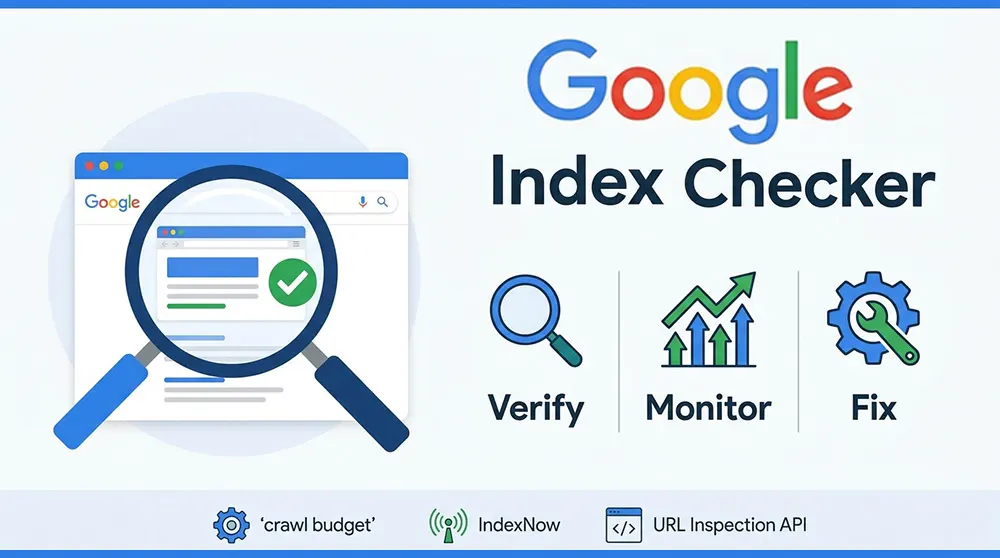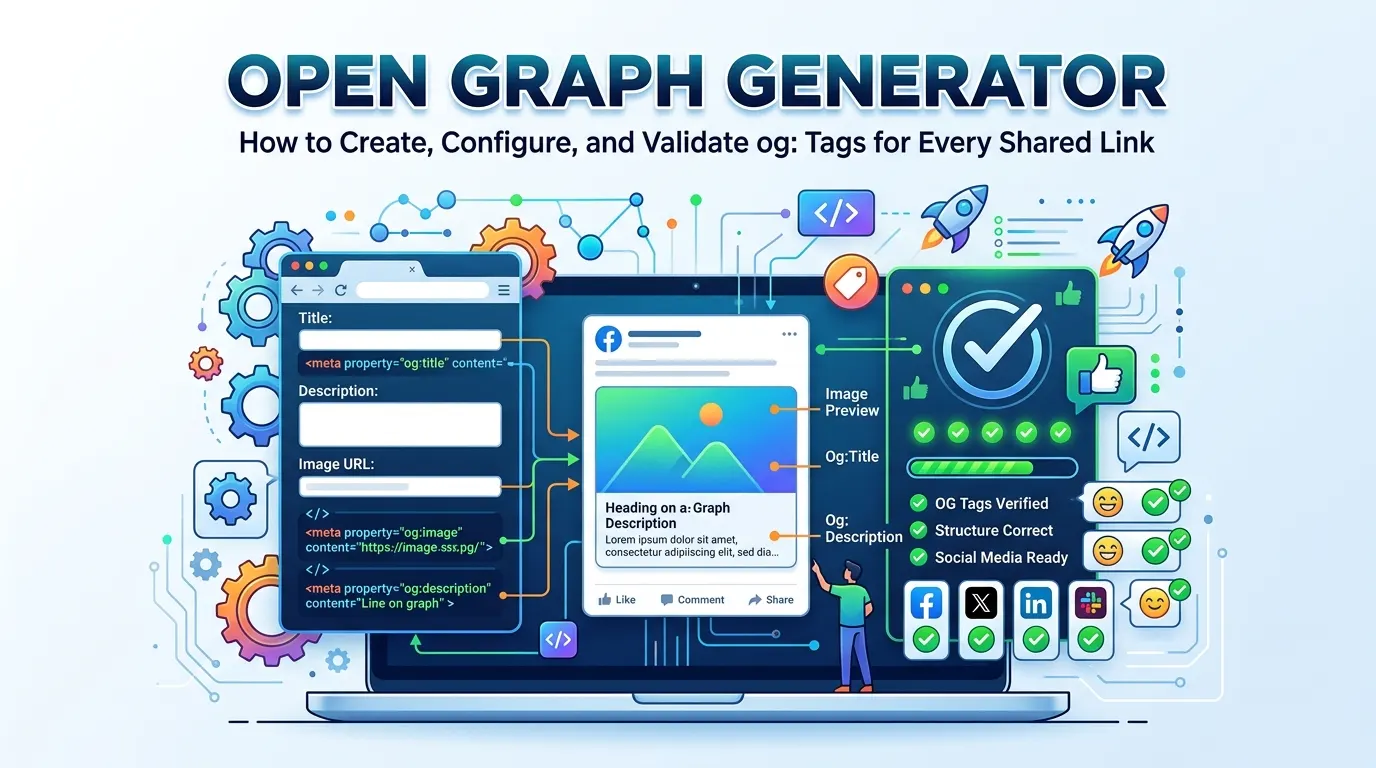
How to Create, Configure, and Validate og: Tags for Every Shared Link
Share a page on LinkedIn and a polished image card appears. Share a different page on Facebook and the result is a bare URL with no image, no headline, and no context. The difference between those two outcomes is not the page's content quality or its design. It is five lines of code in the HTML head section.
Open Graph tags are the metadata that social platforms read before rendering a link preview. An Open Graph generator produces those tags automatically, taking a URL, title, description, and image URL as inputs and returning the correctly formatted HTML ready to paste into any page.
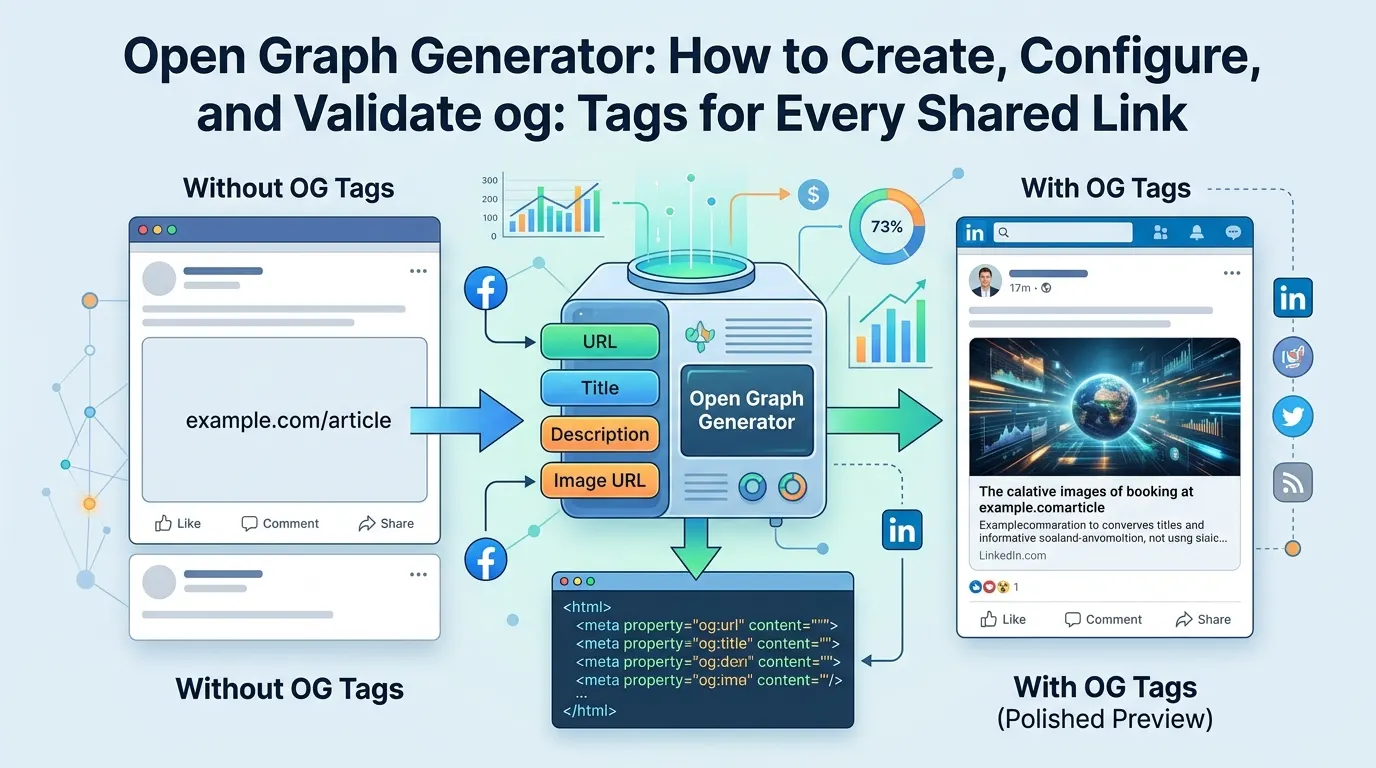
This guide covers what Open Graph is, why the tags matter, how to use a generator effectively, what the image requirements are, how Open Graph relates to Twitter Cards and Schema.org, and how to diagnose and fix the most common implementation mistakes.
What Is the Open Graph Protocol
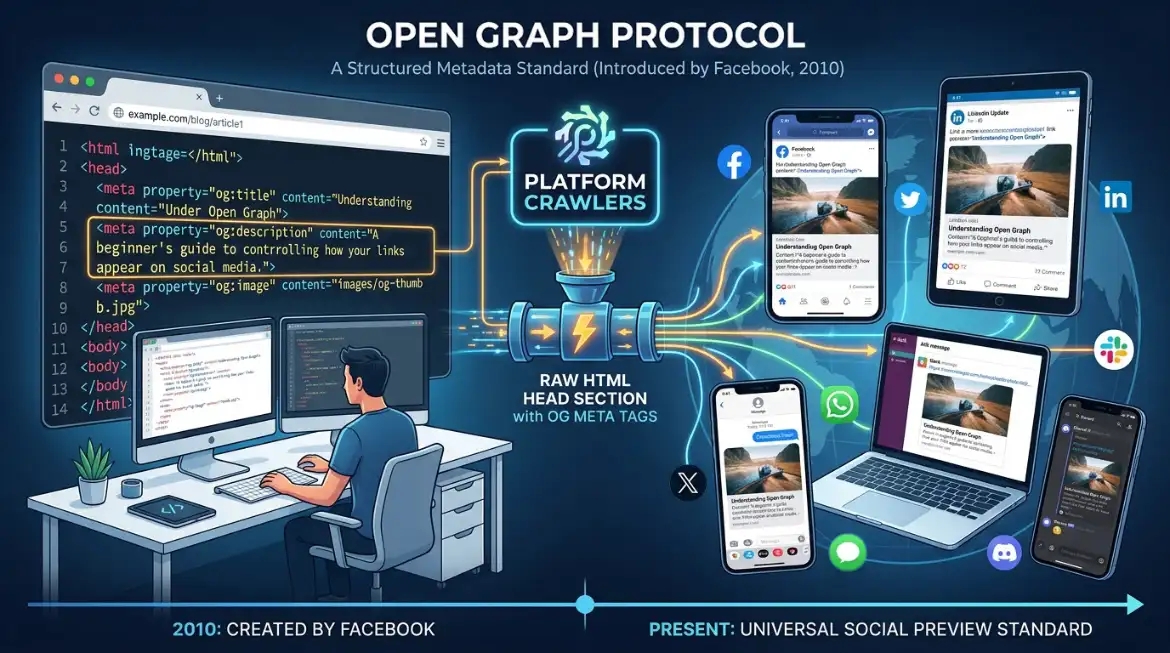
The Open Graph protocol is a metadata standard introduced by Facebook in 2010. It was built to give web publishers a structured way to control how their pages appear when shared on social media, specifically what title, description, and image the platform displays in the link preview card.
The protocol defines a set of meta tags using the property attribute og:title, og:description, og:image, og:url, og:type that live in a page's HTML head section and communicate structured information to any platform whose crawler knows to look for them. Facebook created it. Twitter, LinkedIn, Slack, WhatsApp, Discord, iMessage, and dozens of other platforms now support it.
The name 'Open Graph' reflects the original intent: connecting web pages into Facebook's social graph as structured objects, not just raw URLs. That social graph context has faded as the protocol became universal, but the tags themselves remain the standard mechanism for controlling social previews across the web.
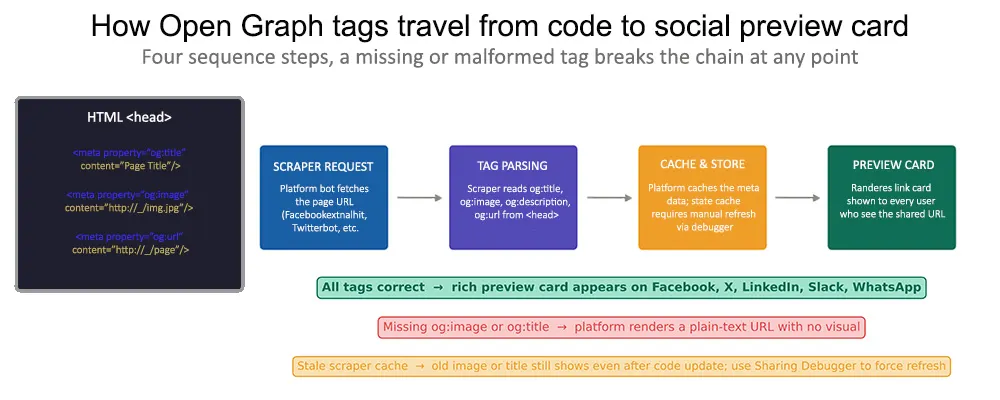
Figure 1: How Open Graph tags travel from the HTML head section to the rendered social preview card. A missing or malformed tag breaks the chain — the platform falls back to scraping random content, usually with poor results.
How Social Platforms Use OG Tags
When a user shares a URL on Facebook, LinkedIn, or Slack, the platform sends an HTTP request to the page using its own crawler bot, such as facebookexternalhit or LinkedInBot, and reads the Open Graph tags from the HTML head. It does not render the full page or execute JavaScript in most cases. It reads the raw HTML, extracts the og: properties, and uses them to build the preview card.
This is why server-side rendering matters for pages that need accurate social previews. If the og: tags are injected by JavaScript after the initial HTML response, many platform crawlers will not see them. The tags must be present in the HTML delivered by the server, not added by client-side scripts.
After the first scrape, platforms cache the result. That cache persists until it expires or is manually refreshed. This means updating the og:image on a page does not immediately change how the page appears when shared; the old image stays visible until the cache is cleared, typically through the platform's own debugging tools.
The Essential Open Graph Tags
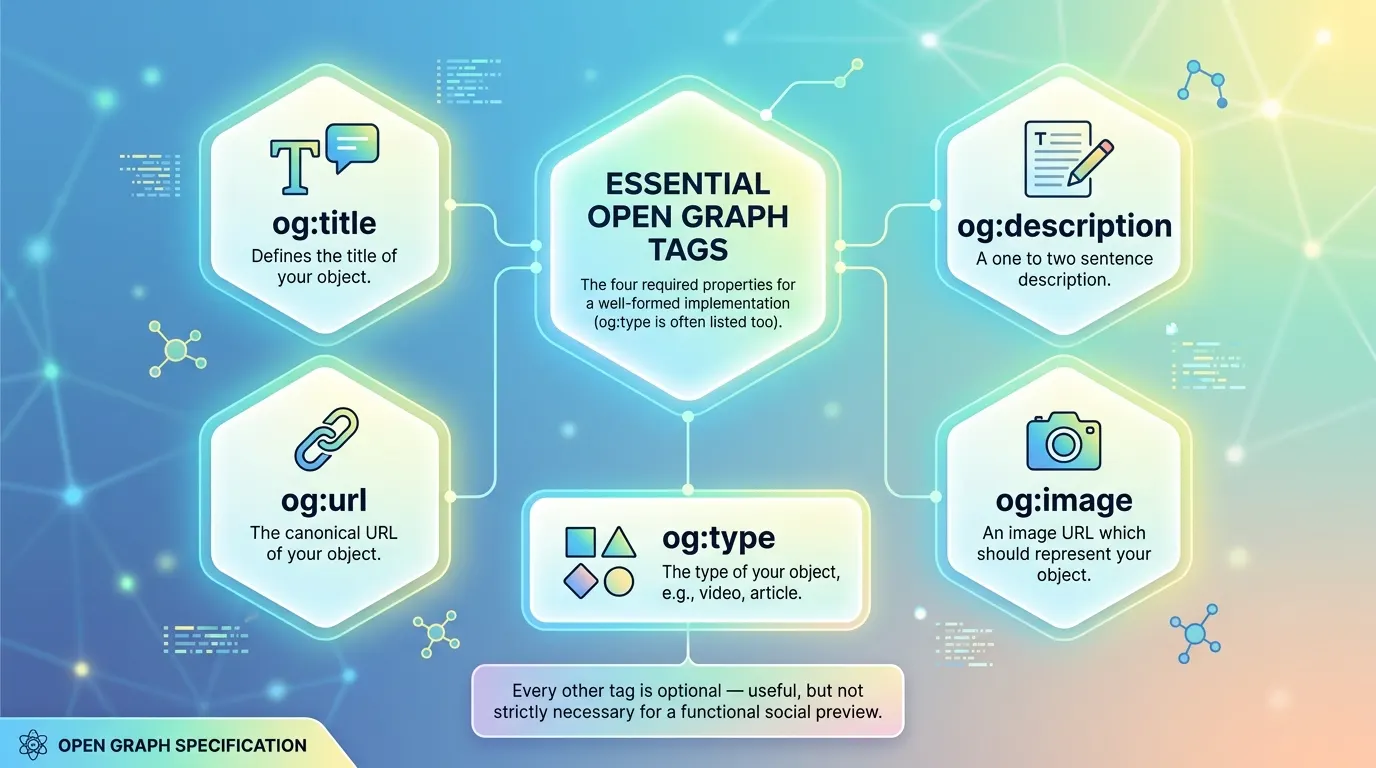
The Open Graph specification defines four required properties for a well-formed implementation. Every other tag is optional, useful, but not strictly necessary for a functional social preview.
og:title
The title that appears in the preview card. Not necessarily the same as the page's HTML title tag although they often should be. The og:title can be optimised specifically for social sharing: shorter, more direct, benefit-focused, with the brand name removed or moved to the end.
Facebook and LinkedIn typically display around 55–60 characters before truncating. A good og:title is the key message of the page, stated in a way that makes someone who sees it in a feed want to click.
og:description
The supporting text beneath the title in the preview card. Around 155 characters is the practical limit before truncation, though this varies by platform and context. The description supplements the title; it should add specific detail or a benefit statement that the title does not contain, not repeat it.
Many CMS platforms fall back to the meta description when no og:description is set. This is acceptable but not ideal: the meta description is optimised for search result snippets, which have different character limits and intent alignment requirements than social preview text.
og:image
The image that dominates the visual space of a preview card. More than any other tag, og:image determines whether a shared link gets engagement. A sharp, relevant, well-composed image at the correct dimensions creates a card that stops the scroll. A missing, broken, or poorly sized image produces a result that looks unfinished.
The value must be an absolute URL including the full protocol and domain. A relative path like /images/preview.jpg will be ignored by most platform crawlers. The URL must be publicly accessible and return the image file directly; redirect chains or authentication walls cause the scraper to fail silently.
og:url
The canonical URL of the page. When a URL has multiple variants with and without trailing slashes, with UTM parameters, or with session tokens, og:url tells the platform which version to treat as the definitive one. This affects how share counts are aggregated and how the page is represented in platform databases.
The value should match the canonical tag in the page's head section. If they differ, there are two conflicting signals about which URL represents the page.
og:type
The content type of the page. The default and the one that covers the vast majority of pages is "website". Other defined types include "article", "video.movie", "music.album", and "profile". Setting the correct type enables additional structured properties specific to that content category. For most marketing and content pages, "website" is correct and sufficient.
og:image Dimensions, File Size, and Format Requirements
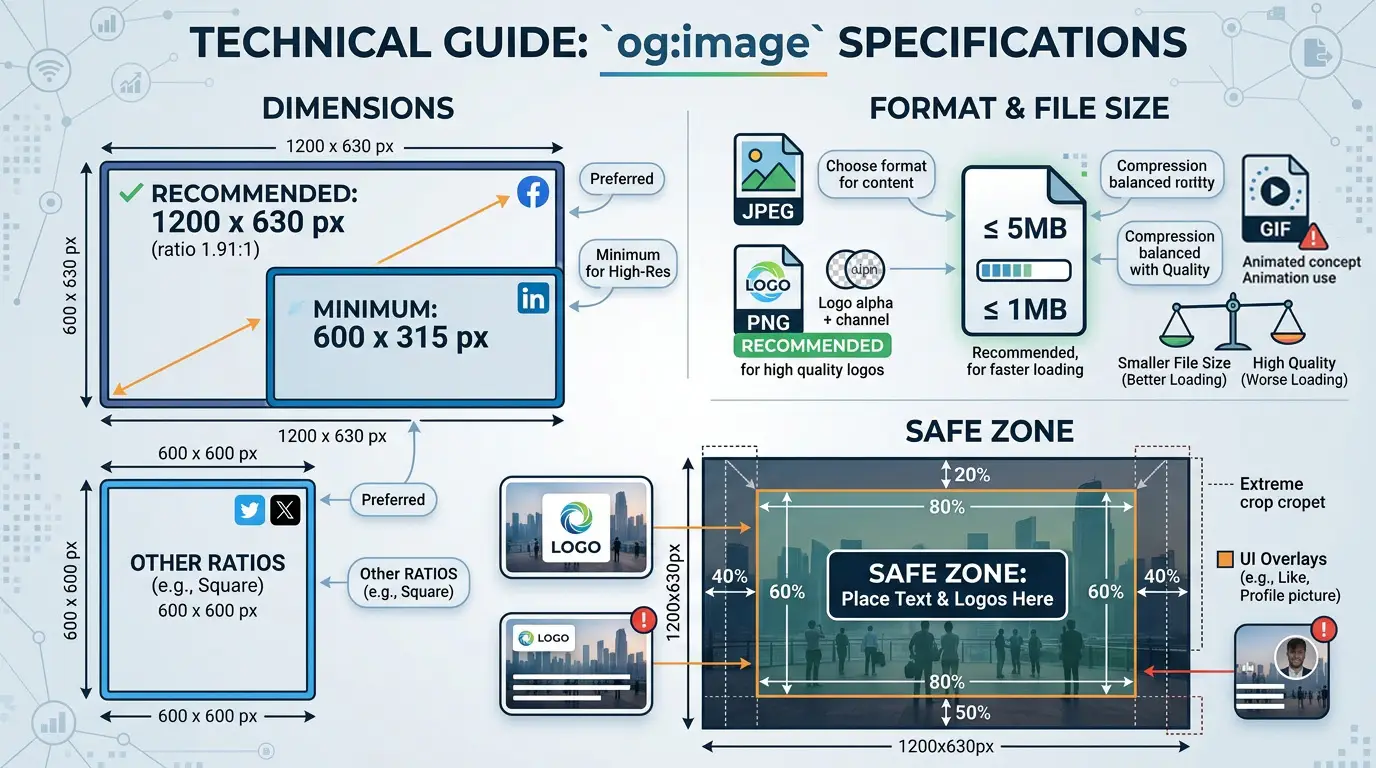
The og:image specification has specific technical requirements that vary slightly by platform. Getting these wrong is the most common reason for broken or degraded social previews.
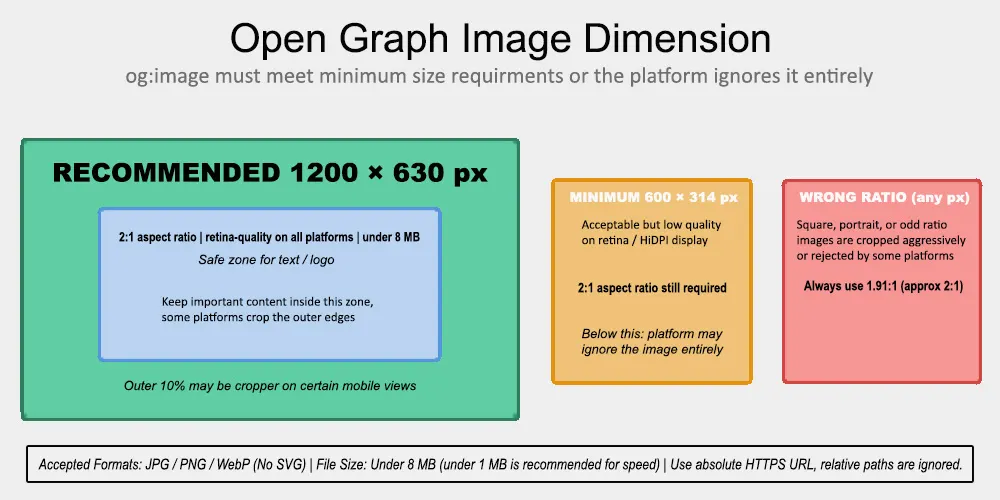
Figure 2: Open Graph image dimension requirements at a glance. The 1200×630px recommended size renders crisply on all platforms and device types. Images below the 600×314px minimum are ignored entirely by most platform crawlers.
Dimensions
The recommended size is 1200×630 pixels. This produces a 1.91:1 aspect ratio close enough to 2:1 that it is often described that way and renders sharply on retina and HiDPI displays. Platforms scale the image down for standard displays rather than up, so starting large preserves quality.
The minimum accepted size is 600×314 pixels. Images below this threshold are ignored by Facebook and several other platforms, resulting in the same no-image preview as a missing og:image tag. For any page that will be shared on social media, the minimum should be treated as a floor to avoid, not a target.
Square images (1:1 ratio) and portrait images are cropped aggressively by most platforms, often cutting the most important part of the image. Designing the og:image specifically as a 1200×630 landscape asset rather than repurposing an existing square or portrait image produces consistently better results.
Format and File Size
JPG and PNG are the most universally accepted formats. WebP is supported by most modern platform crawlers but may fall back on older implementations. SVG is not supported for og:image and will be ignored.
File size should stay under 8 MB, the technical limit for most platforms, but practically, images should be compressed well below 1 MB. A large uncompressed image loads slowly in the scraper request, which can cause the crawl to time out and result in a missing preview. An image optimised for web delivery at 100–300 KB loads reliably across all platforms and network conditions.
Safe Zone for Text and Logos
Some platforms, particularly those rendering previews at smaller sizes or in constrained layouts, crop the outer edges of the og:image. Keeping important text, logos, and focal points within the inner 80% of the image frame ensures they survive across all rendering contexts. Elements placed at the very edges of a 1200×630 image may be cut off in certain mobile or sidebar preview layouts.
Using an Open Graph Generator
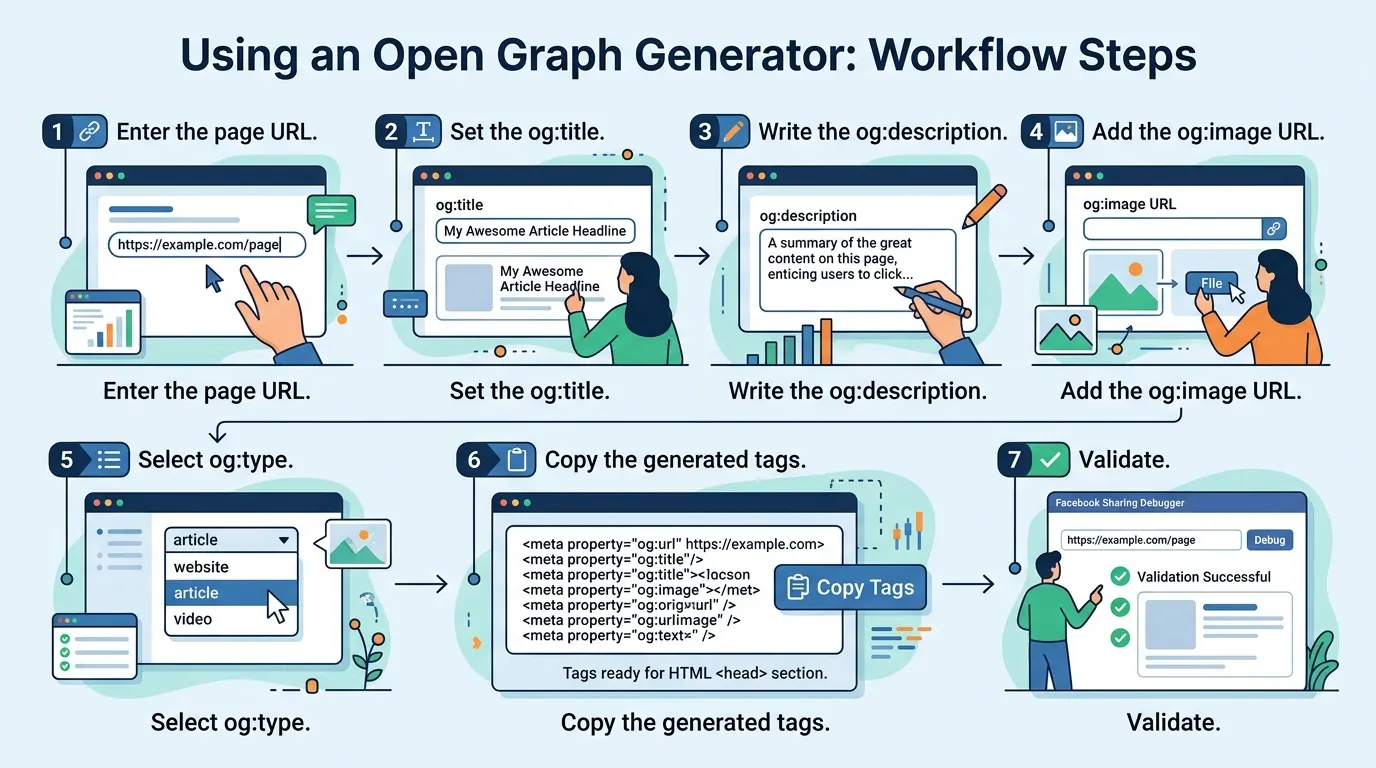
An Open Graph generator removes the need to write og: tag syntax by hand. The workflow is the same across all implementations of the tool: provide the required inputs and receive the formatted HTML tags ready to place in the page's head section.
- Step 1 — Enter the page URL. The canonical URL of the page. The generator may auto-populate other fields by fetching the page, or the remaining fields may need to be filled manually.
- Step 2 — Set the og:title. Write the social-optimised title. This can differ from the SEO title tag — the audience and context are different. Social titles benefit from being slightly more direct and action-oriented than SEO titles, which are optimised for keyword alignment.
- Step 3 — Write the og:description. A concise supporting statement of 100–155 characters. Lead with the specific benefit or key message of the page.
- Step 4 — Add the og:image URL. Paste the full absolute URL of the preview image. Verify it is publicly accessible before generating the tags; a URL that requires authentication will not load for platform crawlers.
- Step 5 — Select og:type. For most pages, 'website' is correct. For news or editorial content, 'article' enables additional properties.
- Step 6 — Copy the generated tags. The tool outputs the complete HTML meta tag block. Paste this into the head section of the page either directly in the HTML template or through the CMS's custom header field.
- Step 7 — Validate. Use the Facebook Sharing Debugger or LinkedIn Post Inspector to verify the tags are being read correctly and to clear the platform's cached version of the page.
One practical note: most Open Graph generators also add Twitter Card tags to the same output, typically twitter:card, twitter:title, twitter:description, and twitter:image. Since Twitter Cards fall back to Open Graph tags when their own tags are absent, this redundancy is beneficial rather than wasteful. Setting both ensures accurate previews across every major platform.
Open Graph, Twitter Cards, and Schema.org
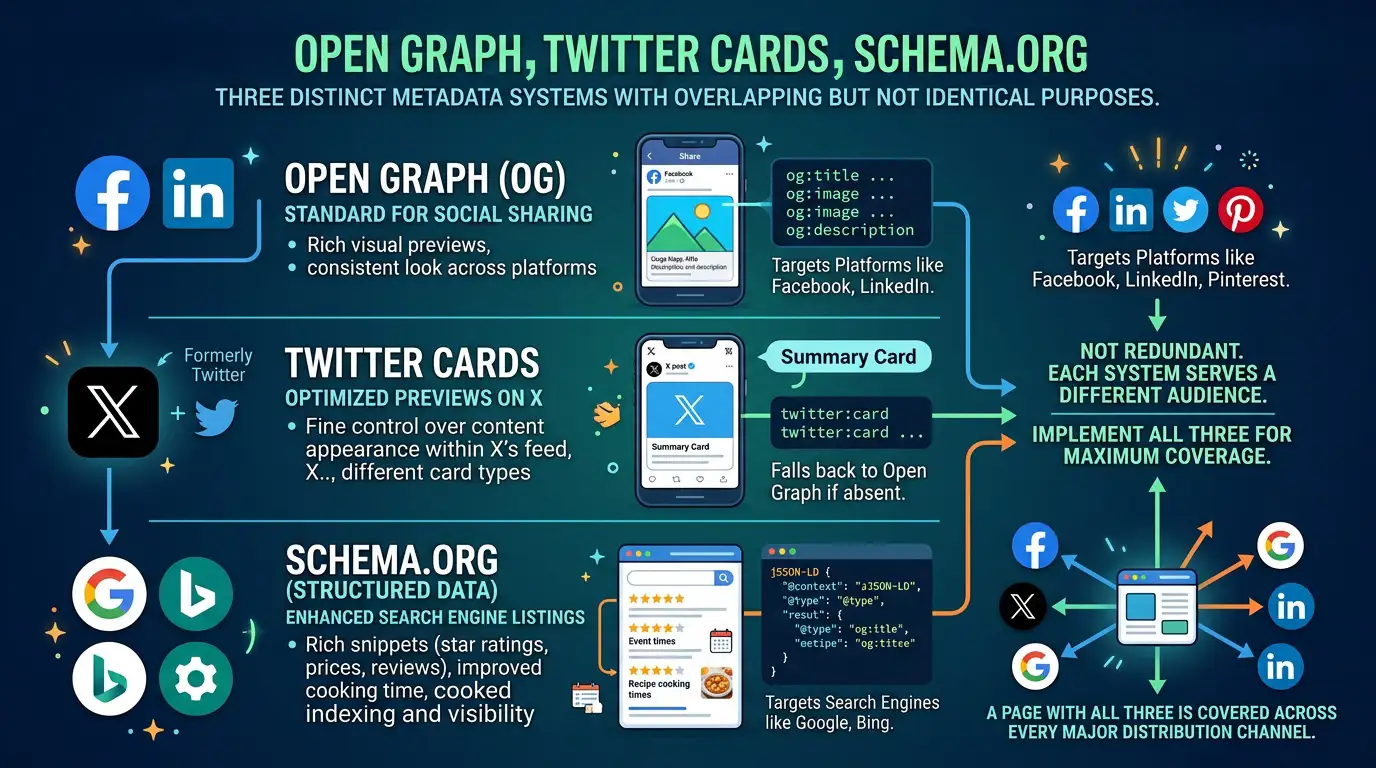
How They Relate:
Three distinct metadata systems serve overlapping but not identical purposes; understanding which system serves which audience prevents the common mistake of treating them as interchangeable.
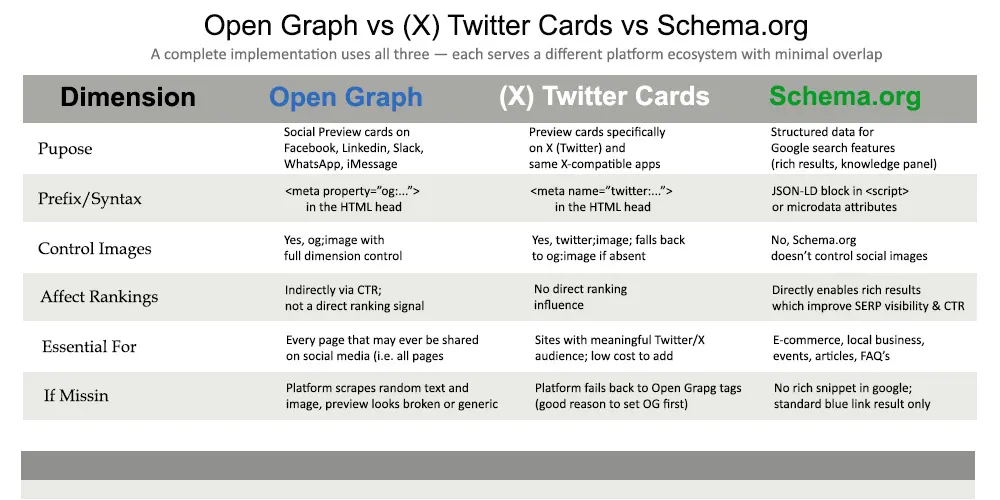
Figure 3: Open Graph, Twitter Cards, and Schema.org compared across six key dimensions. A complete implementation uses all three — each serves a different platform ecosystem with minimal overlap in what they control.
Open Graph
Designed for social platforms. Controls how pages appear in link preview cards on Facebook, LinkedIn, Slack, WhatsApp, Discord, and most other social and messaging platforms. The most widely supported social metadata standard on the web.
Twitter Cards
Twitter's own metadata format, using the name attribute instead of property. Supports several card formats: summary, summary_large_image, app, player that offer more layout control than Open Graph on X (formerly Twitter). When Twitter Card tags are absent, X falls back to Open Graph tags, which is why implementing Open Graph first is the correct priority. Adding Twitter Card tags afterward is a low-effort enhancement for sites with a meaningful X audience.
Schema.org
A structured data vocabulary used primarily by Google for search features, rich results, knowledge panels, local business information, event listings, and product ratings. Schema.org does not control social preview cards. Implementing it improves how Google understands and presents the page in search results, not how the page looks when shared on social media.
All three systems should be implemented on any page that will be shared or indexed. They are not redundant with each other: Open Graph handles social previews, Twitter Cards refine that for X specifically, and Schema.org improves search result presentation. A page with all three is covered across every major distribution channel.
Dynamic and Page-Specific Open Graph Tags
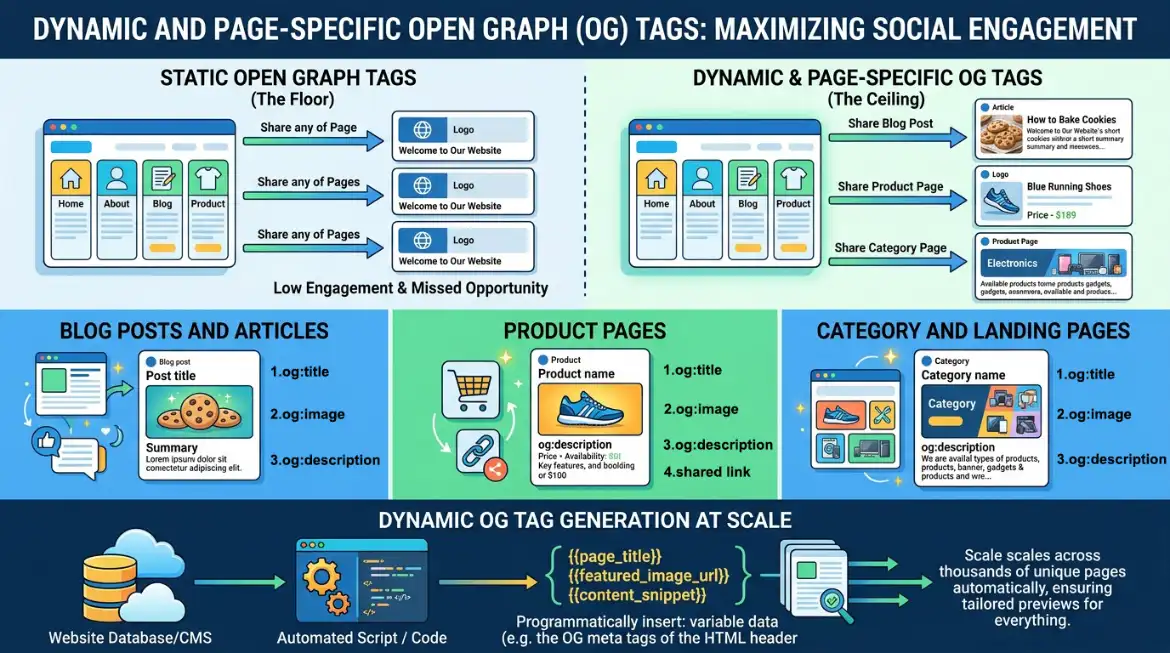
Static Open Graph tags the same og:image and og:description on every page of a site are a floor, not a ceiling. Every distinct page that might be shared deserves og: tags tailored to its specific content.
Blog Posts and Articles
Each post should carry its featured image as og:image, the post title as og:title, and the first substantive sentence or a manually written summary as og:description. For article-type content, setting og:type to 'article' enables additional structured properties: article:published_time, article:author, article:section. These properties feed into how Facebook categorises the content and how it may appear in feeds.
Product Pages
E-commerce product pages benefit from og:images that showcase the product clearly against a clean background, the same constraint as marketplace product photography. When a product is shared, the image is the primary signal of what is being offered. A cluttered lifestyle photograph conveys less information in the small preview card format than a clean product shot.
Setting a consistent og:type of 'og:product' where supported, alongside Schema.org Product markup, provides the most complete coverage across both social and search contexts.
Category and Landing Pages
Pages without a single featured piece of content category pages, landing pages, and the homepage benefit from a designed og:image that reflects the brand or the section's purpose rather than a generic placeholder. A well-designed social card for the homepage or a key landing page is worth the design investment because it will be shared repeatedly and will form part of the first impression the brand makes across social platforms.
Dynamic OG Tag Generation at Scale
Sites with large page counts news archives, product catalogs, user-generated content platforms cannot manually set og: tags for every page. CMS platforms like WordPress with SEO plugins, and custom implementations using templating, generate og: tags programmatically from the page's existing content fields: the post title becomes og:title, the featured image URL becomes og:image, the excerpt becomes og:description.
The risk in programmatic generation is systematic errors: a template that always sets og:image to the same fallback image, a description field left empty that generates a blank og:description, or a title template that appends the site name and makes og:title too long. Auditing a sample of generated tags, particularly for high-traffic pages, catches these issues before they affect a large portion of the site.
Validating and Debugging Open Graph Tags
Implementing Open Graph tags and validating them are two separate steps. A tag can be syntactically correct and properly formatted, with no typos, and still fail to produce a preview because the image URL is inaccessible, the image dimensions are wrong, or the platform's cached version of the page predates the tags.
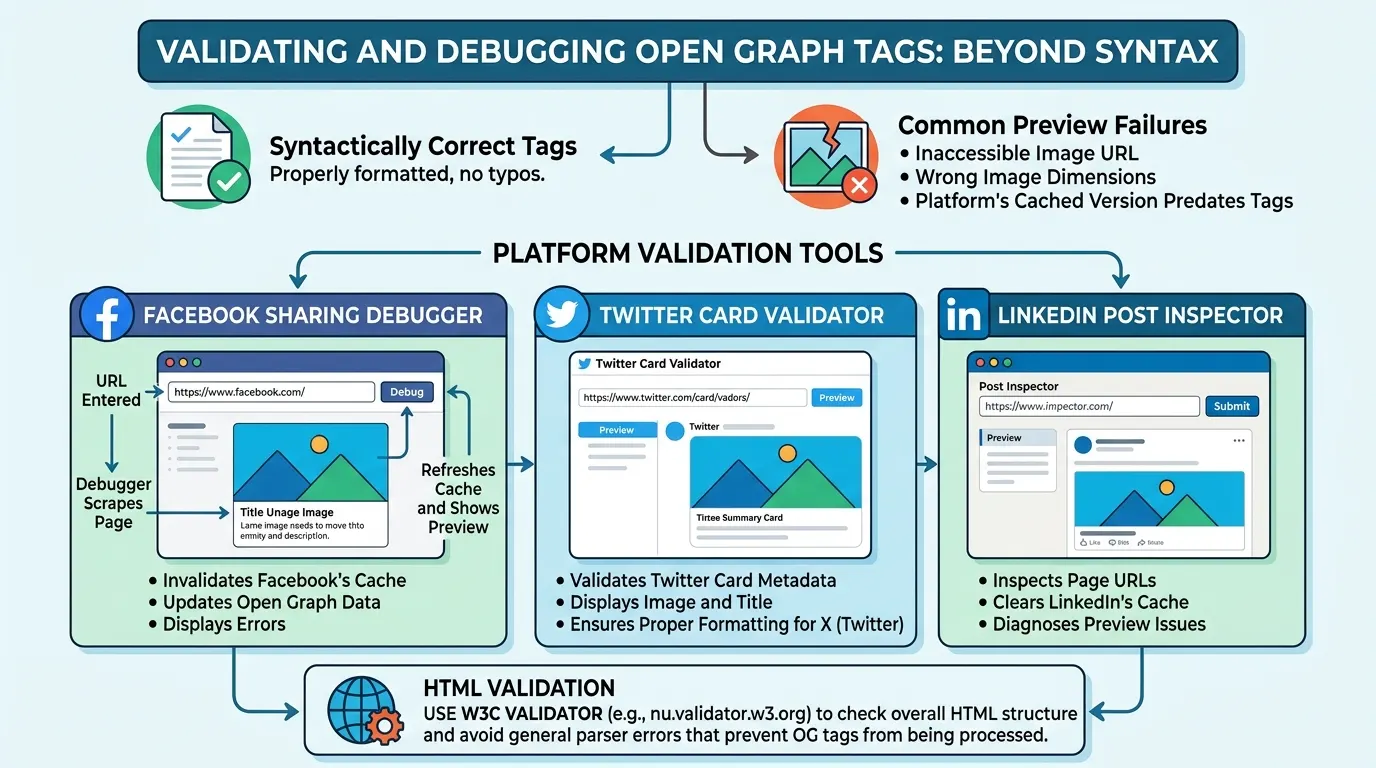
Facebook Sharing Debugger
Facebook's Sharing Debugger is the most useful validation tool for Open Graph tags. It fetches the page as Facebook's crawler would see it, displays every og: property it detected, shows a preview of the card, and reports any errors or warnings. Critically, it also includes a 'Scrape Again' function that clears Facebook's cached version of the page and forces a fresh fetch. This is the mechanism for updating the preview card after changing og: tags on a live page.
The Sharing Debugger is accessible at developers.facebook.com/tools/debug without requiring a developer account for basic use.
Twitter Card Validator and LinkedIn Post Inspector
X (Twitter) provides a Card Validator tool that displays how Twitter Cards render for a given URL. LinkedIn offers the Post Inspector at linkedin.com/post-inspector, which shows the LinkedIn-rendered preview and also provides a cache refresh. Since LinkedIn uses its own scraper and cache independently from Facebook, a page may display correctly on Facebook but have a stale or incorrect preview on LinkedIn; the two debuggers need to be used separately.
HTML Validation
Beyond platform-specific tools, reviewing the raw HTML source of a page using View Source in a browser confirms that the og: tags are actually present in the delivered HTML. This step catches the most common technical failure: og: tags generated by JavaScript that the server does not include in the initial HTML response. If the tags are absent from View Source but visible in the browser DevTools Elements panel, they are being injected client-side and will likely not be read by platform crawlers.
Common Open Graph Mistakes and How to Fix Them
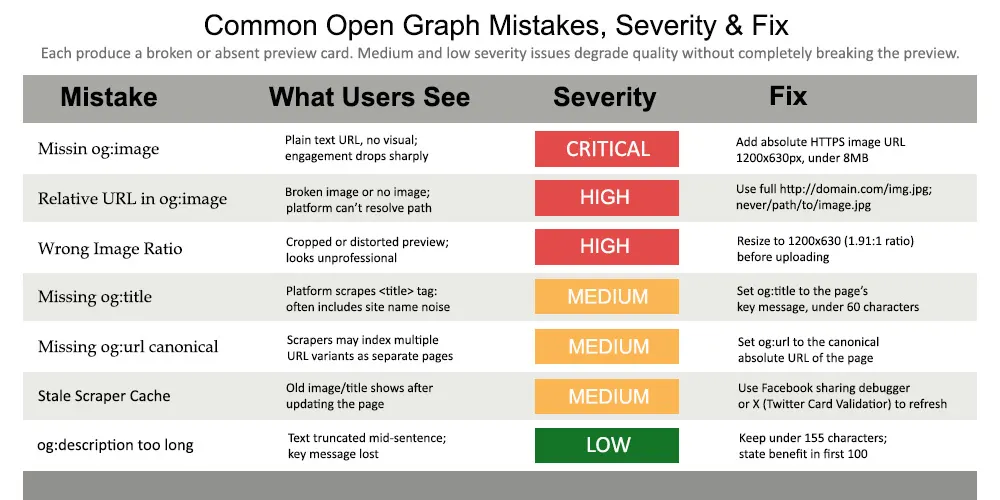
Figure 4: Seven common Open Graph mistakes ranked by severity. The three critical issues — missing og:image, relative image URLs, and wrong image dimensions — each produce a broken or absent preview card. Medium and low severity issues degrade quality without completely breaking the preview.
The patterns above cover the vast majority of Open Graph problems encountered in practice. Most failures trace back to the og:image tag: either it is absent, uses a relative URL, or the image itself does not meet platform dimension requirements. Each of these produces the same visible symptom, a missing or broken preview card, but requires a different fix.
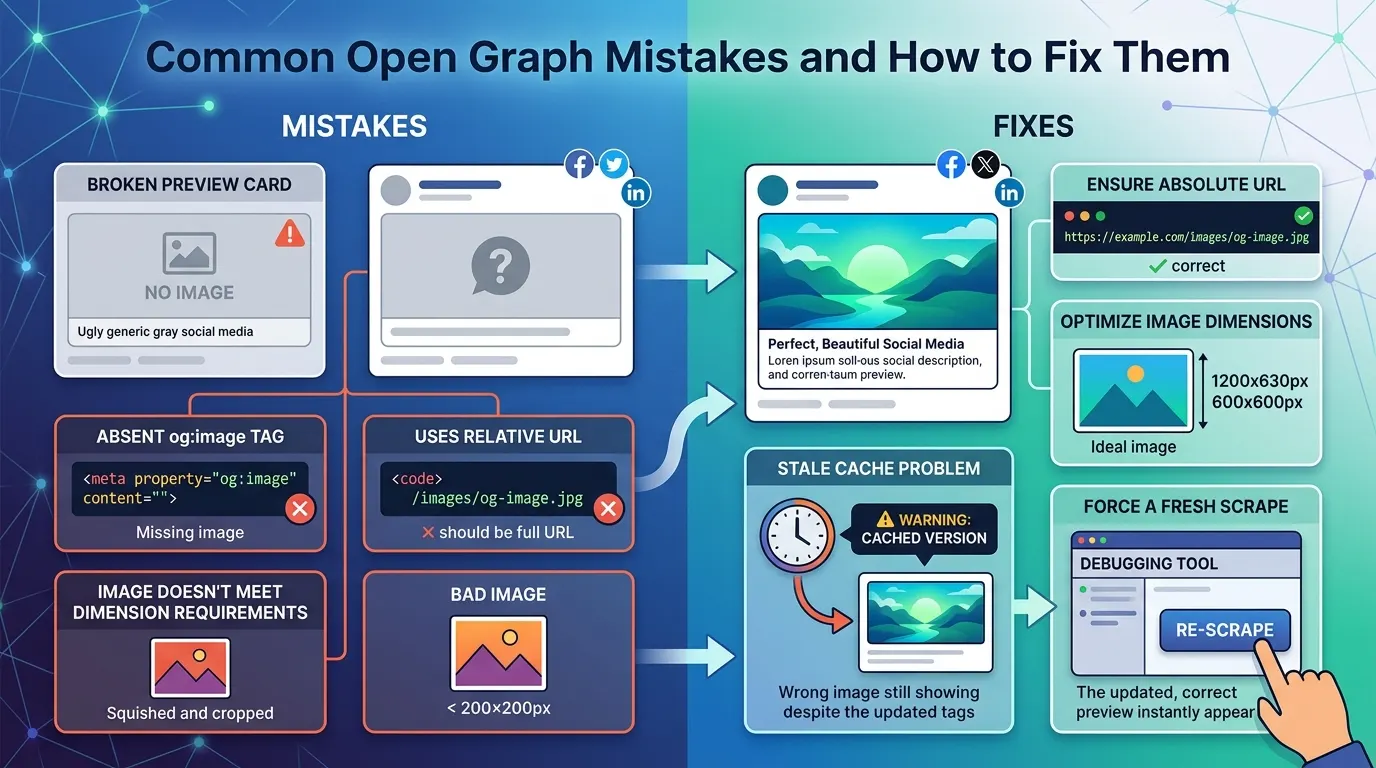
The stale cache problem is worth particular attention because it can be mistaken for a persistent tag error. A page may have perfectly correct og: tags in its HTML, but the platform's cached version from a previous scrape before the tags were added or corrected is still being displayed. The fix is not to change the tags but to trigger a fresh scrape through the platform's debugging tool.
Open Graph Tags and Search Engine Optimisation
Open Graph tags are not a ranking signal. Google has confirmed that it does not use og:title, og:description, or og:image in its ranking algorithm. A page with perfectly implemented Open Graph tags ranks identically to the same page without them, all else being equal.
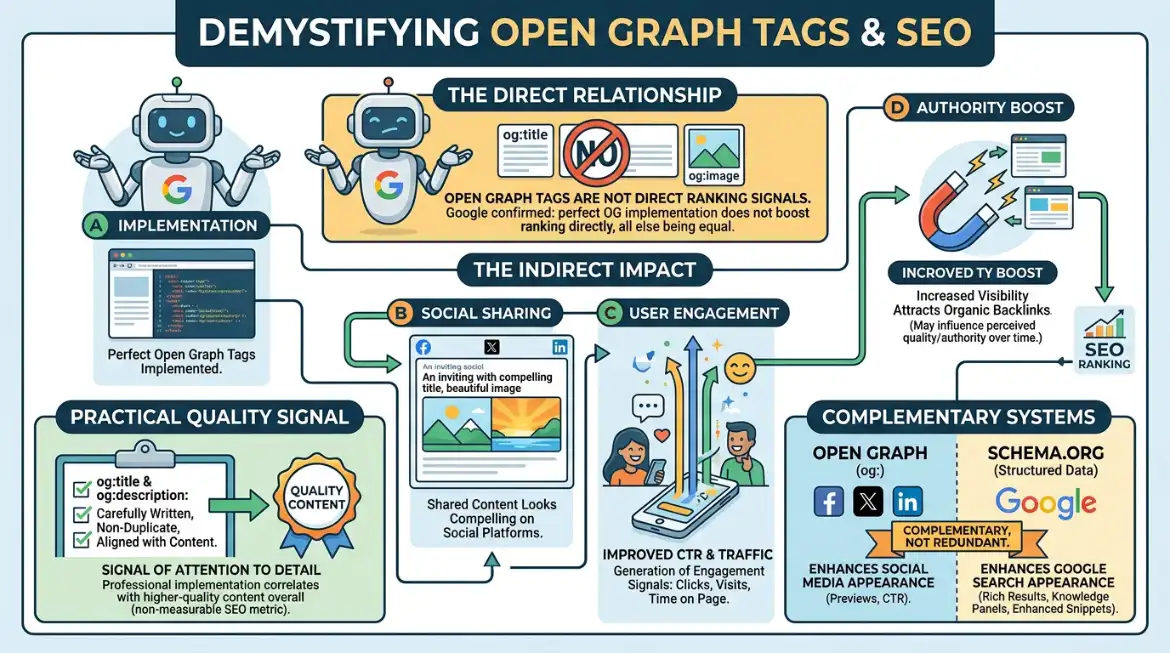
The indirect connection is more significant than the direct one. Pages shared on social media generate engagement signals clicks, visits, time on page that may influence how Google interprets the page's quality and authority over time. More concretely, shared content can attract organic backlinks from people who discover it through social channels and link to it from their own sites. Open Graph tags do not cause this, but they improve the likelihood that a social share will generate clicks and downstream links.
There is also a practical quality signal: a page whose meta description, og:description, and og:title are carefully written, non-duplicate, and aligned with the page's content signals the kind of attention to detail that correlates with higher-quality content overall. This is not measurable as an SEO metric, but it reflects a standard of implementation that tends to accompany other quality signals.
For search appearance specifically, Schema.org structured data, not Open Graph tags, is the mechanism that enables rich results, knowledge panel entries, and enhanced search snippets in Google. The two systems are complementary, not redundant.
Open Graph Tags in WordPress and Other CMS Platforms
The mechanism for implementing Open Graph tags depends on the platform running the site. The HTML output is the same in all cases; the interface for setting the tag values varies.
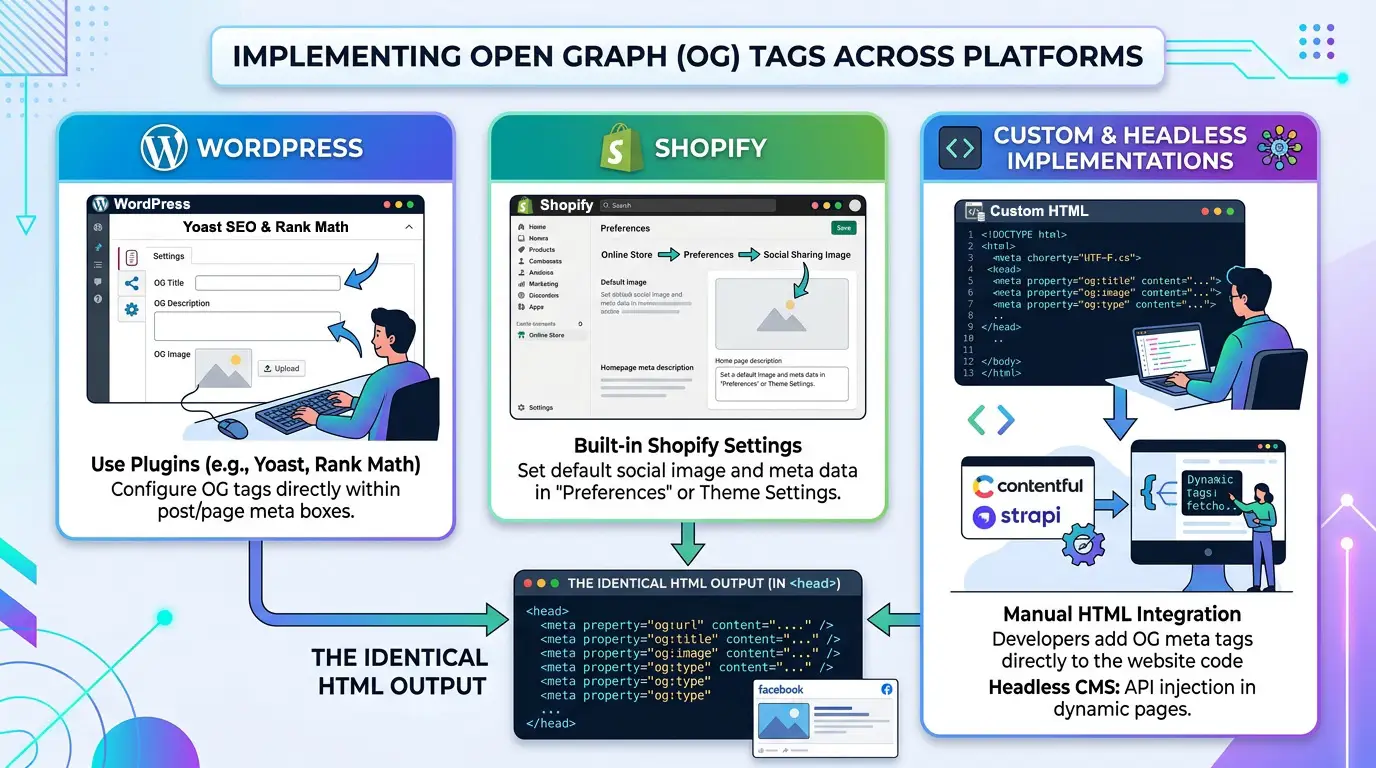
WordPress
WordPress does not add Open Graph tags by default. An SEO plugin Yoast SEO, Rank Math, All in One SEO, or similar adds Open Graph support and exposes per-page og: fields in the post editor. The plugin generates og:title and og:description from the SEO title and meta description fields, with an option to override specifically for social sharing. The featured image is used as og:image unless a separate social image is set.
After installing or activating Open Graph support, the first step is to confirm the tags are actually appearing in the page source; plugins can be misconfigured, and social preview sections are sometimes toggled off by default.
Shopify
Shopify generates og: tags automatically from product and page content using its theme's meta tag templates. The og:title comes from the product or page title, the og:image from the featured product image, and the og:description from the page description field. Custom og: values for specific pages typically require either editing the Liquid template directly or installing an app from the Shopify App Store.
Custom and Headless Implementations
Sites built on custom frameworks like Next.js, Nuxt, Gatsby, or bespoke backends — implement Open Graph tags through their templating or head management system. Next.js projects use the next/head component or the Metadata API (in the App Router) to set og: properties per page. The critical requirement in all custom implementations is that the tags appear in the server-rendered HTML, not injected by client-side JavaScript.
Frequently Asked Questions
Do Open Graph tags affect Google search rankings?
No directly. Google has confirmed og: tags are not ranking signals. Their SEO value is indirect: better social previews generate more clicks on shared links, which can drive traffic, engagement, and potentially backlinks, all of which do influence search performance over time.
What happens if og:image is missing?
The platform's scraper finds no image and renders the shared URL as a plain text link with no visual preview. Engagement rates on text-only links are substantially lower than on image-card links. On platforms like Facebook and LinkedIn, missing og:image is the single highest-impact Open Graph error to fix.
Can I use the same og:image on every page of my site?
Technically yes. Practically, it produces a degraded experience: every shared link shows the same image regardless of which page is being shared. For a homepage or brand-wide fallback image, a single og:image is acceptable. For individual blog posts, products, or landing pages, page-specific images produce better social engagement.
Why does the old image still show after I updated og:image?
Platform scrapers cache their version of the page. Updating the og:image in the HTML does not automatically refresh that cache. Use the Facebook Sharing Debugger (developers.facebook.com/tools/debug) and click 'Scrape Again' to force a fresh fetch on Facebook. Use the LinkedIn Post Inspector for LinkedIn. Each platform maintains its own independent cache.
Does og:description need to be different from the meta description?
It does not need to be different, but it often should be. The meta description is optimised for search result snippets: length-constrained, keyword-aligned, intent-matched to search queries. The og:description is optimised for social context where the audience is in discovery mode rather than search mode, and where a slightly more conversational, benefit-focused phrasing often performs better.
What is the difference between og:title and the page title tag?
The HTML title tag is read by Google and appears in browser tabs. The og:title tag is read by social platform scrapers and appears in preview cards. They serve different audiences and can be optimised differently. A title tag might include a keyword phrase for SEO alignment; an og:title might be shorter and more direct for social click-through. Setting both explicitly, rather than letting platforms inherit from the title tag, allows each to be optimised for its specific context.
Do Open Graph tags work for WhatsApp and iMessage?
Yes. WhatsApp, iMessage, Telegram, Discord, and Slack all read Open Graph tags when generating link previews in conversations. This makes correct og: implementation relevant well beyond traditional social media; a significant portion of link sharing happens in private messaging contexts where the visual preview is the only indicator of what the link contains.
Should og:url match the canonical URL?
Yes, and they should match each other. og:url tells social platforms which URL is the canonical version of the page. The canonical link tag tells search engines the same thing. If they point to different URLs, the two systems are sending conflicting signals about what the page's definitive address is.
Conclusion
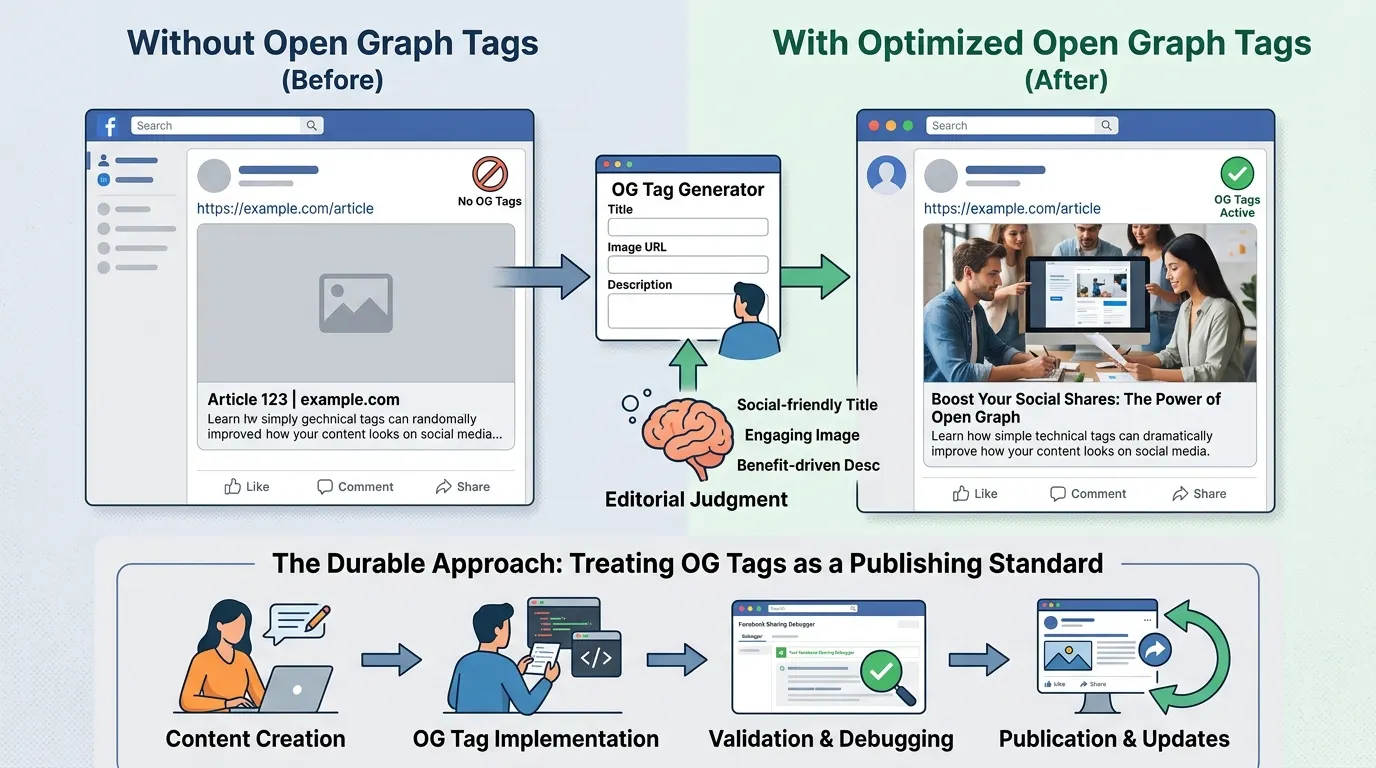
Open Graph tags are a small technical investment with a disproportionate effect on how content travels across the internet. Every page shared on social media or in a messaging app generates a preview card. Whether that card is visually compelling, accurately titled, and clearly described or a bare URL with no image and scraped placeholder text is entirely determined by the og: tags in the page's HTML head.
An Open Graph generator makes the implementation accessible: enter the values, copy the output, paste into the template. The technical barrier is low. What the generator cannot supply is the editorial judgment that makes og: tags effective: a title written for social context rather than search engines, an image composed for 1200×630 at the outset rather than resized from a portrait asset, a description that states a benefit rather than restating the title.
The most durable approach treats Open Graph tags as a publishing standard rather than an afterthought. Setting them at the time of page creation, validating with a debugging tool before publication, and revisiting them when content is updated keeps a site's social previews accurate and effective across every platform that reads them.