How to Verify, Monitor, and Fix Page Indexing in Google Search
Publishing a page is not the same as being visible in Google. Between pressing publish and appearing in search results, a page must be discovered, crawled, evaluated, and accepted into Google's index. Any of those steps can fail silently, leaving the page technically live but invisible to anyone searching.
A Google Index Checker answers the most important question in technical SEO: is this page actually in Google's database? It is a free online tool, or a feature built into Search Console, that returns a direct yes or no for any URL, with reasons when the answer is no.
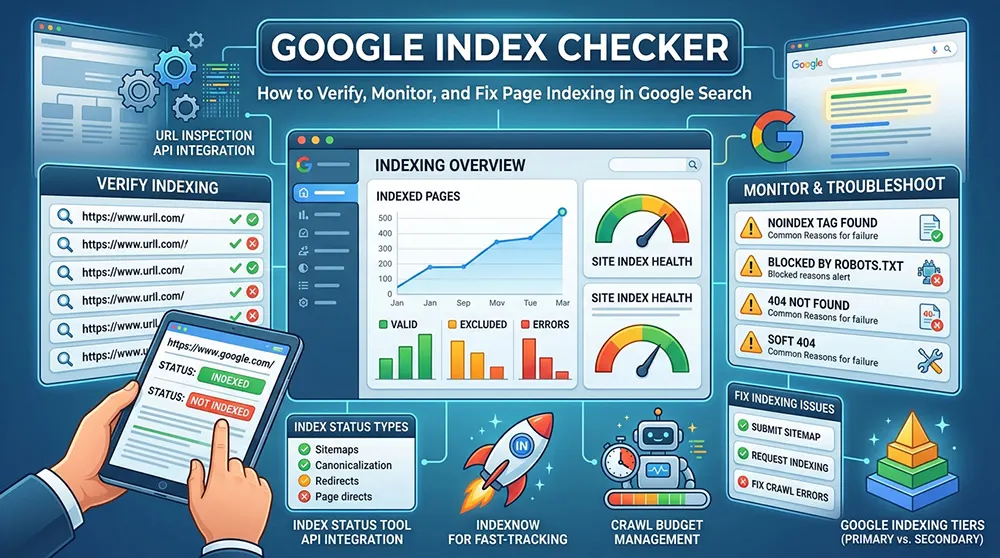
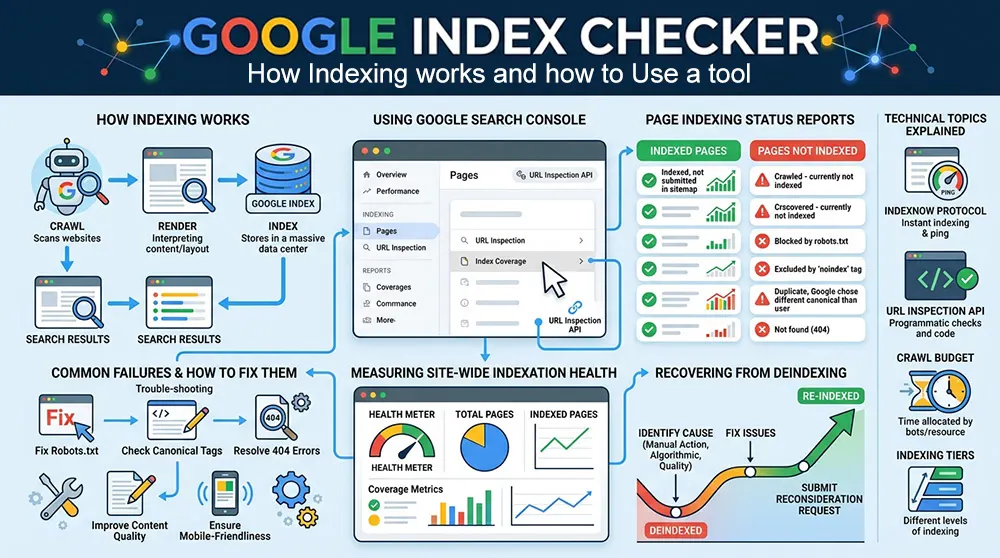
This guide covers how indexing works, how to use an index checker, why pages fail to index, how to read Google Search Console's status reports, how to measure site-wide indexation health, and how to recover from deindexing. Technical topics IndexNow, the URL Inspection API, crawl budget, and indexing tiers are explained in practical terms.
What Is Google Indexing
Google indexing is the process of adding a web page to Google's search database. Pages in the index are eligible to appear in search results. Pages not in the index cannot rank for any keyword, regardless of how well they are written or optimized.
The index contains hundreds of billions of web pages, but that scale does not mean every page gets in. Google applies quality, relevance, and technical criteria at every stage. Pages with thin content, duplicate content, or technical blockers are regularly excluded.
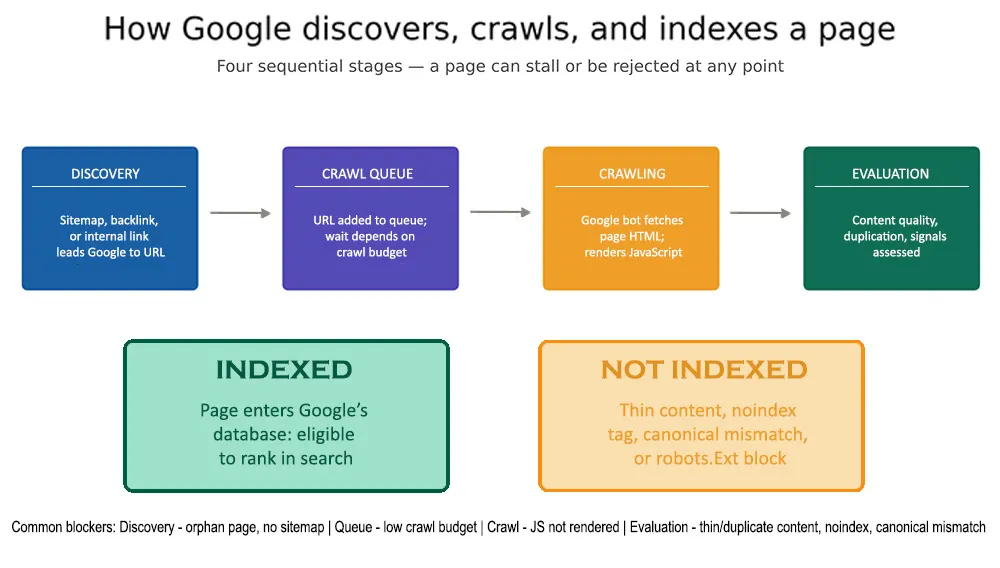
Figure 1: The four stages from URL discovery to indexing. A page can stall or be rejected at any point — each failure has a specific cause and a specific fix.
Discovery happens when Google encounters a URL for the first time through an XML sitemap, an internal link, or a backlink from an external site. Discovery does not trigger immediate crawling. The URL enters a queue, and Googlebot visits when crawl budget allows. After crawling, Google evaluates content and decides whether it belongs in the index. That evaluation is where most rejections occur.
Crawling vs. Indexing
The Distinction That Matters:
These two terms are used interchangeably in casual conversation. They describe different stages of a sequential process, and confusing them leads to the wrong diagnosis.
Crawling is Googlebot fetching a page's content via an HTTP request, HTML received, JavaScript rendered. It is a visit. Indexing is the decision that follows: does this page belong in the database?
A page can be crawled and not indexed. A page can be discovered but never crawled. A page can be indexed and still rank poorly. These are distinct outcomes requiring distinct fixes. Google Search Console reports them separately, and addressing the wrong one wastes time.
What Is a Google Index Checker
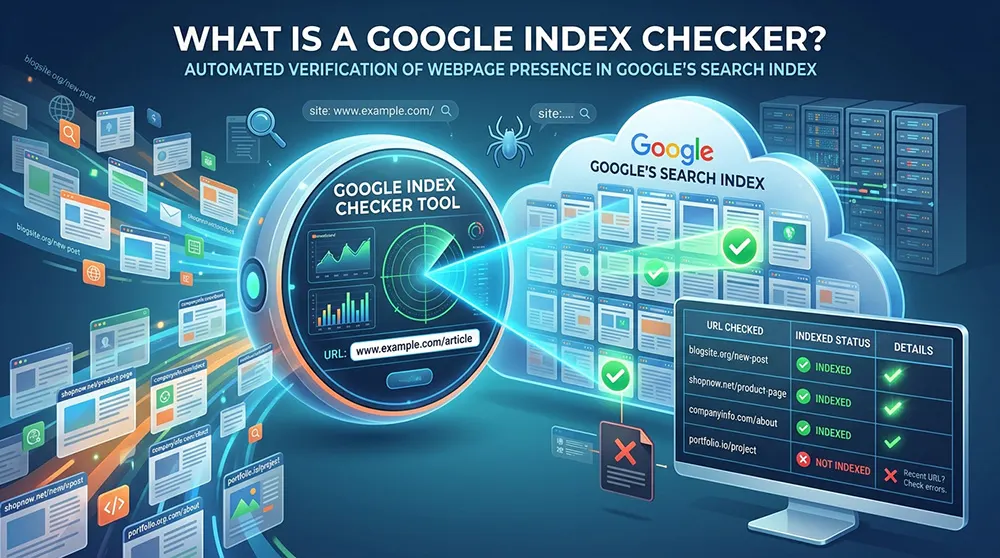
A Google Index Checker is a tool that verifies whether a specific URL is present in Google's index. It performs the check that would otherwise require manually running a site: operator search in Google or opening the URL Inspection tool in Search Console for every page.
The simplest version queries Google with a site: operator and reports whether the result appears. More accurate tools use the Google Search Console API, which returns official indexing data rather than inferring from search results. For developers working at scale, the URL Inspection API enables programmatic checking of thousands of URLs, returning structured data that feeds into custom dashboards.
Three different audiences use this tool. Website owners confirm new content is visible. SEO professionals audit technical problems across a site. Link builders verify that pages linking to their site are themselves indexed; an unindexed backlink passes no ranking benefit.
What a Good Index Checker Includes
The minimum viable version checks a single URL and returns a status. Tools worth using go further.
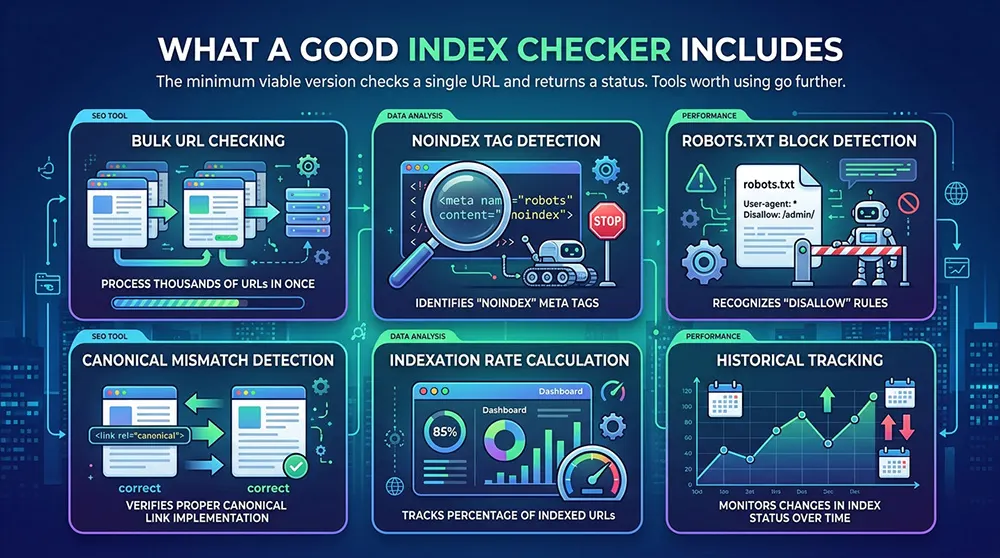
- Bulk URL checking — upload a CSV or sitemap to check hundreds of pages at once.
- Noindex tag detection — flags pages blocked by meta robots or X-Robots-Tag headers.
- Robots.txt block detection — identifies Disallow rules preventing Googlebot access.
- Canonical mismatch detection — catches canonical tags pointing to a different URL than the current page.
- Indexation rate calculation — shows what percentage of submitted URLs are indexed.
- Historical tracking — monitors which pages gain or lose indexed status over time.
Google Search Console includes most of these features and remains the most accurate source because it uses Google's own systems. Third-party tools are most useful for bulk checking at volumes GSC handles inefficiently, and for integrating index data into external workflows.
How to Use a Google Index Checker
- Step 1 — Choose the scope. Single-page checks work for verifying a specific new post or recently fixed page. Full-site audits require a bulk tool or GSC's Index Coverage report.
- Step 2 — Enter the URL. Include the full protocol: https://example.com/page-url. A missing protocol or trailing slash inconsistency can return a false negative.
- Step 3 — Run the check. Single-URL results return in seconds. Bulk checks of thousands of URLs may take several minutes depending on API rate limits.
- Step 4 — Read the status. Indexed, Not Indexed, or an intermediate status like Crawled – Not Indexed. For anything other than Indexed, the tool should explain why.
- Step 5 — Fix highest-priority pages first. Homepage, core product or service pages, and cornerstone content take priority over thin auxiliary pages.
- Step 6 — Recheck after changes. Allow 3–7 days after making technical fixes. For important pages, request indexing directly via the URL Inspection tool in GSC.
One operational note: the site: operator in Google gives an approximate count of indexed pages but is not precise enough for diagnosis. For accurate, actionable data, GSC is the right tool.
Reading Google Search Console Indexing Reports
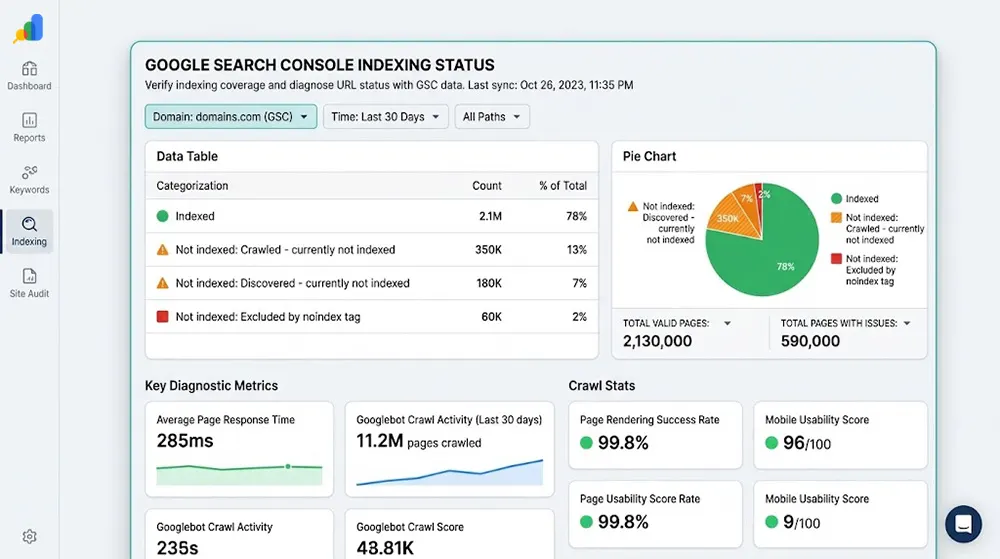
Google Search Console is the authoritative source for indexing data. The two most important sections are the Index Coverage report and the URL Inspection tool.
The Index Coverage report categorizes every URL Google has encountered. It groups pages by status: Indexed, Error, Valid with Warning, or Excluded and shows trend data over time. A sudden drop in indexed pages here is a priority signal, not something to investigate later.
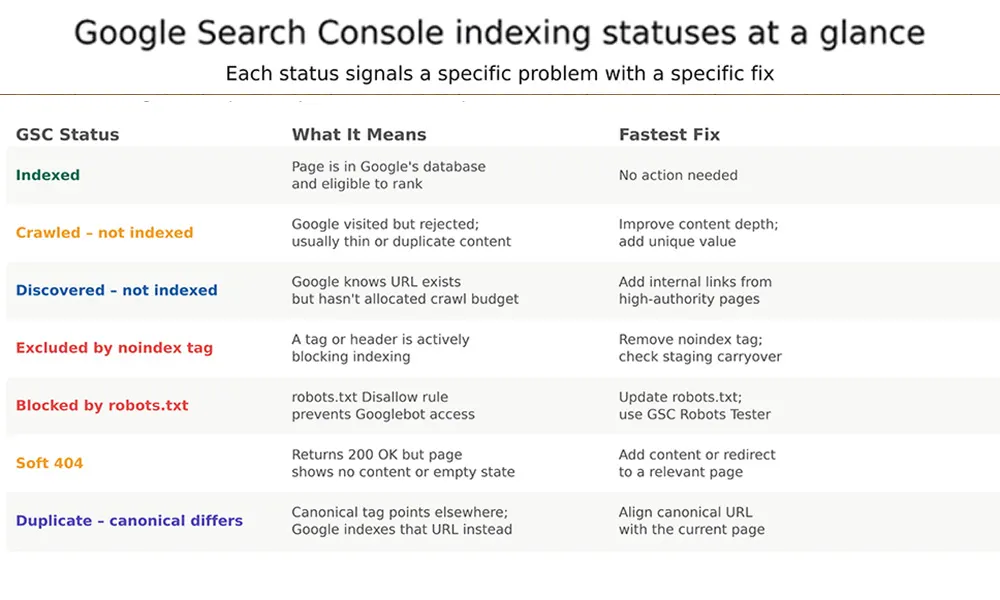
Figure 2: Google Search Console indexing statuses, their meanings, and the fastest fix for each. Knowing which status a page shows determines the correct diagnostic path.
The Statuses That Cause the Most Confusion
Crawled – Currently Not Indexed is the most commonly misdiagnosed status. It means Google visited and actively decided not to include the page. The problem is almost always content quality: too thin, too similar to another page on the same domain, or providing insufficient value. Fixing this requires substantive content improvement, not technical tweaks.
Discovered – Currently Not Indexed means Google found the URL but has not yet crawled it. This is a crawl budget or internal linking problem. Adding prominent internal links from already-indexed, high-authority pages on the same domain is the most reliable fix.
Soft 404 is a page returning a 200 OK HTTP response but showing empty content — an out-of-stock product with no alternatives, a search results page with zero results, or a category with no items. The fix is either adding real content or returning a proper 404 or 410 status.
Duplicate – canonical differs means the canonical tag on this page points to a different URL. Google indexes the canonical destination, not the current page. This is intentional when canonicals are set correctly and a technical error when they are not.
Why Pages Fail to Index
How to Fix Each Cause:
Most indexing failures trace back to a small set of causes. The diagram below shows the relative frequency of each.
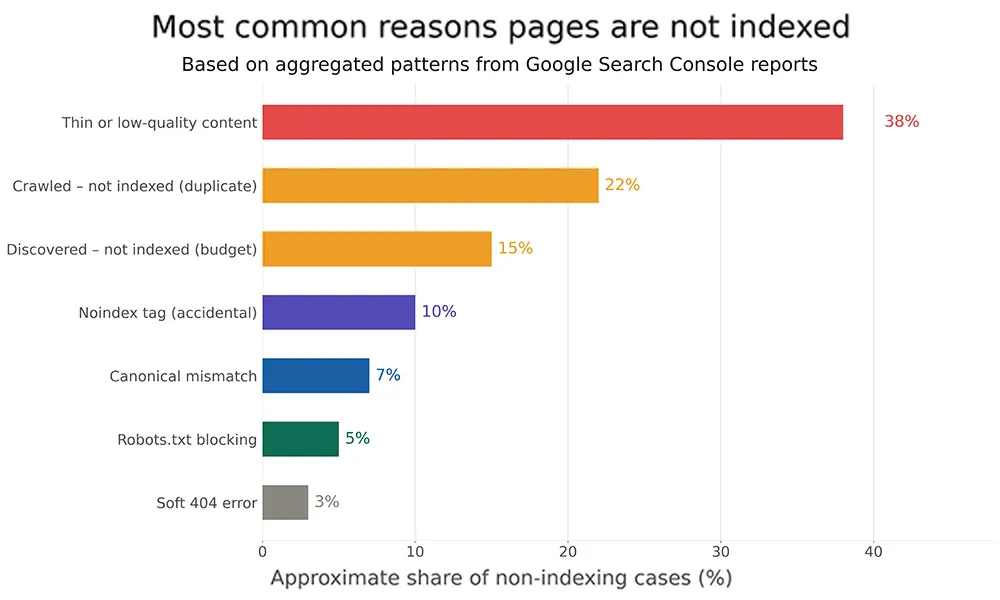
Figure 3: Distribution of non-indexing causes based on aggregated Search Console patterns. Content quality issues — thin content, near-duplicates — account for well over half of all failures.
The most important observation: content quality issues account for well over half of all non-indexing cases. Technical blockers noindex tags, robots.txt rules, canonical mismatches account for the rest. Fixing a robots.txt block takes five minutes. Fixing thin content takes weeks. Both are necessary; they are not equivalent problems.
Measuring Indexation Health — Indexation Rate
Checking individual URLs answers whether a specific page is indexed. Measuring the indexation rate answers a broader question: how much of the published site is actually reachable through search?
The formula: divide indexed pages by total published pages and multiply by 100. A site with 1,000 published pages and 830 indexed has an 83% indexation rate. Whether that is acceptable depends on context; a news site may intentionally exclude low-traffic historical content. A product catalog should have near-complete indexation of active listings.
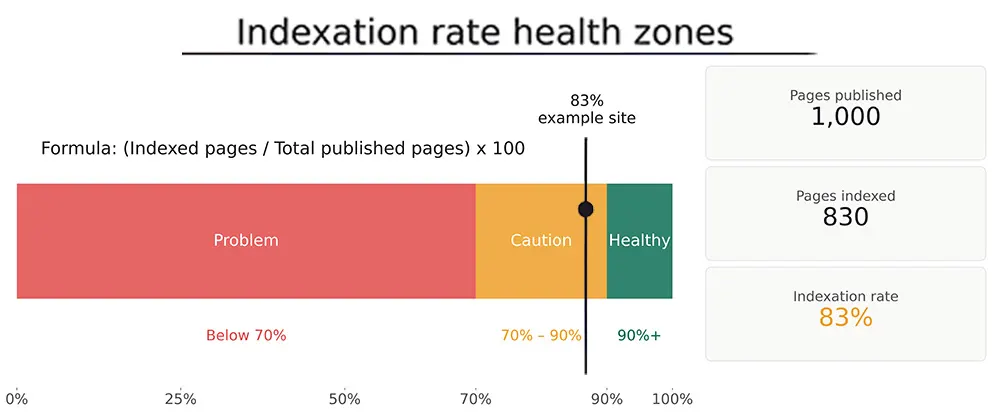
Figure 4: Indexation rate health zones. The example site at 83% sits in the caution zone — worth investigating which 170 pages are excluded and why.
A high indexation rate does not automatically translate to search visibility. Being in the index and ranking in meaningful search results are different outcomes. A page can be indexed and rank on page fifteen, receiving effectively no traffic. Checking whether a page is indexed is the first diagnostic step, not the final one.
How to Accelerate Google Indexing
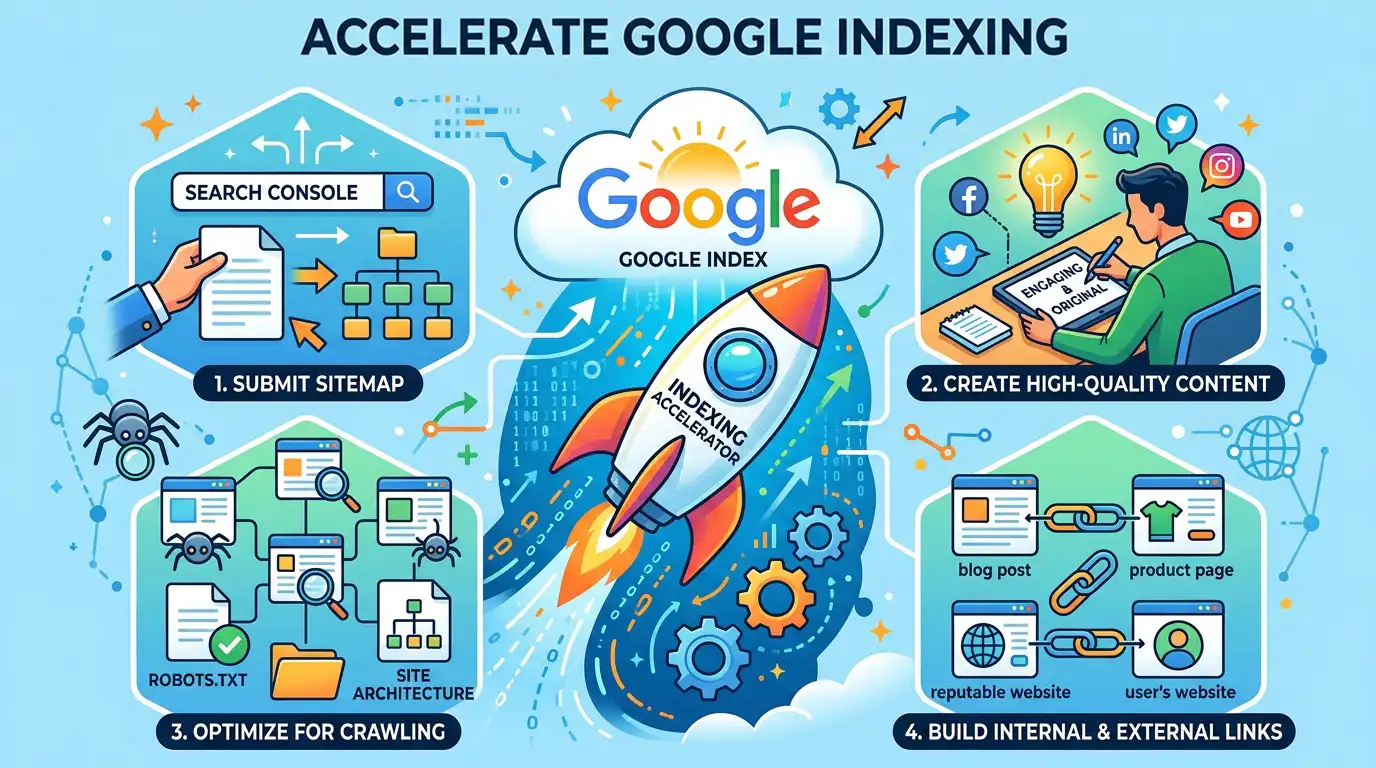
There is no guaranteed way to force immediate indexing. There are reliable ways to make it significantly faster.
- Submit an XML sitemap — list all important URLs and submit via GSC under the Sitemaps section. Keep it current; remove URLs for deleted or redirected pages promptly.
- Request indexing via URL Inspection — enter the URL in GSC and click Request Indexing. This works for a limited number of URLs per day but is reliable for important new or updated pages.
- Build internal links from indexed pages — new pages linked from the homepage, a navigation menu, or a recently indexed high-traffic page get discovered and crawled faster than orphan pages. Internal links are the most consistently effective acceleration method.
- Earn external backlinks — a link from an established, frequently crawled domain is a strong discovery signal. Googlebot follows that link and typically visits the destination within hours or days.
- Publish fresh content regularly — sites that update frequently get crawled more often. Googlebot allocates more crawl budget to active sites.
- Implement IndexNow — the IndexNow protocol notifies search engines the moment content is published or updated. It is more accessible than the Google Indexing API for general websites.
- Ensure mobile-first indexing compliance — Google uses the mobile version of a page for indexing and ranking. If the mobile page is missing content that exists on desktop, that content will not be indexed.
IndexNow vs Google Indexing API
Two technologies exist for notifying search engines about content changes. They are frequently confused because they sound similar. They serve entirely different purposes.
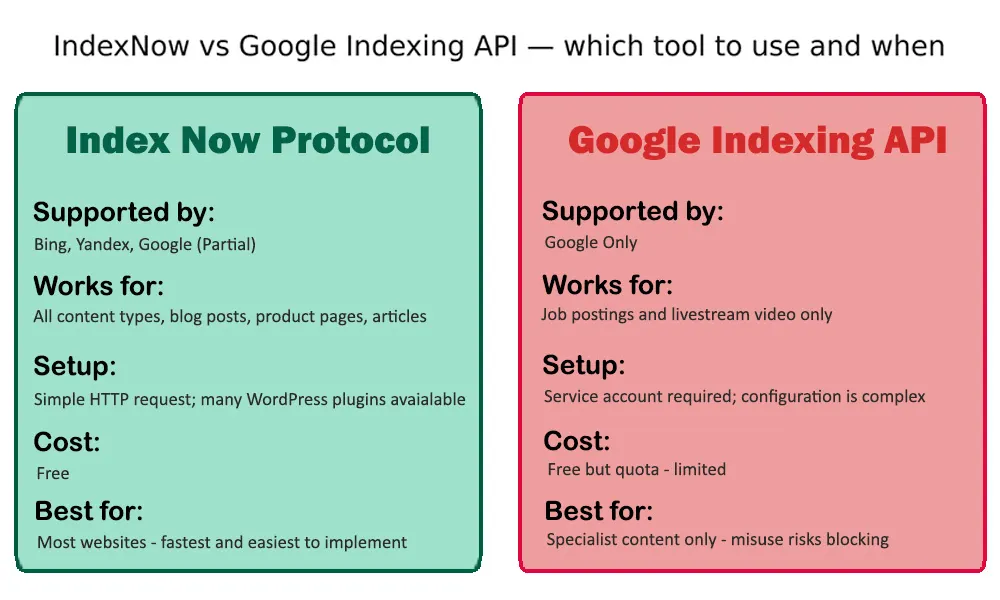
Figure 5: IndexNow works for all content types and is the right choice for most websites. The Google Indexing API is restricted to job postings and livestream video — using it for blog posts or product pages risks errors or account restrictions.
IndexNow
IndexNow is an open protocol supported by Bing, Yandex, and partially by Google. A website sends a simple HTTP request containing the updated URL, and participating search engines receive the notification immediately. Many CMS platforms have plugins implementing IndexNow automatically on publish.
For most websites, blogs, e-commerce stores, news sites, and service pages, IndexNow is the right tool. It is free, requires no service account, and works across multiple search engines simultaneously.
Google Indexing API
The Google Indexing API is officially designed for two specific content types: job postings and livestream video. Google has been explicit that it is not intended for general web pages. Using it for blog posts or product pages can result in errors or, in cases of sustained misuse, restrictions on the account.
The API requires a service account, authentication setup, and quota management. For the narrow use case it was designed for high-volume job listing sites or video platforms it is the correct tool. For everyone else, IndexNow and manual GSC requests are the appropriate options.
Deindexing and Recovery
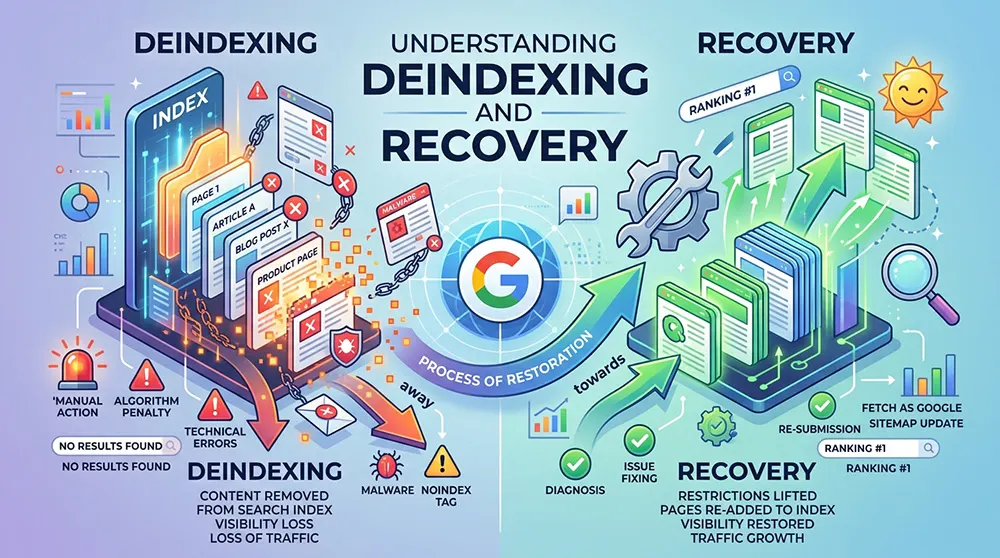
Deindexing happens when previously indexed pages disappear from search results. It can occur gradually over weeks or suddenly after a specific event. Understanding which type occurred determines the recovery path.
Sudden Deindexing
Sudden, large-scale deindexing typically follows one of three causes: a technical change (noindex tag accidentally added site-wide, robots.txt updated to block Googlebot, server returning 500 errors), a manual action from Google (a webmaster guidelines violation), or a core algorithm update aggressively demoting a site's content quality.
Technical causes are the fastest to diagnose and fix. Use a bulk index checker to identify the scope, then audit robots.txt and noindex tags. If the cause is a manual action, GSC will show a notification under Security and Manual Actions. Core algorithm deindexing requires substantive content improvement over weeks or months.
Gradual Deindexing
Gradual deindexing is harder to detect and often indicates content quality drift — new pages added faster than old ones justify their continued inclusion, or a slow accumulation of thin content that progressively signals lower quality.
A falling indexation rate measured over time is the most reliable early indicator. Monthly tracking with a bulk checker catches this before it becomes a significant traffic problem. The fix is usually a content audit: improve or merge pages with potential, return 410 status codes for those with no path to improvement.
Recovery Steps
- Run a bulk index checker to identify exactly which pages are missing.
- Check each missing page in GSC's URL Inspection tool for specific error codes.
- Verify no noindex tag, robots.txt block, or canonical mismatch exists on the page.
- Improve content quality: add depth, original data, relevant internal links.
- Request reindexing via GSC for the highest-priority pages.
- Monitor over 2–4 weeks. Pages without recovery should be evaluated for merging or removal.
Mobile-First Indexing and Core Web Vitals
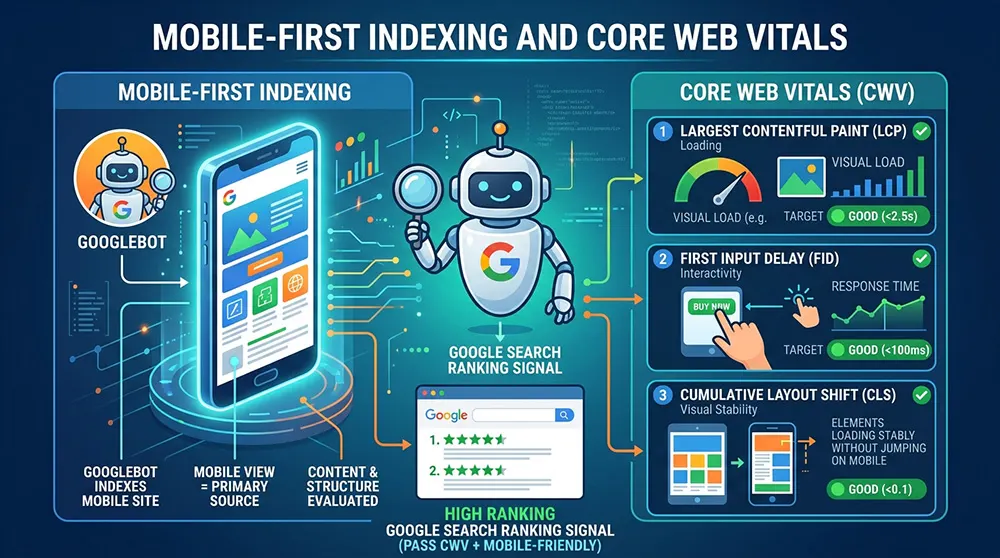
Google has used mobile-first indexing since 2019. The practical meaning: Google reads and evaluates the mobile version of a page to determine what gets indexed and how it ranks.
Pages where the mobile version contains less content than the desktop version will be indexed based on mobile content only. Desktop-only content, text hidden behind desktop-specific CSS, or images missing from the mobile template will not be included in the index.
Core Web Vitals LCP (Largest Contentful Paint), INP (Interaction to Next Paint), and CLS (Cumulative Layout Shift) are page experience signals rather than direct indexing gates. Poor scores do not block a page from being indexed. They do affect crawl priority. Sites with consistently poor Core Web Vitals tend to get crawled less frequently, which means new content takes longer to discover and index.
Bulk Index Checking for Large Sites
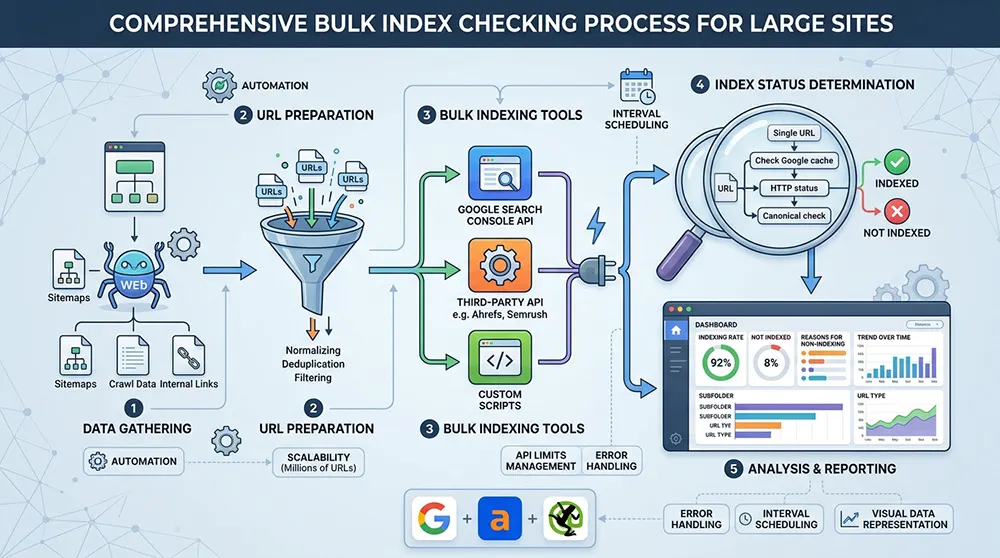
For a site with fewer than a hundred pages, checking index status manually is feasible. For an e-commerce catalog with tens of thousands of product pages, a news archive with years of articles, or a programmatic SEO deployment at scale, manual checking is not viable.
Bulk index checkers accept a CSV of URLs, a pasted list, or a sitemap URL and return a status for each. The most useful output is not just indexed/not-indexed lists but pattern analysis: which categories of pages are failing, which site sections have low indexation rates, and whether the problem concentrates in a specific template or content type.
For developers integrating indexing data into custom systems, the URL Inspection API returns structured JSON for each URL: the canonical URL Google sees, the last crawl date, the crawl and indexing status, and any detected issues. Rate limits apply, so large-scale checks require batching rather than real-time lookups.
- After a domain migration: verify old URLs redirect and new URLs are indexed.
- After an HTTPS switch: confirm HTTP versions redirect, and HTTPS pages are indexed.
- After a CMS update: check that no template change introduced a site-wide noindex tag.
- After a content audit: confirm that deleted pages return 404 or 410 and are removed from the index.
- Competitor research: estimate how many pages of a competitor site are indexed.
Sitemaps and Structured Data in Indexing
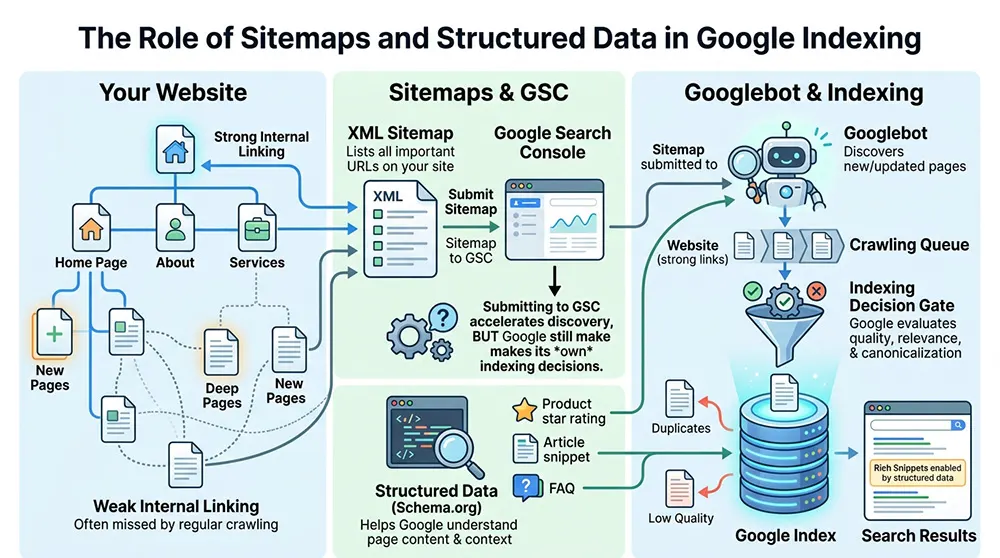
An XML sitemap lists the URLs a site wants Google to know about. Submitting one to GSC does not guarantee indexing; Google makes its own decisions, but it accelerates discovery for new and deep pages that lack strong internal linking.
A sitemap is most effective when kept current. Including URLs for deleted pages, redirect sources, or blocked pages sends conflicting signals. Most CMS platforms generate sitemaps automatically; the configuration should exclude noindexed pages, paginated duplicates, and filtered URL variants that do not add content value.
Structured data schema markup does not affect whether a page gets indexed. It helps Google understand the content type and enables rich results in search: star ratings, product prices, FAQ dropdowns. Well-structured pages are easier for Google to categorize confidently, which may influence how quickly they move through indexing evaluation. The practical minimum: implement structured data for the content types the site publishes and validate with Google's Rich Results Test.
Checking Indexing of Backlinks and Guest Posts

A backlink from a non-indexed page passes no link equity to the destination. For link builders and anyone managing a guest posting program, verifying that host pages are indexed is a non-optional step in the workflow.
The fastest check: run the guest post URL through a Google Index Checker or perform a site: search for the specific URL. If the page appears in results, it is indexed. If it does not, the link is not currently contributing to ranking.
The Google cache link, previously a useful verification shortcut, was removed in September 2024. The Wayback Machine at web.archive.org is now the primary tool for checking what content crawlers saw at a specific point in time, particularly useful for verifying page content before a redesign or migration.
Common Mistakes in Index Management
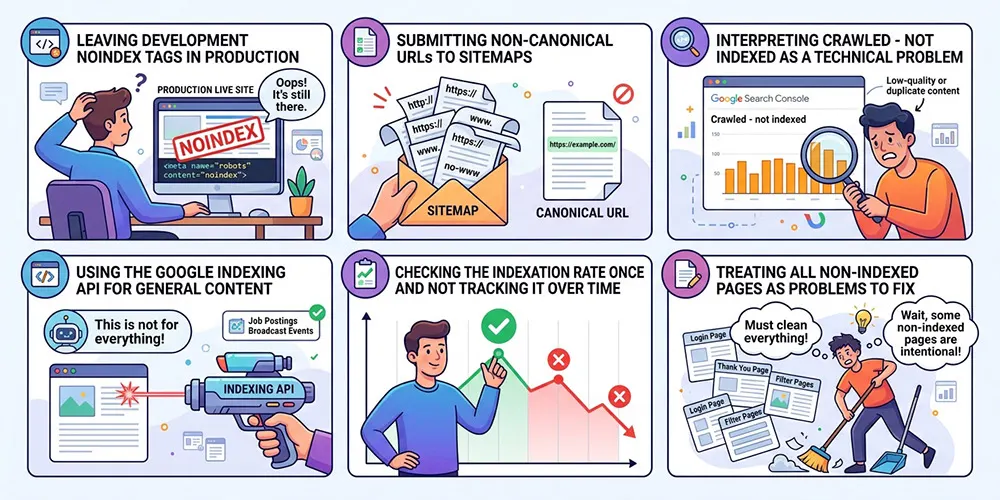
Leaving development noindex tags in production. The single most common technical indexing failure. Staging environments use noindex to prevent indexing of unfinished work. When the site launches, that tag occasionally carries over. A one-line check in GSC catches it immediately.
Submitting non-canonical URLs to sitemaps. If the canonical tag on a page points to a different URL, Google indexes the canonical destination. Sitemaps should list canonical URLs only.
Interpreting Crawled – Not Indexed as a technical problem. It is rarely technical. It is a content quality signal. Fixing robots.txt or canonical tags will not change this status. Only improving content quality will.
Using the Google Indexing API for general content. The API is designed specifically for job postings and livestream video. Applying it to blog posts or product pages does not accelerate indexing and risks account-level consequences.
Checking the indexation rate once and not tracking over time. A single measurement tells the current state. The trend reveals whether indexing health is improving or declining. Monthly tracking is sufficient for most sites.
Treating all non-indexed pages as problems to fix. Thin tag pages, paginated duplicates, filtered URL variants, and session-based URLs may legitimately belong out of the index. Not indexing them intentionally reduces crawl waste.
Frequently Asked Questions
What does a Google Index Checker actually do?
It verifies whether a specific URL appears in Google's search database. The check uses either the site: operator or the URL Inspection API for more accurate official data. The result is indexed, not indexed, or an intermediate status explaining why the page is absent.
Why is a page crawled but not indexed?
Google visited the page and made a deliberate decision not to include it. The most common cause is content that is too thin, too similar to other pages on the same domain, or insufficiently useful relative to competing content. Technical fixes will not resolve this; only substantive content improvement will.
How long does Google take to index a new page?
It varies significantly by domain authority and how the page is linked. A new page on a high-authority domain with strong internal links can be indexed within hours. On a newer or lower-authority site, the same page might take days or weeks. Submitting via GSC's URL Inspection and building internal links from already-indexed pages are the most reliable ways to reduce the wait.
What is indexation rate and how is it measured?
Indexation rate is the percentage of published pages in Google's index: (indexed pages / total published pages) x 100. Above 90% is generally healthy for content sites. A sudden drop indicates a technical problem; a slow decline indicates a content quality problem accumulating over time.
What is the difference between IndexNow and the Google Indexing API?
IndexNow is an open protocol for notifying search engines, including Bing, Yandex, and partially Google, when any content is published or updated. It works for all content types and is straightforward to implement. The Google Indexing API is restricted to job postings and livestream video. Using it for general web content does not accelerate indexing and may cause errors.
How do I check if my whole site is indexed?
The site: operator in Google search gives an approximate count. For accurate data, GSC's Index Coverage report is the correct source. It shows total indexed pages, pages with errors, excluded pages, and trend data over time.
Can I remove a page from Google's index?
Yes. Add a noindex meta tag, block the page in robots.txt, or delete it and return a 404 or 410 status code. After making the change, use GSC's URL Removal tool to request expedited removal. Note that robots.txt blocking prevents crawling but does not remove an already-indexed page; noindex or page deletion is required for removal.
How often should indexing status be checked?
After any major site change, migration, HTTPS switch, content audit, CMS update, or template change. For ongoing maintenance, monthly is sufficient for most sites. News sites and high-volume e-commerce catalogs benefit from weekly checks or automated monitoring via the URL Inspection API.
Conclusion
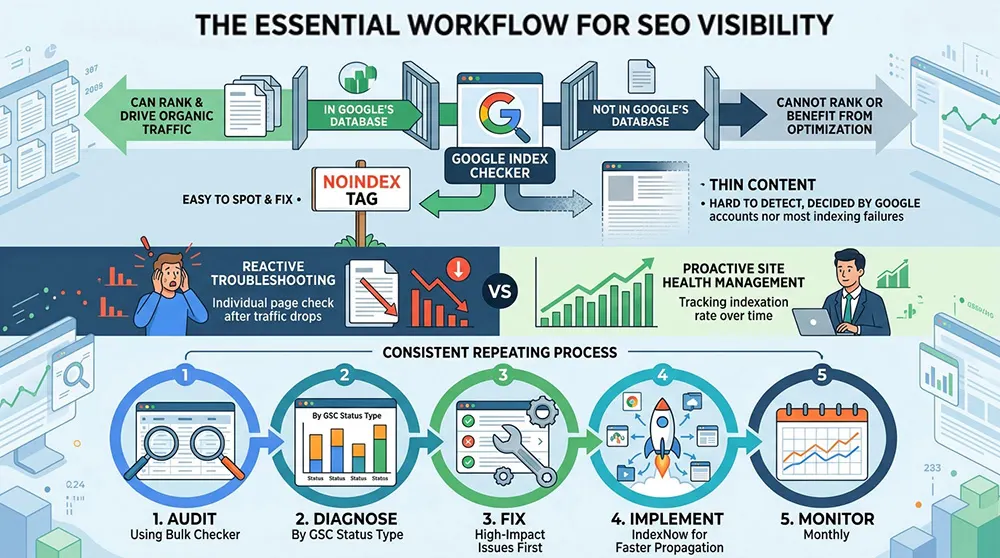
Indexing is the prerequisite for everything else in search. A page not in Google's database cannot rank, cannot drive organic traffic, and cannot benefit from any optimization applied to it. A Google Index Checker answers whether that prerequisite is met for a single page, a content section, or an entire site.
The most important thing the tool reveals is not always the obvious one. A noindex tag is easy to spot and easy to fix. Thin content that Google has quietly decided not to index is harder to detect and harder to address, but it accounts for the majority of indexing failures. Tracking indexation rate over time, rather than checking individual pages reactively, is what distinguishes proactive site health management from troubleshooting after traffic drops.
The workflow that holds up in practice: audit with a bulk checker, diagnose root causes by status type using GSC, fix the highest-impact issues first, implement IndexNow for faster update propagation, and monitor monthly. That process, repeated consistently, keeps a site's content visible to the people searching for it.