How to Analyze, Optimize, and Write SERP Snippets That Win Clicks
Every time a search result appears on Google, two elements determine whether someone clicks it: the title and the brief paragraph beneath it. That paragraph is the meta description. It sits in the HTML head section, invisible on the page itself, but entirely visible to anyone scanning search results.
A meta description checker analyses that snippet and tells you whether it is doing its job. It examines character length, pixel width, keyword presence, and whether the description aligns with the intent of the people searching for that page. The output is not just a character count; it is a diagnostic of your click-through potential.
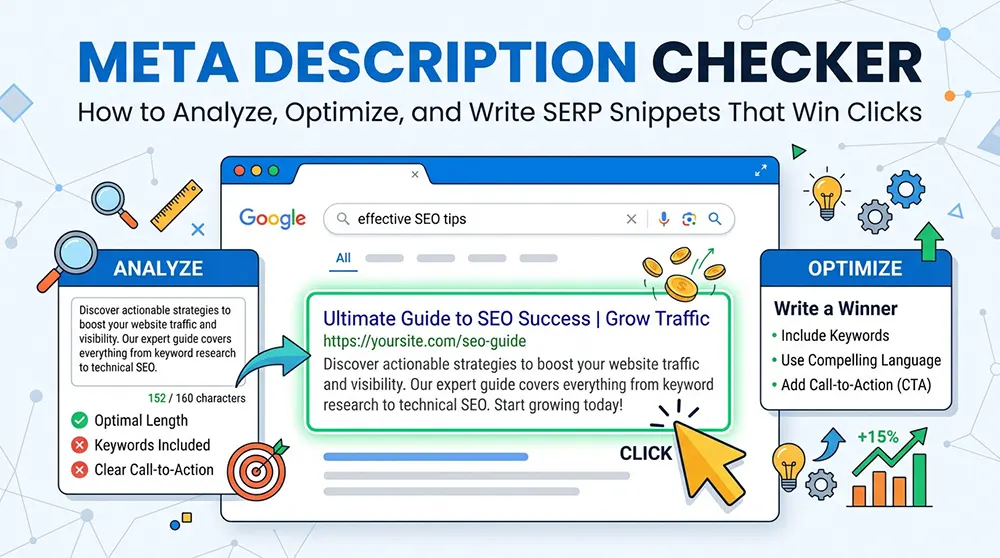
This guide covers what a meta description tag is, how a checker analyses it, what character and pixel limits mean in practice, how to write descriptions that convert impressions into clicks, and which mistakes cost websites traffic every day.
What Is a Meta Description Tag
A meta description tag is a single line of HTML that lives in the head section of a web page. It does not appear anywhere on the visible page. Its only audience is search engines and, through them, the people reading search results.
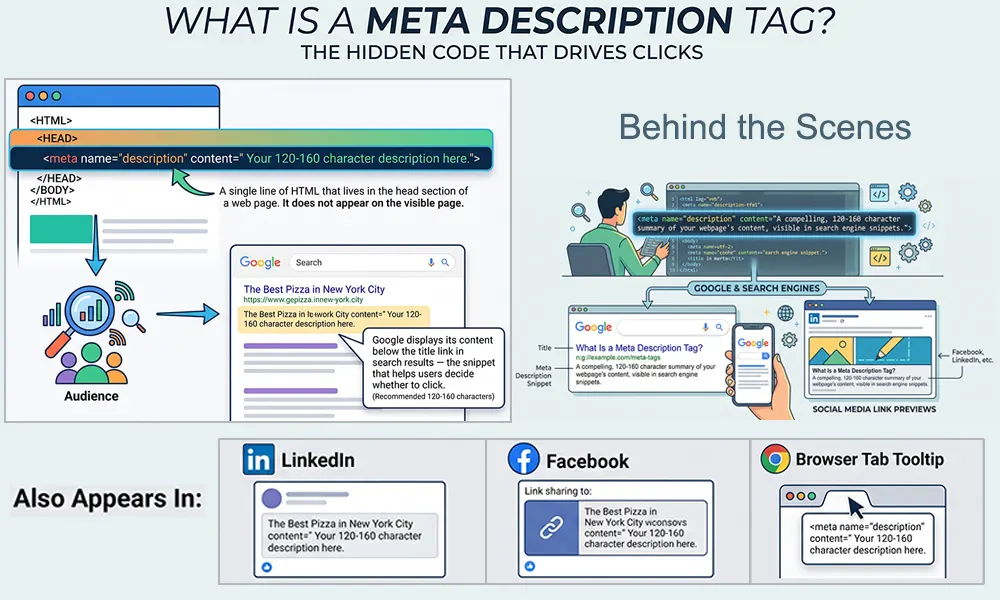
The syntax looks like this:
<meta name="description" content="Your 120-160 character description here.">
Google reads this tag and displays its content below the title link in search results the snippet that helps users decide whether to click. It also appears in social media link previews on LinkedIn and Facebook, and in some browser tab tooltips.
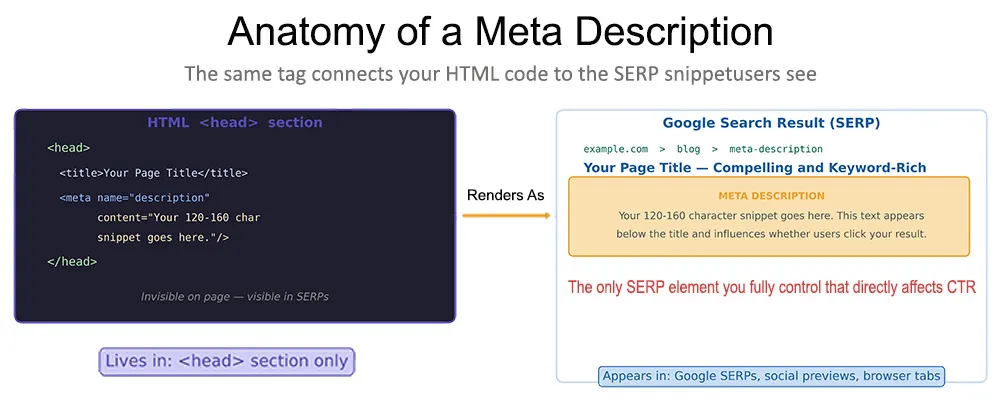
Figure 1: The meta description tag lives in the HTML head section and renders as the snippet beneath the title in Google search results. It is the only SERP element entirely within the publisher's control that directly affects click-through rate.
The tag is optional; Google will not penalise its absence. But when no meta description is provided, Google generates one automatically, usually by pulling a sentence or fragment from the page body that appears to match the search query. This auto-generated text is frequently awkward, incomplete, or stripped of context. Writing a custom description is the only way to control what that snippet says.
Beyond Google, the meta description feeds directly into how pages appear when shared on social media. While Open Graph tags take priority on platforms like Facebook, many tools fall back to the meta description when no og: description is present. A well-written description can therefore serve multiple distribution channels at once.
Why Google Sometimes Rewrites It
Google rewrites meta descriptions more often than most site owners realise; studies suggest it modifies the displayed snippet in most impressions. The most common triggers are a description that doesn't match the search query, a description that is too vague to match the user's intent, or content elsewhere on the page that Google judges as more directly relevant.
A description that aligns tightly with user intent, uses the primary keyword naturally, and accurately summarises the page is far less likely to be rewritten. That alignment is precisely what a meta description checker evaluates.
How a Meta Description Checker Works
A meta description checker is not a simple character counter. It performs a layered analysis that evaluates the description from several angles simultaneously: length, pixel width, keyword relevance, structural completeness, and duplicate status across the site.

Extraction and Data Collection
The tool fetches the page and reads the meta description tag from the HTML head section. For tools that accept a URL directly, this happens via a live HTTP request. For tools that accept pasted text, analysis begins immediately. This step can surface a first problem: a missing tag. If no meta description exists, that fact is the most important finding the tool returns.
Length and Pixel Validation
The most visible output is the length assessment. But the more useful measurement is pixel width, not character count. Google allocates approximately 920 pixels for a snippet on desktop and roughly 680 pixels on mobile. Because different characters occupy different pixel widths, a capital W is considerably wider than a lowercase i; a description of 155 characters may display fully on desktop and truncate on mobile.
Keyword and Intent Analysis
A checker evaluates whether the primary keyword appears in the description, and whether it appears naturally. Modern tools go further, assessing the presence of related phrases and LSI terms that signal topical relevance to Google's natural language processing systems. Google bolds the words in a snippet that match the user's search query, making keyword-inclusive descriptions visually more prominent, which increases click-through rate.
Issue Detection and SEO Scoring
The checker scans for problems that reduce SERP performance: absent descriptions, duplicates across multiple pages, excessively keyword-dense copy, and descriptions structured without any call to action. Many tools compile these findings into a quality score, typically 0–100, that reflects the overall health of the snippet and prioritises what to fix first.
SERP Preview
Many checkers include a preview panel that renders the title and description as they would appear in a Google search result separately for desktop and mobile. This is often the most practically useful output, because a description that looks complete in a text editor can truncate midway through a word when rendered in the narrower pixel space of a mobile result.
Meta Description Length
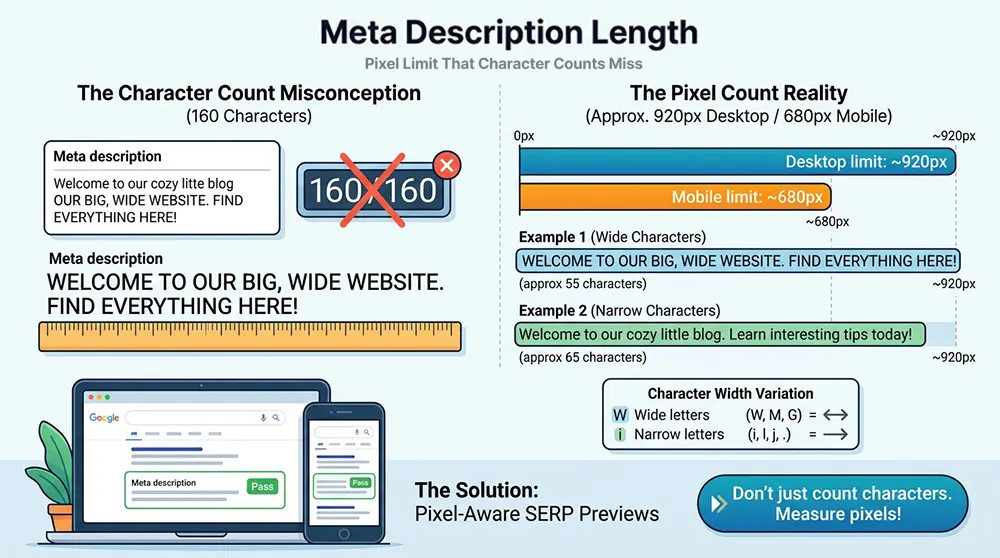
The Pixel Limit That Character Counts Miss:
The 160-character guideline is widely repeated. What is less commonly explained is why it is only a guideline rather than a hard limit, and why staying under it does not guarantee the full description displays.
Google measures snippets in pixels, not characters. The rendering environment on desktop allocates approximately 920 pixels. On mobile, that allocation is narrower, roughly 680 pixels. An average character in standard body text occupies around 6–7 pixels, but characters vary: punctuation marks and lowercase letters like i, j, l are considerably narrower than capitals like W, M, and G.
A 155-character description written with many wide characters can truncate at 130 characters of displayed text. A 145-character description with mostly narrow characters may display in full. The only reliable way to verify display is through a pixel-aware SERP preview rather than a raw character count.
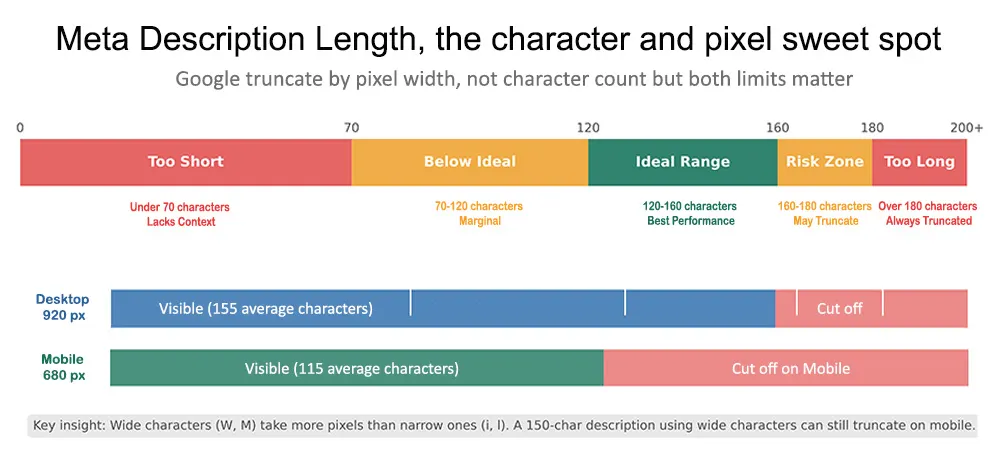
Figure 2: The relationship between character count, pixel width, and SERP display. The safe range is 120–160 characters, but pixel analysis determines actual truncation risk on each device type. Mobile has a significantly tighter limit than desktop.
What Happens When a Description Truncates
Truncation almost always removes the end of the sentence. Since most descriptions build toward a call to action, the element designed to trigger the click truncation tends to cut exactly the words that most directly influence whether someone clicks.
The fix is not just shortening. It is front-loading the most important information. If the primary benefit is stated in the first half of the description, truncation on mobile becomes less damaging; the essential message survives even if the call to action is partially lost.
How to Write a Meta Description That Gets Clicked
The formula for a high-performing meta description is simple enough to state in one line and difficult enough to execute consistently that most published descriptions fall short of it.
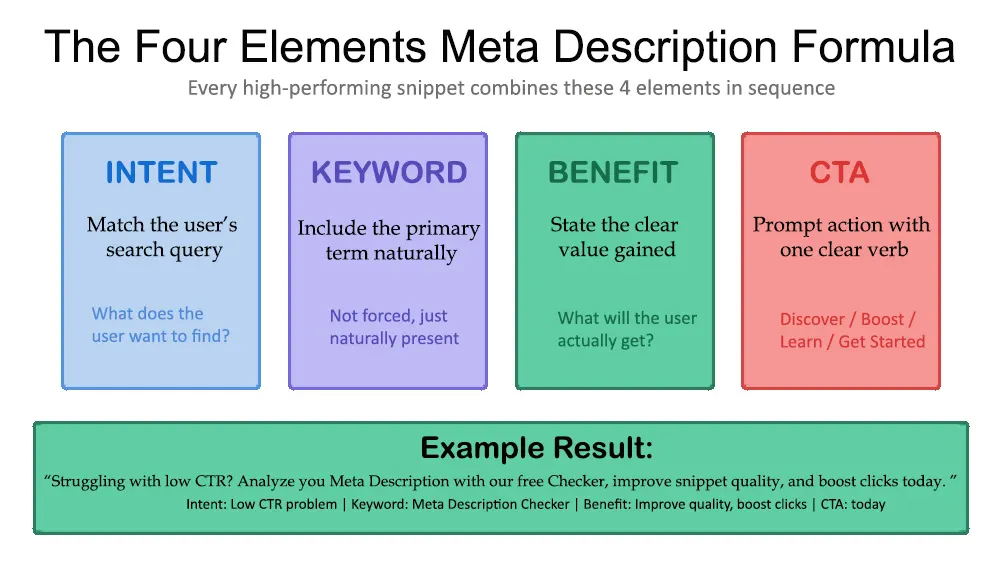
Figure 3: The four-element meta description formula. Each element serves a specific purpose. Removing any one of them measurably reduces click-through performance — intent alignment establishes relevance, the keyword triggers visual bolding in results, the benefit answers 'why should I click,' and the CTA prompts the action.
The four elements intent, keyword, benefit, and call to action each carry distinct weight. Intent alignment ensures the user immediately recognises this result answers their question. The keyword, appearing naturally, triggers the visual bolding in search results that draws the eye. The benefit statement answers the unstated question every user has: what will this page do for me? The call to action converts interest into a click.

Matching Search Intent
Search intent describes the underlying goal behind a query. Someone searching 'meta description checker' is almost certainly looking for a tool to use, not a theoretical explanation of what meta descriptions are. A description that opens with 'Learn about meta description theory' mismatches that intent and will be scrolled past.
Intent alignment is also why Google rewrites descriptions: if the tag describes the page in general terms but the user's query is highly specific, Google pulls a snippet that more directly addresses that query. A description written with clear intent alignment is displayed as written far more consistently.
Keyword Placement Without Stuffing
The primary keyword should appear once, early, in a position where it reads naturally. It should not appear twice. Beyond the primary term, related phrases add semantic relevance without requiring repetition: 'SERP snippet,' 'search result preview,' 'click-through rate' all signal relevance for a meta description optimisation page without repeating the exact phrase.
Writing the Benefit Statement
The most common failure mode is the absence of a clear benefit. A description that says 'This page explains how meta descriptions work' informs the user that information exists. It does not tell them what they will be able to do after reading the page, what problem it solves, or why this result is worth their time over the other nine on the page.
A benefit statement is concrete and specific: 'improve click-through rate,' 'fix truncation errors,' 'check every page in bulk.' Abstract benefits like 'improve your SEO,' 'better results' are too vague to differentiate one result from another.
Real Examples — Before and After:
Using a Meta Description Checker in an SEO Workflow
A meta description checker produces the most value not as a one-time check on a single page but as a systematic tool applied at the right points in a site's content lifecycle.
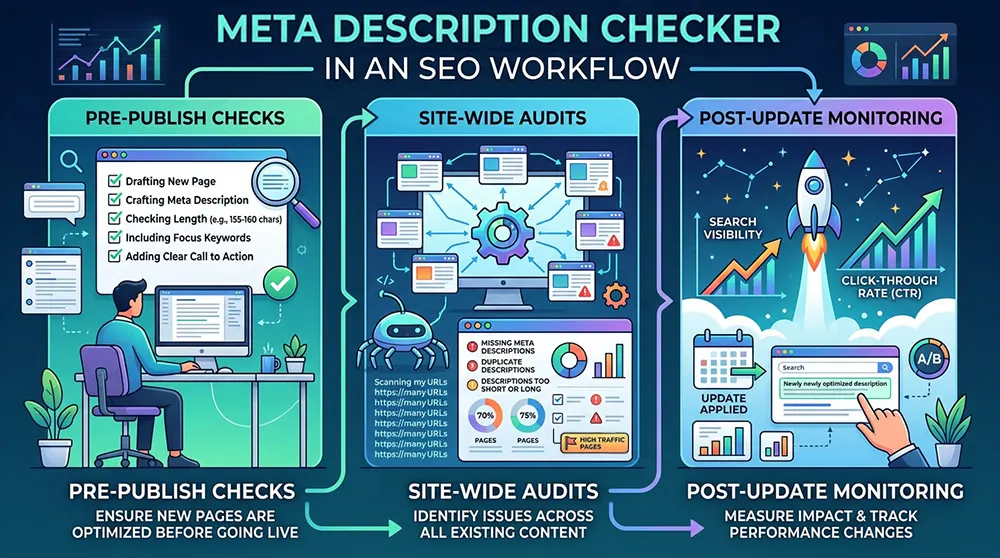
Pre-Publish Checks
Before publishing a new page, paste the draft meta description into a checker and verify length, keyword presence, and pixel display. This takes under a minute and catches the most common errors: truncation risk, missing keyword, no call to action before the page goes live and before Google crawls it.
The SERP preview is particularly useful at this stage. A description that looks fine in the CMS sometimes reads very differently when rendered as a search result. Seeing the title and description together, as they will appear in Google, frequently reveals issues invisible in the content editor: a title that runs long combined with a description that starts weakly creates a poor first impression even if both elements are individually within spec.
Site-Wide Audits
For sites with large page counts, content-heavy blogs, e-commerce catalogs, news archives, the highest-value use of a meta description checker is bulk analysis. Running all URLs through the tool simultaneously surfaces the issues that matter most at scale: pages with no description, pages where the description duplicates another page's, and pages where the description was written years ago and no longer matches the current content or search intent.
Duplicate meta descriptions are a persistent problem on e-commerce sites where product pages share a template. When two pages targeting different products carry the same description, Google receives a weak signal about what differentiates them. A bulk checker identifies every duplicate pair, making it straightforward to prioritise the highest-traffic pages for rewriting first.
Post-Update Monitoring
After any significant content update, algorithm update, or site migration, re-running a meta description audit confirms that no descriptions were lost, truncated, or inadvertently duplicated during the change. CMS migrations in particular are a common source of meta description problems; template changes sometimes strip tags, and bulk imports sometimes overwrite custom descriptions with placeholder text.
Meta Descriptions, Click-Through Rate, and Search Visibility
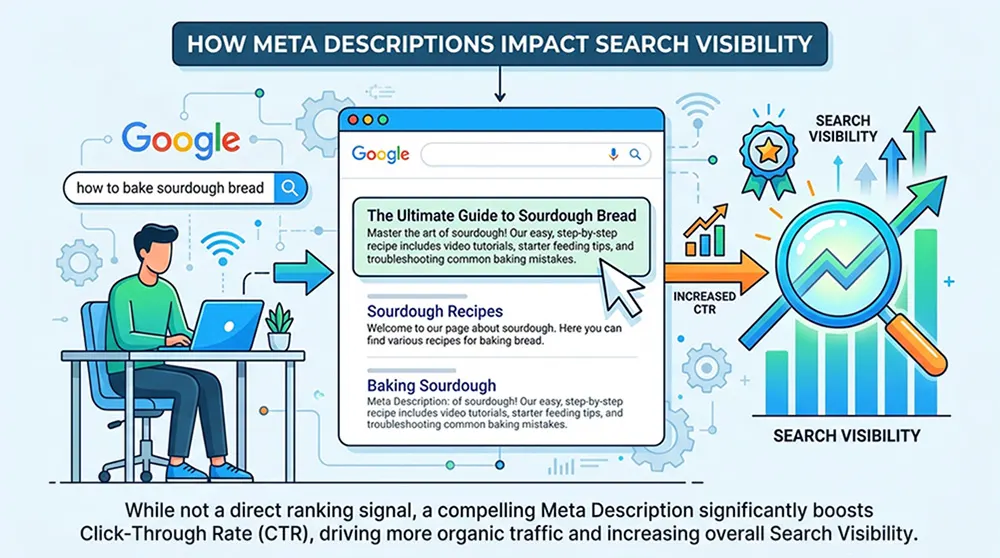
Meta descriptions are not a ranking signal. Google confirmed this explicitly, and testing consistently confirms that changing a meta description does not move a page's position in search results. This is factually important, and it is also the wrong frame for evaluating how much meta descriptions matter.
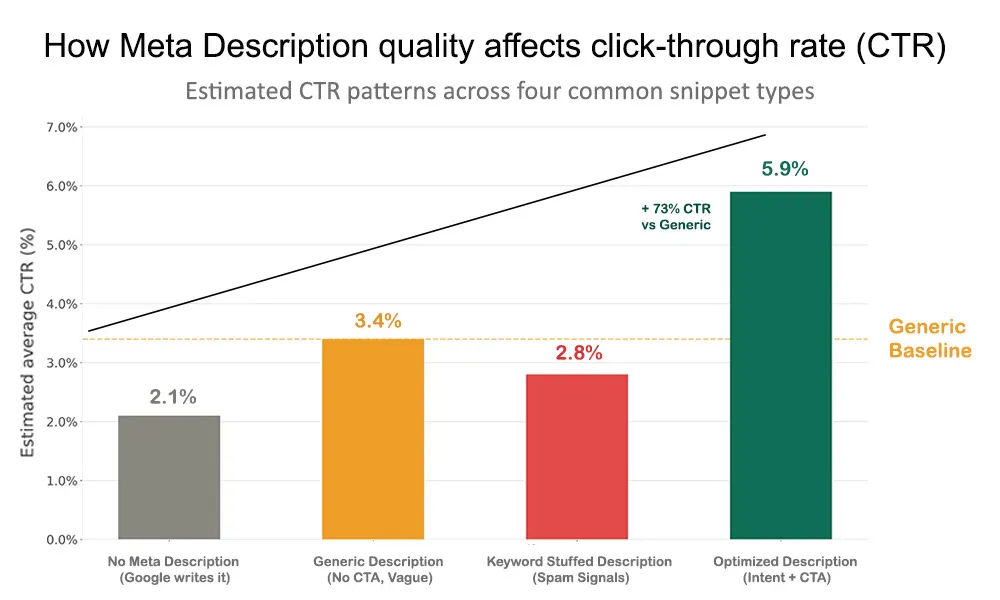
Figure 4: Estimated CTR patterns across four common meta description types. An optimized description — intent-matched, benefit-stated, with a clear call to action — consistently outperforms generic alternatives even when page ranking is identical. The difference between a 2% and 5% CTR on 10,000 monthly impressions is 300 additional visits per month from no ranking change.
What meta descriptions directly affect is click-through rate. For a page generating 10,000 monthly impressions, the difference between a 2% CTR and a 5% CTR is 300 additional visits per month without any change in rankings, content, or links. That difference comes entirely from the snippet.
The relationship between CTR and search visibility is indirect but real. Google's systems interpret sustained high CTR as a relevance signal: users searching a query and clicking a result at a higher rate than expected suggests the result is delivering on its promise. Over time, this behavioral signal can contribute to improved ranking. Treating meta description optimisation as unrelated to SEO performance misses a genuine lever.
When Google Rewrites the Snippet
Google's decision to rewrite a meta description is not random. It is driven by a mismatch between the description and the specific query that triggered the impression. The same page can trigger many different queries, and Google may display different snippets for different queries sometimes the written description, sometimes a dynamically pulled excerpt.
A description that tightly matches the primary intent of the page will be used as-is for the queries that matter most. For more peripheral queries, Google may still override it. The goal is not to prevent all overrides; it is to ensure the written description is used for the queries that drive the most valuable traffic.
Common Meta Description Mistakes and How to Fix Them
Most meta description problems fall into a small number of categories. Each is straightforward to identify with a checker and straightforward to fix once identified.
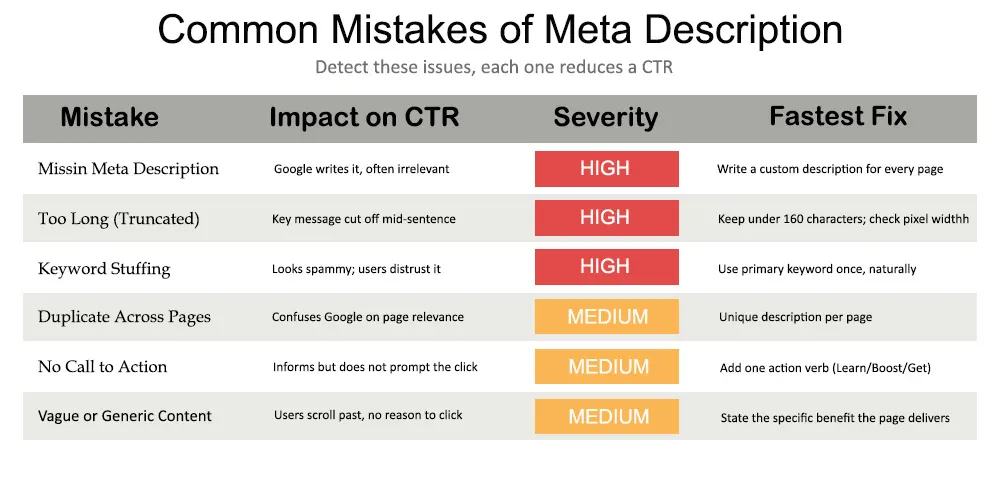
Figure 5: Six common meta description mistakes ranked by CTR impact. The three high-severity issues — missing descriptions, truncated snippets, and keyword stuffing — directly undermine click-through performance. Medium-severity issues compound over time and are worth fixing systematically across a site.
Missing Descriptions
Pages with no meta description give Google no guidance on what snippet to display. Google generates one automatically, typically by extracting a sentence from the body content that appears to match the query. This generated text is frequently clipped mid-sentence, lacks a call to action, and may not reflect the page's most important message.
A site-wide checker identifies every page missing a description. Prioritise by traffic and commercial importance the homepage, core product or service pages, and highest-traffic content pages first.
Truncation
A description that exceeds Google's pixel allocation is cut off. The text that disappears is almost always the end of the call to action, the key differentiator, or the most specific benefit. A user reading a truncated snippet sees an incomplete thought, which reduces both trust and click likelihood.
Front-load the description: state the primary benefit and keyword in the first 100 characters, and treat everything after that as reinforcement rather than essential information. On mobile, the safe window is tighter than on desktop.
Keyword Stuffing
Repeating the primary keyword multiple times does not improve how Google evaluates a description. It makes the snippet look untrustworthy to the human reading it. One natural occurrence of the primary keyword is sufficient. Related semantic terms 'SERP snippet,' 'search result preview,' and 'snippet optimisation' add relevance signals without triggering the repetition pattern that signals low-quality content.
Duplicate Descriptions
Large sites, particularly e-commerce sites with templated product pages, frequently carry the same meta description on dozens or hundreds of pages. When Google encounters identical descriptions on different pages, it receives a weakened signal about what each page specifically offers.
Bulk checking identifies every duplicate. For pages with genuinely similar content, focusing the description on the specific differentiator a unique product attribute, a specific location, a distinct audience is sufficient to create meaningful variation.
No Call to Action
A description without any directive word informs but does not prompt. Users reading a passive description are given information about what exists on the page without any nudge toward clicking. A single clear call to action at the end consistently improves CTR. The call to action should match the page type: 'learn more' for informational content, 'try it free' for tools, 'get a quote' for service pages.
Vague or Generic Content
A description that describes the page in general terms without stating a specific benefit is the most common meta description failure. Replace vague framing with specifics: 'shows you how to avoid the five truncation mistakes that reduce CTR' is more useful and more clickable than 'explains meta description optimisation.'
Meta Descriptions Across Platforms and CMS Tools
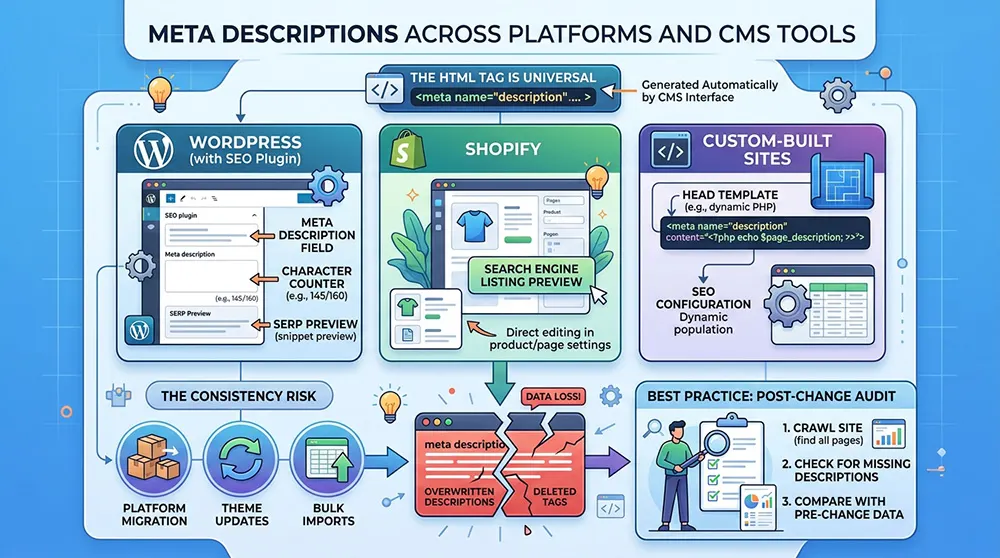
How a meta description is added to a page depends on the platform running the site. The HTML tag itself is universal, but most site owners interact with meta descriptions through a CMS interface rather than editing HTML directly.
WordPress sites using an SEO plugin expose the meta description field in the page editor, with a character counter and often a SERP preview built in. The underlying HTML tag is generated automatically from whatever is entered in that field. Shopify exposes a search engine listing preview section in product and page editors. Custom-built sites typically manage meta descriptions through a head template or a dedicated SEO configuration.
The consistency issue arises when a site migrates platforms, updates its theme, or applies a bulk import. Any of these operations can overwrite or delete existing meta descriptions. Running a site-wide meta description audit after any significant technical change is standard practice for exactly this reason.
AI-Generated Descriptions
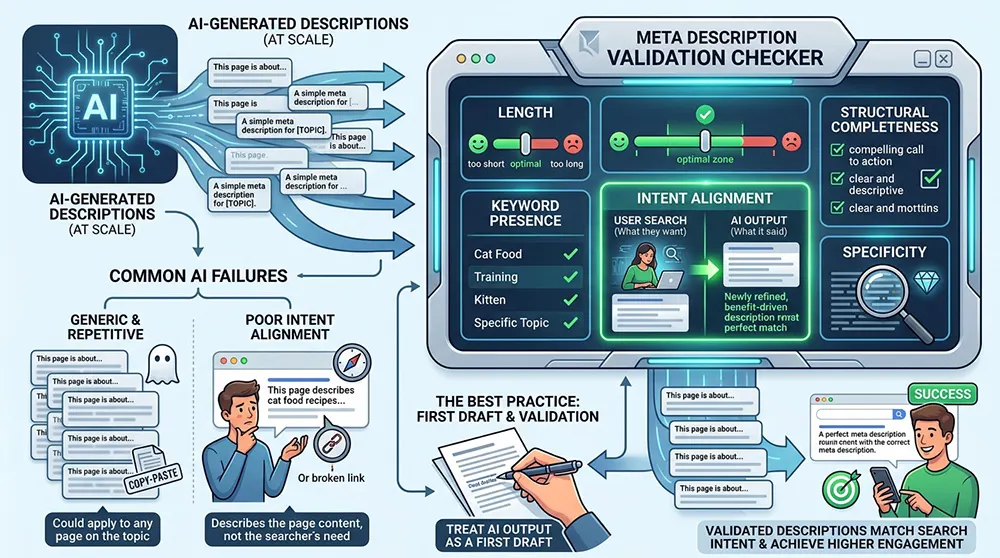
AI writing tools can generate meta descriptions at scale, useful for large content libraries where custom writing would take significant time. The output needs validation against the same criteria a meta description checker applies: length, keyword presence, intent alignment, and structural completeness.
AI-generated descriptions often fail on intent alignment; they describe what the page says rather than matching what a user searching for that topic expects to find. They also tend toward the generic, producing descriptions that could apply to any page on the same topic rather than this specific page. Treating AI output as a first draft and validating each description with a checker before publishing produces significantly better results than publishing AI output directly.
FAQ's
Does a meta description directly affect Google rankings?
No. Google has confirmed that meta descriptions are not a direct ranking factor. They do not influence where a page appears in search results. What they do influence is click-through rate. Sustained CTR improvement can contribute to ranking signals over time, but the meta description itself is not in the ranking algorithm.
What is the ideal character length for a meta description?
The generally accepted safe range is 120–160 characters. The more precise measurement is pixel width: approximately 920 pixels on desktop and around 680 pixels on mobile. Characters vary in width, so a pixel-aware SERP preview is more reliable than a character count alone for determining whether a description will display in full.
Why does Google rewrite my meta description?
Google generates its own snippet when it determines the written description does not match the intent of the search query that triggered the impression, or when another part of the page content would be more directly relevant. A description that closely matches the primary intent of the page, is specific, keyword-inclusive, and benefit-focused, is displayed as written more consistently than a generic one.
Can I use the same meta description on multiple pages?
Not without consequence. Duplicate meta descriptions give Google a weaker signal about what differentiates those pages. Each page should have a unique description that reflects its specific content and the specific intent of users looking for that page.
How do I check meta descriptions across an entire site?
Bulk checking tools accept a CSV of URLs, a sitemap URL, or a full site crawl and return the meta description status for each page: missing, too long, too short, or duplicated. Google Search Console also surfaces meta description issues in its coverage reports for pages with missing or truncated descriptions.
Should I include the primary keyword in every meta description?
Yes, once and naturally. Google bolds the words in a snippet that match the user's search query, making keyword-inclusive descriptions visually more prominent in results. Including the primary keyword improves relevance signalling and click-through performance. Including it more than once or in forced phrasing produces no benefit and makes the snippet look mechanical.
What happens if I leave the meta description blank?
Google generates a snippet automatically, typically by extracting text from the page body that appears to match the search query. This generated snippet is often clipped mid-sentence, lacks a call to action, and may not represent the page's most important content. It is a missed opportunity to control the first impression users have of the page in search results.
How often should meta descriptions be reviewed?
For individual pages: whenever the page content changes significantly, when CTR data shows a sustained drop, or when a related algorithm update changes what Google expects from snippets. For the site as a whole: after any major technical change, platform migration, theme update, bulk content import, and as part of a regular SEO audit cadence.
Conclusion
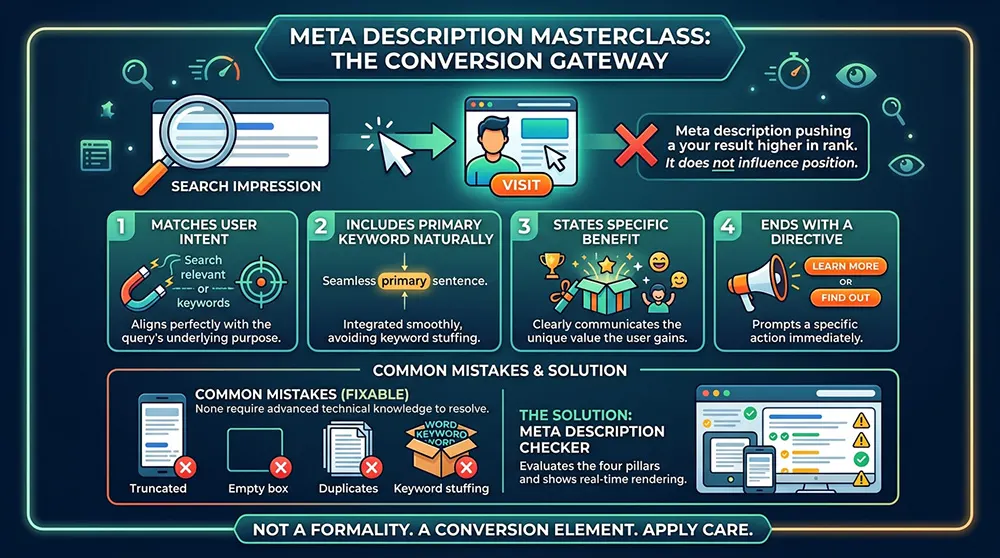
A meta description does one job: it determines whether someone scanning search results decides to click. It does not influence the position of the result. Its entire purpose is to convert an impression into a visit.
That narrowness of purpose is what makes it tractable. Most of what determines whether a description converts comes down to four things: it matches the intent behind the query, it includes the primary keyword naturally, it states a specific benefit the user will gain, and it ends with a directive that prompts action. A meta description checker evaluates all four, identifies which are missing or weak, and shows exactly how the snippet renders before it is published.
The mistakes that reduce click-through rate are well-documented and consistently fixable: descriptions that truncate on mobile, pages with no description at all, duplicate descriptions across templated pages, descriptions stuffed with repetitions of the same keyword. None require advanced technical knowledge to resolve. They require the right tool applied consistently, and the discipline to treat the snippet as a conversion element rather than a formality.
For any site where search visibility matters, the meta description is the last piece of copy between a ranking and a visit. Getting it right deserves the same care as any other element of the page.