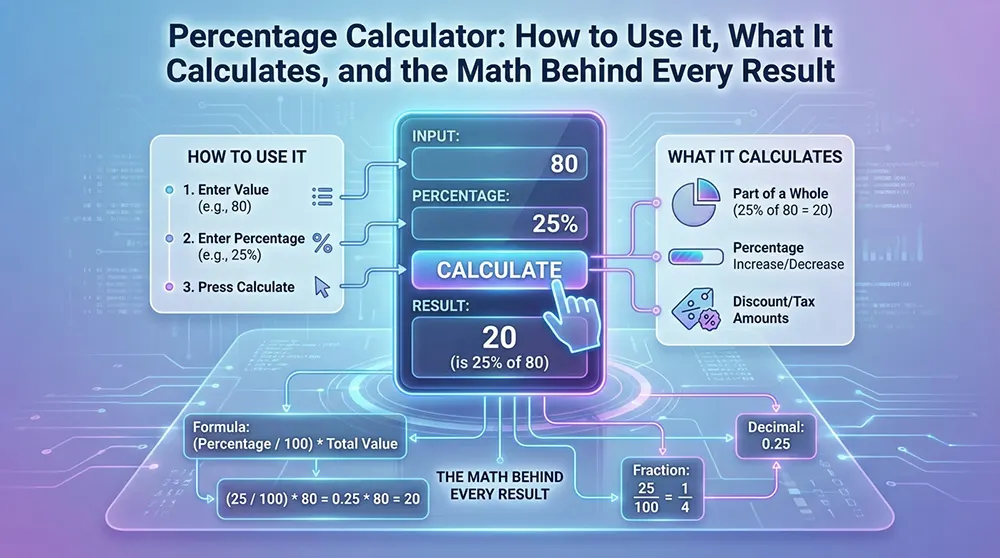
How to Use It, What It Calculates, and the Math Behind Every Result
A percentage calculator is one of the most-reached-for tools in everyday arithmetic. The calculation itself isn't hard, but the right formula changes depending on which variable is unknown, and that is where most errors happen. The tool removes the arithmetic burden. It cannot remove the interpretive step.
This guide covers the tool itself first: what it does, which mode to select, and when a calculator is genuinely the right choice over mental math. Then it covers the mathematics: the formulas, the edge cases, and the distinctions between percentage, percentage point, percentile, and basis points that even experienced analysts mix up.
Everything is shown step by step. No prior knowledge beyond basic arithmetic is assumed.
What Is a Percentage Calculator
A percentage calculator is a utility online, in a spreadsheet, or as a mobile app that performs proportional calculations without requiring the user to recall or work through the arithmetic manually. Enter two values, select the mode that matches the question, and get the third value back.
The tool exists because the formula is easy to misapply. The wrong base value, the wrong calculation direction, or the wrong mode produces a number that looks plausible but is wrong. A well-designed calculator matches the user's question to the correct formula automatically.
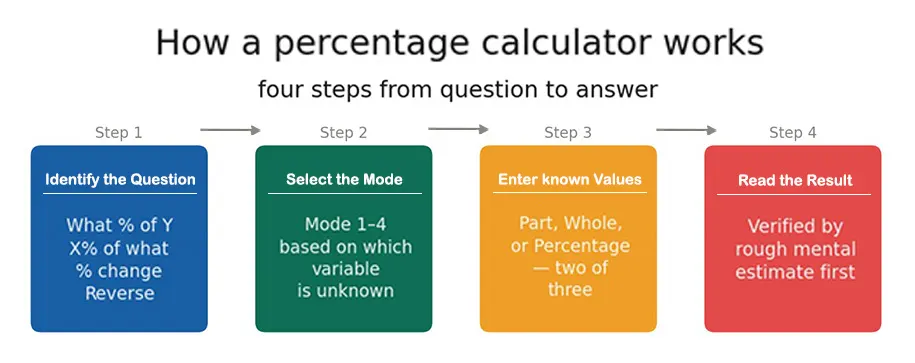 Figure 1: Four steps from question to answer. The most common error is selecting the wrong mode in step 2 — using 'what is X% of Y' when the question is actually a reverse percentage.
The Main Calculation Modes
Which mode to select is the most important practical skill for using a percentage calculator accurately. Every mode solves for a different unknown variable.
Mode 1 — What is X% of Y? The most common query. Enter the percentage and the whole; get back the part. A 15% tip on a meal, an 8% sales tax, a 30% discount all answered here.
Mode 2 — X is what percent of Y? Enter the part and the whole; get back the percentage. A student who scored 52 out of 65 wants to know the percentage: (52 ÷ 65) × 100% = 80%.
Mode 3 — Percentage change from X to Y. Enter the original and the new value; get the percentage increase or decrease. A salary rise from $50,000 to $55,000 is a 10% increase.
Mode 4 — Find the original value before a change. Enter the final value and the percentage applied; get back the starting point. A sofa at $680 after a 20% discount originally cost $850. This mode is the one most people reach for a calculator to handle and the one most likely to be attempted with subtraction when division is needed.
How to Use a Percentage Calculator — Step by Step
Step 1 — Identify the question type. Determine which of the four modes fits. Most errors come from selecting the wrong mode, not entering the wrong numbers.
Step 2 — Identify which two values are known. Every percentage calculation has three variables: part, whole, percentage. Two are always given; the calculator finds the third.
Step 3 — Enter values in the correct fields. A number placed in the wrong field produces a wrong result without any error message. Read the field labels.
Step 4 — Verify with a rough mental estimate. For any significant decision, a sanity check prevents errors from being acted on. 15% of $48 should land around $7. If the output is $72, something was entered incorrectly.
When to Use a Calculator vs. Mental Math
Mental math works well for round percentages on round numbers: 10%, 25%, 50% and their combinations. For anything involving decimal percentages, large numbers, or sequential steps, a calculator is faster and safer. The practical rule: if the result will inform a financial commitment, a medical record, or a document being shared, use the calculator.
Accessing a Percentage Calculator
Searching any of the core calculation queries returns a working calculator directly in the search results page. Spreadsheet applications handle percentage calculations natively through cell formatting and arithmetic formulas. Standard mobile calculator apps expose a percentage button in landscape mode.
For any tool handling personal financial data, the calculation should run locally in the browser without transmitting input values to a server. Tools that require account creation to perform a basic calculation are collecting data they do not need for the function they advertise.
What Is a Percentage
A percentage expresses a part-to-whole relationship as a fraction of 100. The term comes from the Latin per centum by the hundred. If 45 out of 50 exam questions are answered correctly, that is 45/50 = 90/100 = 90%.
The relationship between percentage, decimal, and fraction is fixed. Every percentage converts to a decimal by shifting the decimal point two places left: 75% becomes 0.75. A percentage also represents a proportion, a ratio of part to whole, which is why it appears wherever proportional comparison is needed.
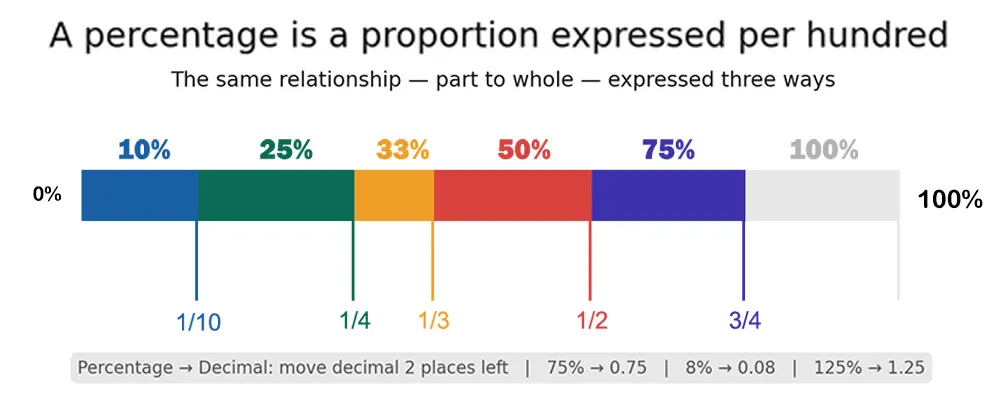
Figure 2: Common percentages on a proportion bar with fraction equivalents. Converting between percentage and decimal is a two-place decimal shift in either direction.
Common Fraction Equivalents
Knowing a handful of fraction-to-percentage conversions makes mental calculation considerably faster. Knowing that 1/8 equals 12.5% means a 12.5% tip is calculated by dividing the bill by 8.
The Percentage Formula — How It Works
One equation powers every percentage calculation:
Percentage = (Part ÷ Whole) × 100%
The same equation rearranges to solve for any of the three variables. Cover one corner of the triangle below, and the remaining two reveal the formula for that corner.
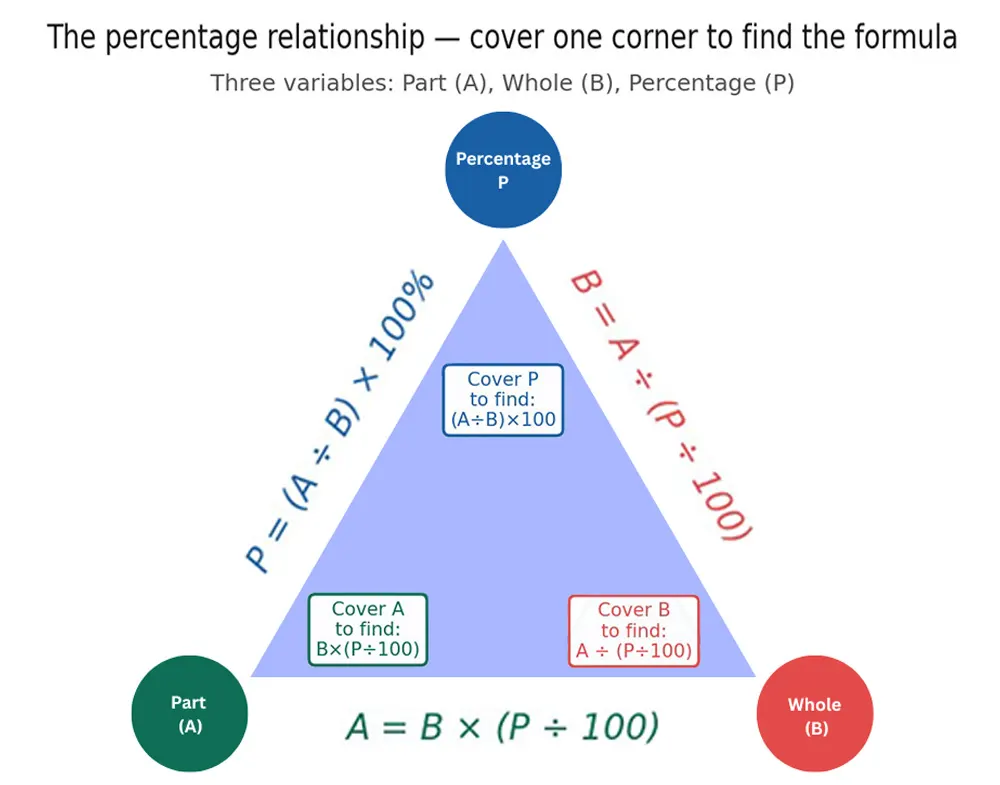
Figure 3: The percentage triangle. Cover any corner to find the formula for that variable. Every percentage calculation is one of these three forms.
Finding What Percentage One Number Is of Another
Divide the part by the whole, multiply by 100%. A basketball player who sinks 18 of 24 free throws: (18 ÷ 24) × 100% = 75%. A company with $25,000 profit on $100,000 revenue: 25% profit margin. Same arithmetic, different context.
Finding a Percentage of a Number
Convert to a decimal and multiply. A 15% tip on a $48 meal: 0.15 × $48 = $7.20. An 8% tax on a $250 purchase: 0.08 × $250 = $20.
Finding the Whole When Part and Percentage Are Known
Divide the part by the percentage as a decimal. If 40 students represent 25% of a class: 40 ÷ 0.25 = 160 students total. This is the direction where manual errors cluster most: dividing when multiplication is expected, or the reverse.
Percentage Increase and Decrease
Percentage change expresses an absolute difference as a relative one:
Percentage Change = ((New − Original) ÷ Original) × 100%
The base is always the original value, not the new one. A stock moving from $50 to $60 is a 20% increase ($10 ÷ $50). Using $60 as the base gives 16.7%, a different number, and the wrong answer. That single error is responsible for more incorrect percentage change calculations than any other.
Why Back-to-Back Changes Do Not Cancel
A 20% pay cut followed by a 20% raise does not restore the original. Starting at $1,000: the cut removes $200, leaving $800. The raise adds 20% of $800 $160, reaching $960. The worker is $40 short. The second percentage operates on a smaller base than the first.
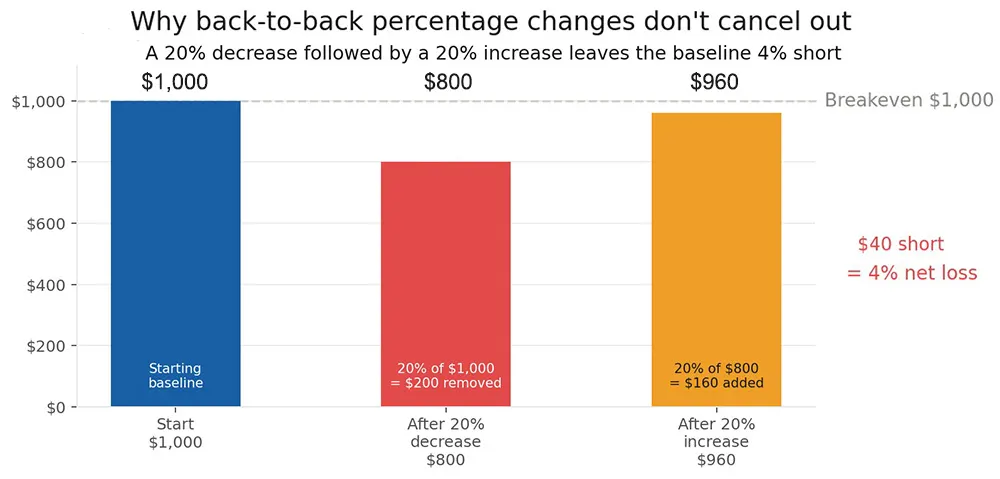
Figure 4: Back-to-back percentage changes do not cancel. The second operates on a shifted baseline — smaller in this case — so the net result is a loss even though the percentages were equal.
The same logic explains why a 50% market decline requires a 100% gain to break even. A portfolio at $10,000 that falls 50% reaches $5,000. Returning to $10,000 requires a 100% gain on $5,000. That is arithmetic, not an anomaly.
Mental Percentage Shortcuts
Everything builds from 10%, which is always the number with its decimal shifted one place left. From there, doubling, halving, and combining reaches any common percentage in two or three steps, no calculator required.
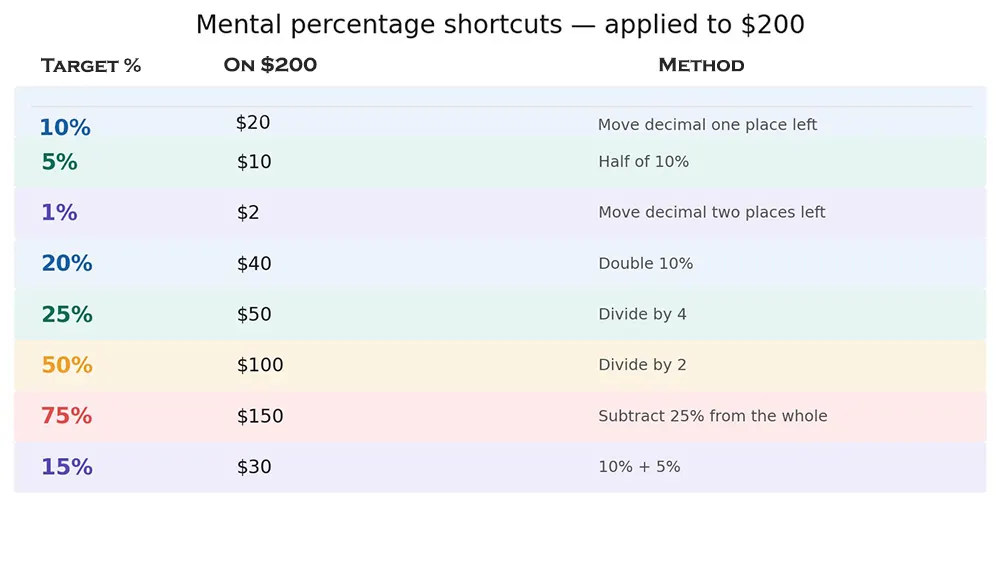
Figure 5: Eight core anchors applied to $200. Combine any two — 35% = 25% + 10%, for example — to reach other targets quickly.
The Reversal Trick
X% of Y equals Y% of X. Both expressions multiply the same two numbers; the order does not change the product. Finding 16% of 50 is awkward mentally. But 50% of 16 is immediately obvious: 8. Same answer. The trick is most useful when one of the two is a round number: 4% of 75 becomes 75% of 4, which is three-quarters of 4, which is 3.
Stacked Discounts and Nested Percentages
When two discounts apply sequentially, they multiply, not add. A 30% discount followed by a 20% discount produces a 44% total reduction, not 50%. The first discount reduces the base; the second applies to that reduced figure.
On a $200 item: 30% off leaves $140. Then 20% off $140 removes $28, leaving $112. Total reduction: $88 on $200, which is 44%. The correct shortcut is to multiply the decimal complements: 0.70 × 0.80 = 0.56; the buyer pays 56% of the original.
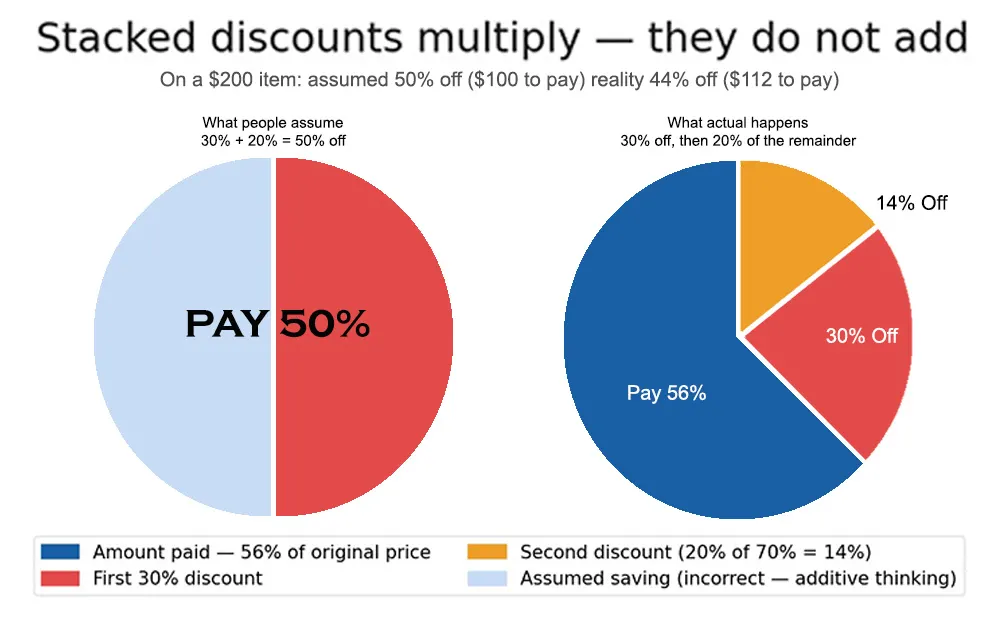
Figure 6: Stacked discounts multiply, not add. A 30% + 20% stack is 44% total off — not 50%. The left pie shows the wrong assumption; the right pie shows reality.
Retailers present stacked discounts in steps because '30% off, then an extra 20%' sounds more generous than '44% off' even though the result is identical. Worth knowing before assuming a promotion is as large as it sounds.
Reverse Percentage — Finding the Original Value
A sofa costs $680 after a 20% discount. The $680 represents 80% of the original (100% minus 20%). Divide by 0.80: $680 ÷ 0.80 = $850. That is the only correct method.
The general rule: divide by (1 minus the discount rate) for markdowns, or by (1 plus the rate) for tax-inclusive totals. A bill of $216 including 8% tax: $216 ÷ 1.08 = $200 before tax. A salary of $52,500 after a 5% raise: $52,500 ÷ 1.05 = $50,000 original.
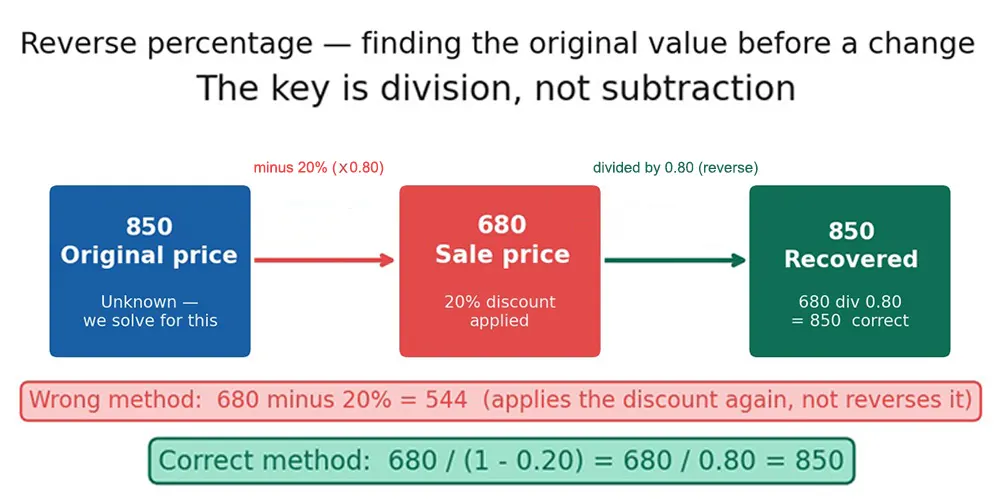
Figure 7: Reverse percentage flow. Subtracting the discount from the sale price applies it a second time — a common and costly error. Division is the only correct approach.
Subtracting 20% from $680 gives $544, which is not the original price but the sale price discounted again. This mistake is worth being explicit about because it feels intuitively correct to many people.
Percentage Difference Between Two Numbers
When two values are compared without a clear 'before' and 'after', percentage difference uses their average as the reference:
Percentage Difference = (|Value 1 − Value 2| ÷ Average of Both) × 100%
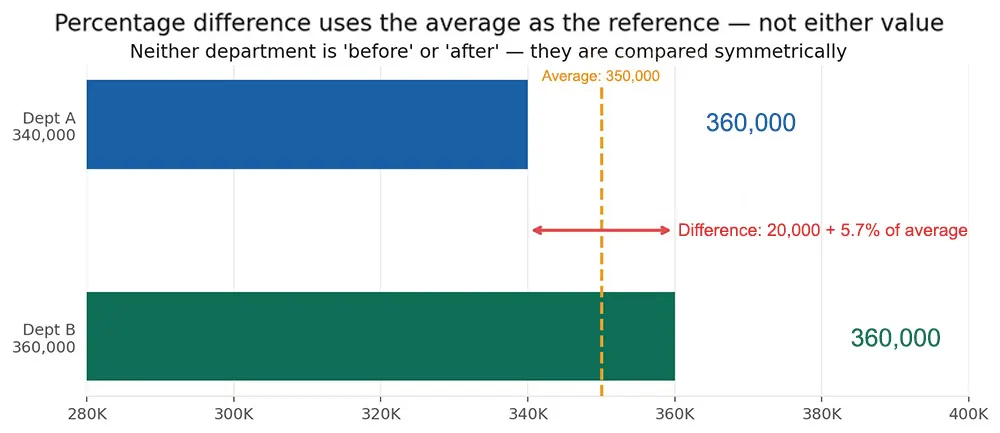
Figure 8: Percentage difference between two departments at $340K and $360K. The average — $350K — is the reference, not either individual value.
Two departments with revenues of $340,000 and $360,000 have a 5.7% difference. Neither is the 'original '; both are current values compared symmetrically. This differs from percentage change, which tracks movement over time from a defined starting point. Mixing the two produces misleading results.
Percent Error
Percent error compares a measured value to a known reference used in laboratory work, calibration, and quality control:
Percent Error = (|Measured − Reference| ÷ |Reference|) × 100%
A thermometer reading 76.25°C against a reference of 74.96°C has a percent error of approximately 1.7%. Unlike percentage difference, percent error anchors to the reference value, not the average of both. A percent error above 10% typically flags a calibration problem worth investigating.
Percentage vs. Percentage Points vs. Basis Points
These three terms are regularly confused, and the confusion is not harmless. If unemployment rises from 4% to 6%, that is a 2 percentage point increase and a 50% relative increase. Reporting either as the other misrepresents the magnitude of the change.
A percentage point is the arithmetic gap between two percentages. A percentage change is the relative movement as a fraction of the starting value. Medical research that reports a treatment reducing risk from 2% to 1% has achieved a 1 percentage point reduction and a 50% relative risk reduction. Both are accurate statements; they describe different things. The relative figure sounds more dramatic, which is why it tends to appear in headlines rather than method sections.
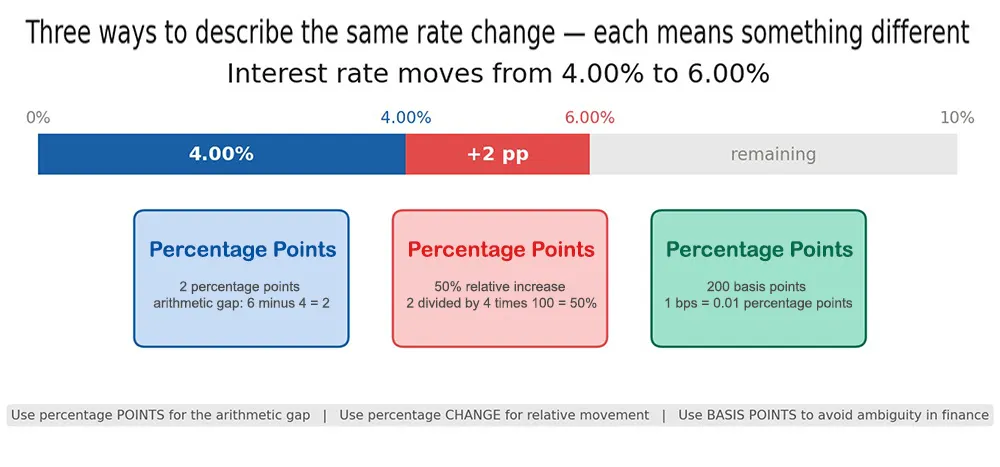
Figure 9: Three ways to describe the same rate move from 4.00% to 6.00%. Each term is correct; each describes a different dimension of the change.
Basis points equal 0.01 percentage points each. A rate move from 4.00% to 4.25% is 25 basis points. Financial markets use them because the language eliminates the ambiguity that makes percentage point changes easy to misread as percentage changes.
Percentile Is Not a Percentage
Scoring in the 90th percentile means outperforming 90% of test takers — not answering 90% of questions correctly. A student could score 65% and still rank in the 90th percentile if the test was difficult enough. Percentile is a rank; percentage is a proportion. Growth charts, standardised tests, and income distribution data all use percentiles. Reading them as percentages produces the wrong interpretation every time.
Weighted Averages — Why Simple Averaging Fails
Percentages from groups of different sizes cannot be averaged directly. A company with 50 employees at 80% target achievement and 200 at 70% does not have a 75% overall rate.
The correct calculation: 50 × 0.80 = 40, plus 200 × 0.70 = 140; that is 180 meeting targets out of 250 total, which is 72%. The simple average (75%) overstates performance by treating the smaller department as equally significant as the larger one.
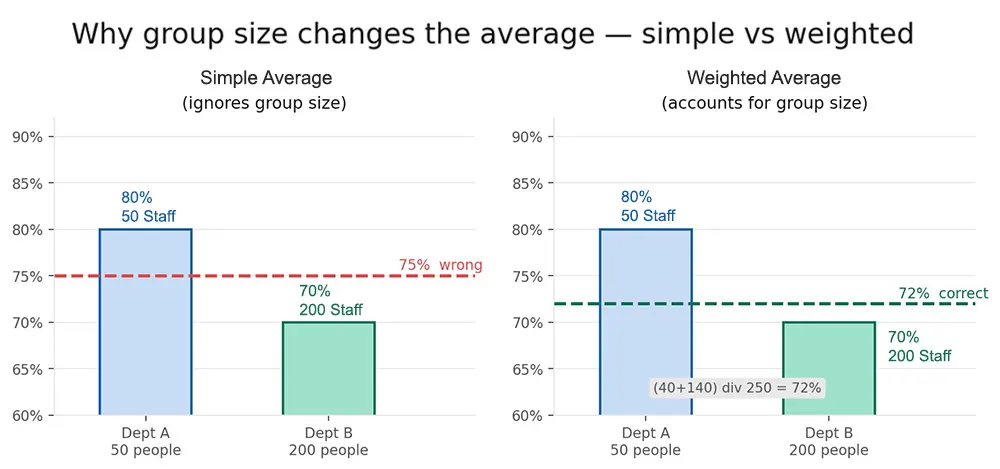
Figure 10: Simple averaging ignores group size; weighted averaging corrects for it. On these numbers, the difference is 3 percentage points — significant enough to matter in a real performance review.
Weighted Average = (Value₁ × Weight₁ + Value₂ × Weight₂ + ...) ÷ Total Weight
Grade Weighting
The final grade is 84.4%, not 83.67% from a direct average, because the final exam carries the most weight. A student who underperforms on the final exam and tries to compensate with quiz scores is working against the weighting structure.
Real-World Applications
The same percentage formula runs through four distinct domains, each with its own conventions and its own typical errors.
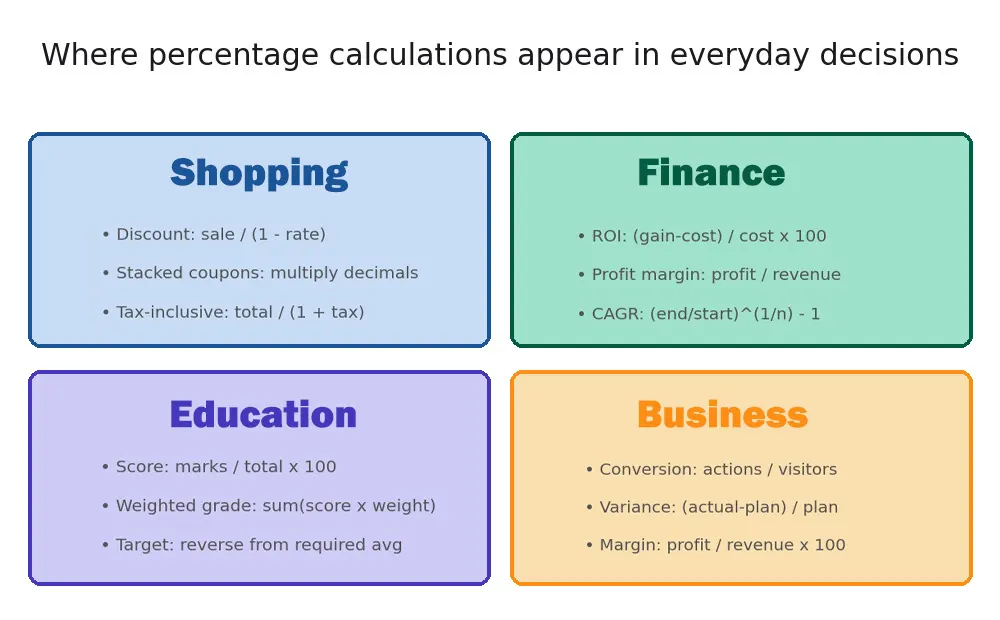
Figure 11: Four domains where percentage calculations appear regularly. Each has its own formula conventions — the underlying arithmetic is identical.
Shopping — Discounts and Tax
A 40% discount on a $90 jacket: 0.40 × $90 = $36 off, leaving $54. To reverse-verify whether a sale price is genuine, use Mode 4: $54 ÷ 0.60 = $90 original. Stacked coupons require multiplication: a 30% store discount plus a 10% loyalty code means paying 0.70 × 0.90 = 63% of the original, not 60%.
Finance and Investment
ROI: (Gain − Cost) ÷ Cost × 100%. A $5,000 investment returning $7,500 produces a 50% ROI. That figure can be compared across investments of different sizes, which is why you use a percentage rather than an absolute gain. Profit margin divides profit by revenue; whether that margin is strong or weak depends on the industry; the percentage makes comparison possible.
Education — Exam and Grade Calculations
A score of 72 out of 80: (72 ÷ 80) × 100% = 90%. That conversion puts results on a common scale regardless of total marks. Weighted grading is where the calculation gets less intuitive: a final exam worth 50% of the course grade has five times the impact of a quiz worth 10%, and the weighted average formula is the only way to calculate the result correctly.
Business — Conversion Rates and Variance
A website with 1,000 visitors and 35 purchases has a 3.5% conversion rate. Raising it to 3.8% is an 8.6% relative improvement, meaningful on a high-traffic site even though the absolute change looks small. Variance analysis compares actual results to plan: a department that spent $52,500 against a $50,000 budget ran 5% over, which communicates scale relative to the plan in a way the raw $2,500 does not.
Common Percentage Mistakes
The errors in practice are rarely arithmetic. They are structural: wrong base, wrong operation, wrong formula for the question being asked.
- Using the wrong base for percentage change. Always use the earlier value as the denominator. A stock from $50 to $60 is a 20% increase ($10 ÷ $50), not 16.7% ($10 ÷ $60).
- Adding stacked discounts. A 30% and a 20% discount multiply to 44% total off, not 50%. This is the most commonly made percentage error in retail contexts.
- Averaging percentages without weighting. Simple averaging across groups of different sizes distorts the result. Use a weighted average when underlying groups have different totals.
- Confusing percentage with percentage points. A rise from 5% to 6% is a 1 percentage point increase and a 20% relative increase. In medical or financial reporting, presenting one as the other is a meaningful misstatement.
- Subtracting instead of dividing for reverse percentages. To find the original before a 20% discount, divide the sale price by 0.80. Subtracting 20% from the sale price applies the discount a second time.
- Decimal entry errors in spreadsheets. Excel stores percentages as decimals. Typing 25 and formatting as a percentage displays 2500%. Enter 0.25, or type 25% directly. This single error causes more spreadsheet mistakes than any other.
Calculating Percentages in Spreadsheets and Code
Excel and Google Sheets
- Find the percentage of a number: =0.15*B2 (15% of the value in B2). Or =15%*B2; both produce the same result.
- Percentage increase or decrease: =(B2-A2)/A2 formatted as a percentage. The cell format handles the ×100 display.
- Reverse percentage: =B2/0.8 to find the original before a 20% reduction.
For weighted averages, SUMPRODUCT handles the multiplication and summation together: =SUMPRODUCT(scores_range, weights_range)/SUM(weights_range). This avoids manual intermediate columns and scales cleanly across large datasets.
JavaScript
// Basic percentage
const pct = (part / whole) * 100;
// Percentage change
const change = ((newVal - oldVal) / oldVal) * 100;
// Reverse percentage — find original before discount
const original = salePrice / (1 - discountRate);
// Stacked discounts — multiply, not add
const finalPrice = original * (1 - d1) * (1 - d2);
Floating-point arithmetic in JavaScript can produce results like 0.30000000000000004 for 0.1 + 0.2. For financial outputs, round to two decimal places with toFixed(2).
Python
def percentage(part, whole):
return (part / whole) * 100
def pct_change(old, new):
return ((new - old) / old) * 100
def reverse_pct(sale_price, discount_rate):
return sale_price / (1 - discount_rate)
For weighted averages on large datasets, use numpy's average() with the weights parameter rather than implementing the formula manually. Rounding accumulates across many iterations.
Frequently Asked Questions
What is a percentage calculator used for?
It handles any proportional calculation involving three variables: a part, a whole, and a percentage. The four core uses are finding a percentage of a number, finding what percentage one number is of another, calculating the percentage change between two values, and reversing a known percentage to find the original value. Each use case matches a specific mode in the tool.
What is the formula for calculating a percentage?
Percentage = (Part ÷ Whole) × 100%. It rearranges to find any of the three variables: Part = Whole × (Percentage ÷ 100), or Whole = Part ÷ (Percentage ÷ 100).
Why do two equal percentage changes not cancel out?
Because the second change applies to a different base. A 20% decrease on $1,000 produces $800. A 20% increase on $800 produces $960, not $1,000. The only way to fully recover from a 20% loss is a 25% gain.
What is the difference between percentage and percentage points?
A percentage point is the arithmetic gap: 4% to 6% is a 2 percentage point increase. A percentage change is the relative movement: 4% to 6% is a 50% relative increase. Both descriptions are accurate; they measure different things.
How do stacked discounts work?
They multiply, not add. A 30% discount followed by a 20% discount means paying 0.70 × 0.80 = 0.56 of the original 44% off total, not 50%. Each discount applies to the price remaining after the previous one.
How do you find the original price before a discount?
Divide by (1 minus the discount rate). A sale price of $68 after 15% off: $68 ÷ 0.85 = $80. For a tax-inclusive total, divide by (1 plus the tax rate): $216 with 8% tax gives $216 ÷ 1.08 = $200 before tax.
Can percentages be averaged directly?
Only when the underlying groups are the same size. When sizes differ, use a weighted average: multiply each percentage by its group size, sum the products, divide by the total count.
What are basis points?
One basis point equals 0.01 percentage points. A rate move from 3.00% to 3.25% is 25 basis points. The term eliminates ambiguity: '25 basis points' cannot be confused with '25%'.
Conclusion
A percentage calculator removes the arithmetic step. It does not remove the interpretive one: knowing which mode to select, which value serves as the base, and whether the question calls for percentage change or percentage difference.
The errors that cost people real money or lead to real misunderstandings in practice are rarely arithmetic. They are conceptual: wrong base for a percentage change, additive thinking applied to multiplicative discount structures, simple averaging applied to groups that require weighting, or a percentage point shift reported as a percentage change.
Understanding those distinctions makes any calculator output meaningful rather than just numerical. A correct result on the wrong formula is still a wrong answer.