How to Audit and Write Titles That Actually Get Clicked
A page can rank on the first result and still get skipped, over and over, by people scanning the results above and below it. Ranking gets a page onto the page. The title tag is what decides whether anyone actually clicks it, and it's frequently the least-optimized element on an otherwise well-built page.
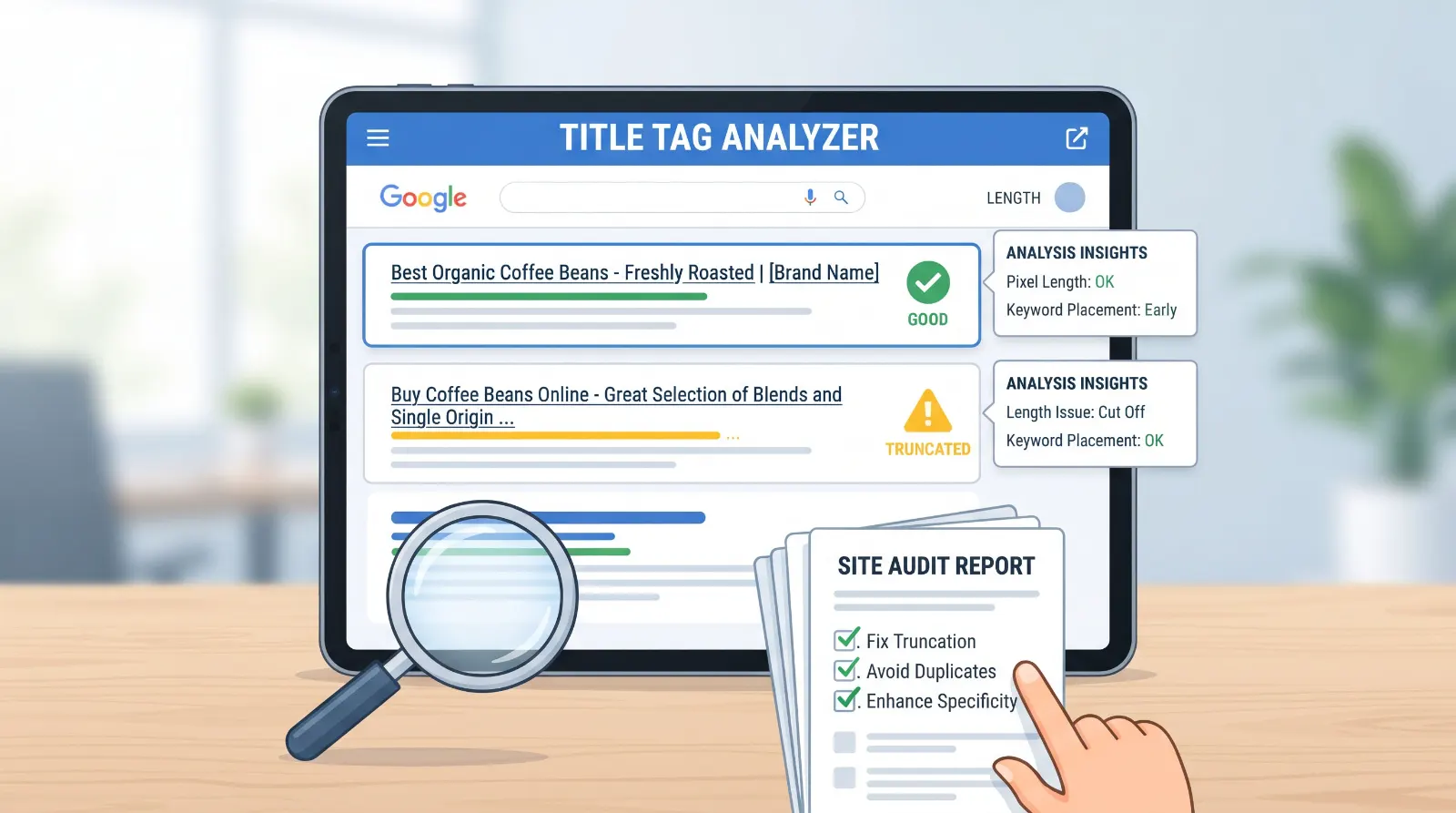
A title tag analyzer checks the specific things that determine whether a title works: length against the actual pixel limit search engines enforce, where the primary keyword sits, whether it's been left blank or duplicated across pages, and how it will actually render in a search result before it goes live.
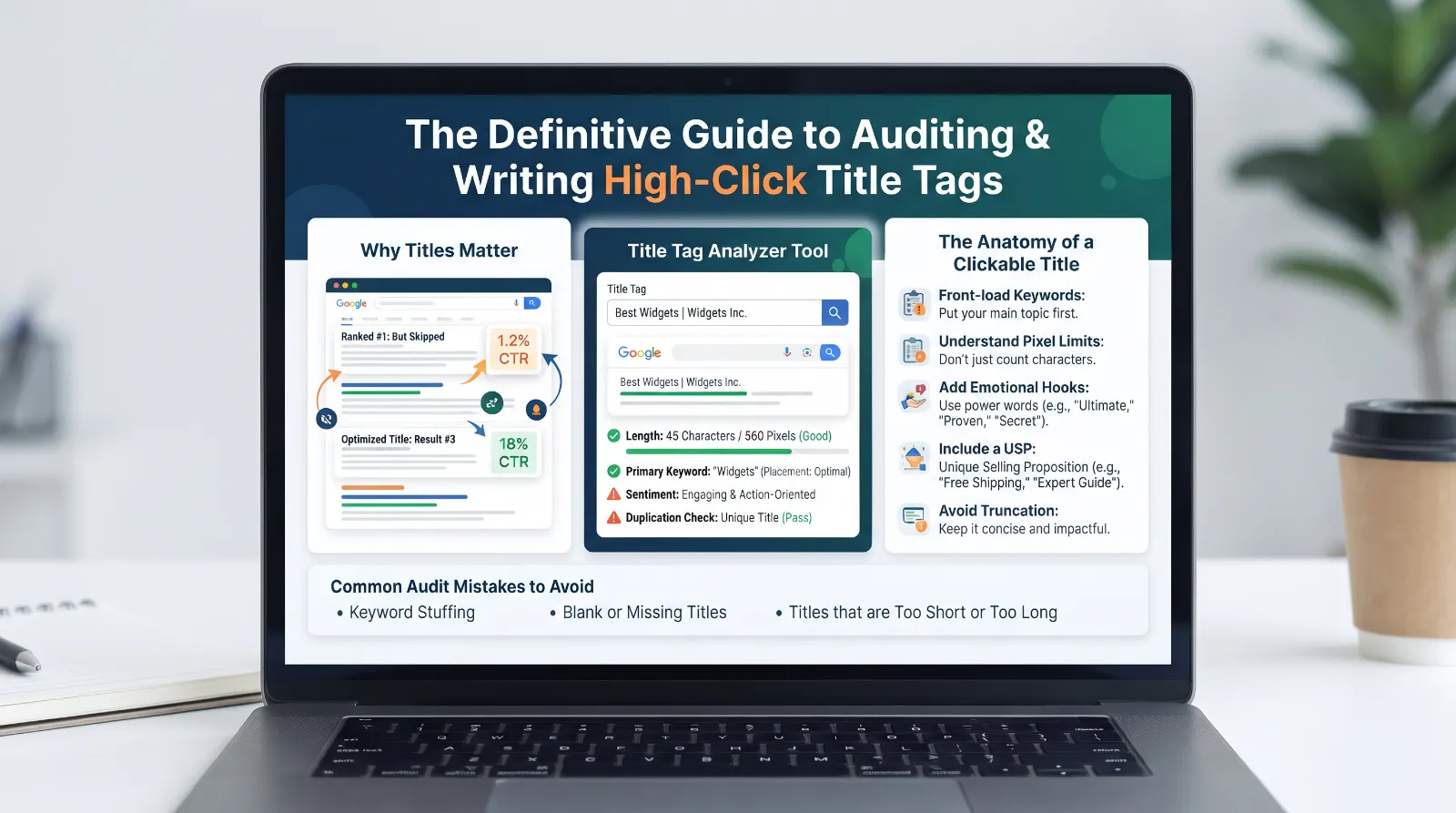
This guide covers what a title tag is and how search engines use it, how an analyzer evaluates one, the real length constraint behind the '50-60 characters' guideline, how to write titles that convert impressions into clicks, and the mistakes that show up most often in real audits.
What Is a Title Tag
The title tag is the HTML element that produces the clickable blue headline in a search result, the text shown in a browser tab, and, in the absence of other signals, the default text used when a page is shared on social media. It lives in the page's head section:
<title>Best SEO Tools for 2027 – Improve Rankings Fast</title>
It is a single tag rendered in three different contexts, each with its own display rules and its own truncation behavior.
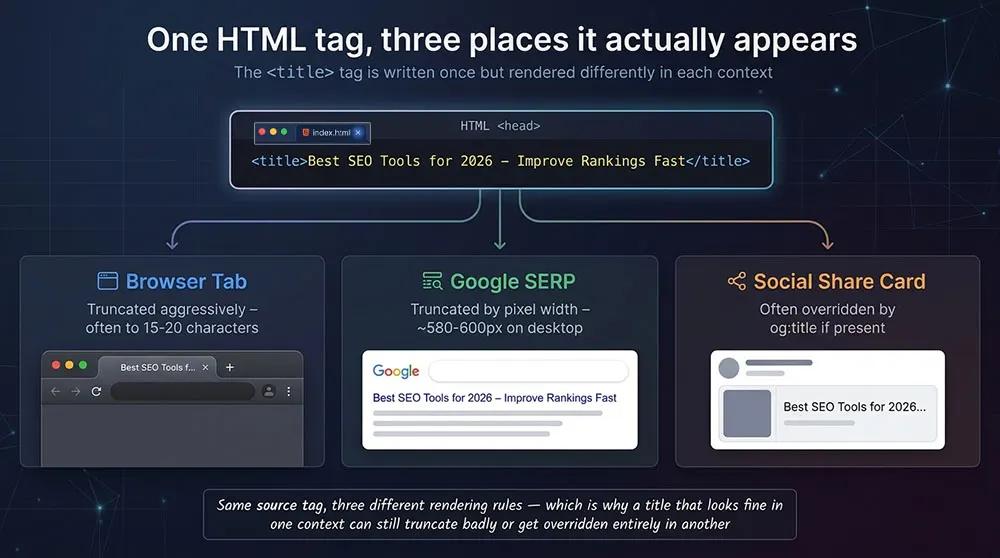
Figure 1: The same title tag renders differently depending on where it appears. A title that displays fully in a browser tab can still truncate in a search result, and social platforms often override it entirely if an og: title tag is present.
Search engines treat the title as a primary relevance signal, comparing its content against the search query to help determine whether a page is a good match. That relevance role is distinct from click-through rate, which the title also influences but through a different mechanism: even a page ranking in position one loses traffic to a lower-ranked result with a more compelling title, because ranking determines visibility and the title determines whether that visibility converts into a click.
What Is a Title Tag Analyzer

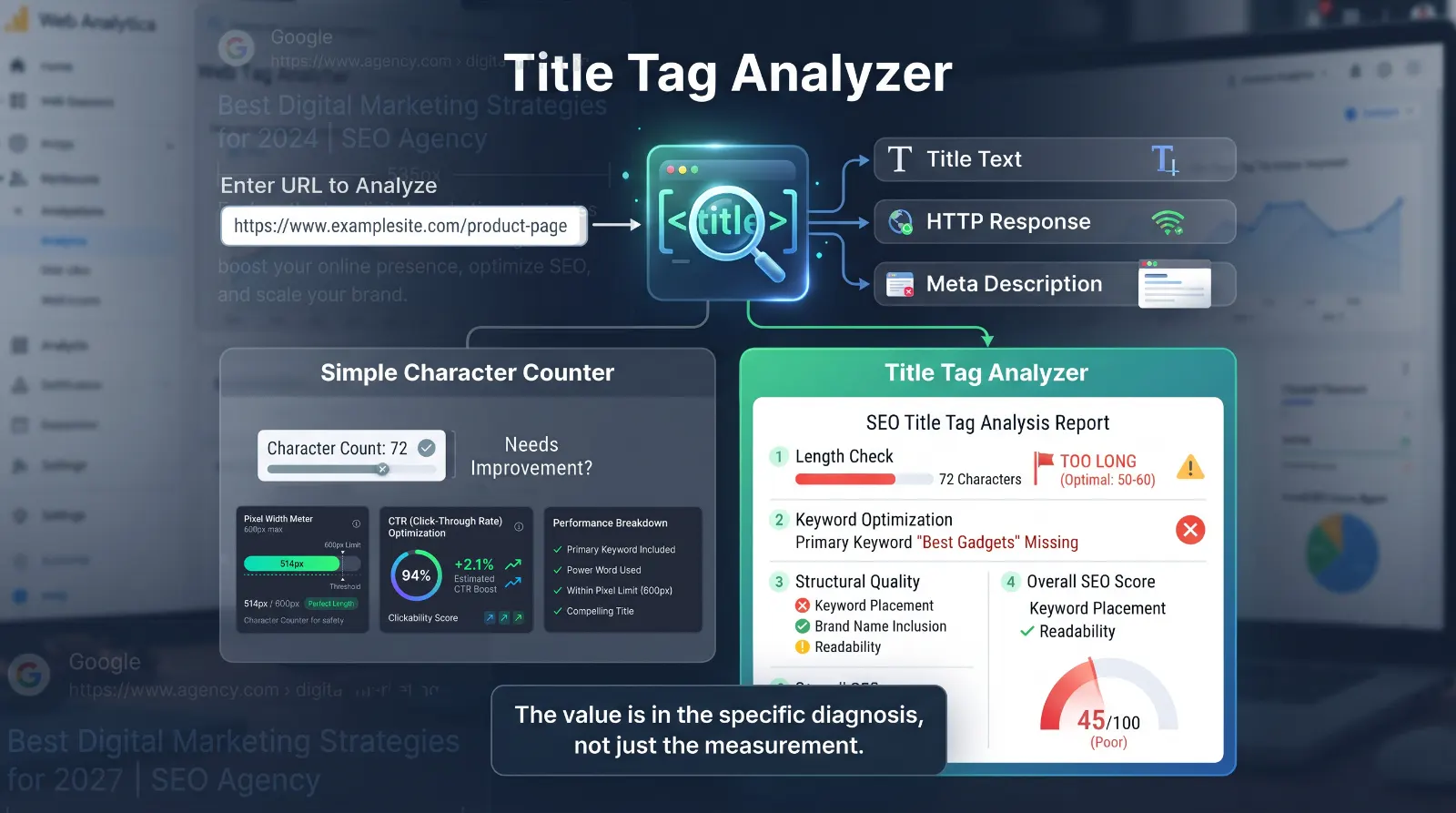
A title tag analyzer is a tool that inspects a page's title tag against a defined set of SEO criteria and returns a specific, actionable report rather than a vague sense that something might be wrong. Entering a URL triggers extraction of the title text, the HTTP response code, and often the meta description alongside it, followed by evaluation against length, keyword placement, and structural benchmarks.
A typical output identifies specific, fixable problems: a title measured at 72 characters flagged as too long, a missing primary keyword, or a resulting SEO score that summarizes overall health. This kind of specific finding is what separates a useful analyzer from a simple character counter; the value is in the diagnosis, not just the measurement.
How the Evaluation Process Works
- Extraction — the tool pulls the <title> content directly from the page's HTML source.
- Length and pixel analysis — both character count and rendered pixel width are calculated, since Google truncates based on pixels, not characters directly.
- Keyword placement check — the tool evaluates whether the primary keyword appears early, ideally within the first 30 characters, where it carries the most relevance weight and visual prominence.
- Issue detection — flags missing titles, duplicate titles across multiple URLs, titles outside the ideal length range, and keyword stuffing.
- Score generation — many tools summarize the findings into a single score, useful for prioritizing which pages need attention first across a larger site
Title Tag Length — Characters vs. Pixels
The '50–60 characters' guideline that circulates constantly in SEO advice is a useful approximation, not the actual rule search engines apply. Google truncates titles based on rendered pixel width, roughly 580 to 600 pixels on desktop, and because different characters occupy different amounts of horizontal space, character count is only a rough proxy for what will actually display.
A capital letter like W or M takes up considerably more horizontal space than a lowercase i or l. Two titles with an identical character count can render completely differently, one displaying in full, the other truncating mid-word purely because of which specific letters they contain.
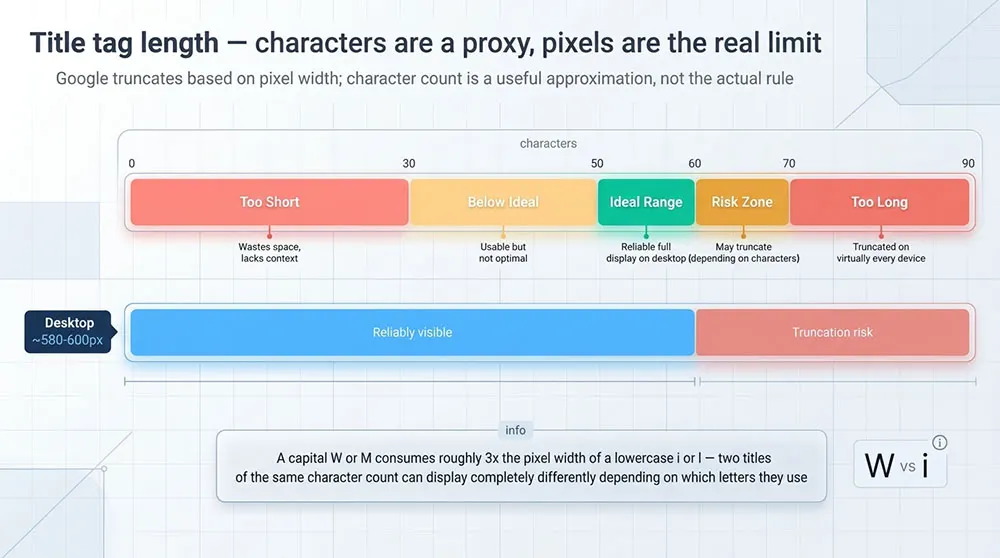
Figure 2: Character count is a proxy; pixel width is the actual constraint. The 50-60 character range is a reasonably safe zone for most titles, but a pixel-aware preview is the only way to confirm a specific title will display in full.
A truncated title reads as an incomplete thought: 'Best SEO Tools for Beginners That Will Dramatically Improve Your Web…,' which damages both clarity and the likelihood of a click. The practical fix isn't just trimming characters; it's front-loading the most important information so that even a title truncated near the pixel limit still communicates its core value before it cuts off.
Keyword Placement and Search Intent Alignment
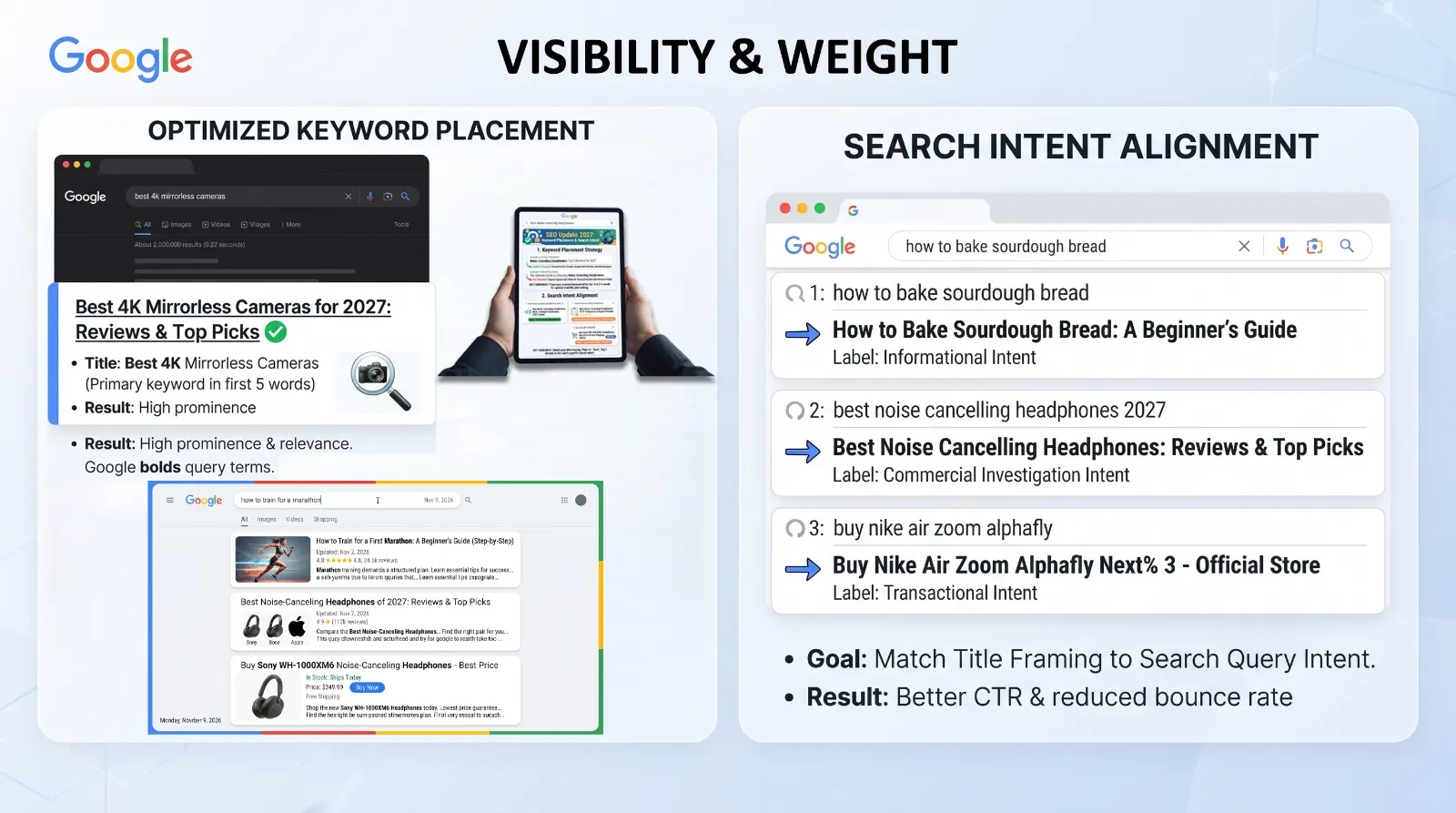
Where the primary keyword sits in a title matters as much as whether it's present at all. Placing it within the first 3 to 5 words improves both its visual prominence Google bolds matching query terms and its relevance weight in how the title is evaluated against a search query.
Beyond placement, the title needs to match the intent behind the query it's targeting. An informational query calls for a title framed around explanation: 'How to...'. A commercial-investigation query responds better to comparative framing: 'Best...'. A transactional query benefits from direct, action-oriented framing: 'Buy...'. A title well-optimized for length and keyword placement can still underperform if it's answering the wrong kind of question for the intent behind the search.
Writing Title Tags That Get Clicked
A title tag has two audiences simultaneously: a search engine's relevance-matching system and a human deciding whether to click among several similar-looking results. Writing well for both means combining a clear primary keyword with a specific, concrete value statement, not just a topic label.
A Simple Optimization Formula
[Primary Keyword] + [Specific Benefit] + [Optional Brand]
Applied: "Title Tag Analyzer – Check Length, Fix Errors, Boost CTR | Brand". The structure gives both the search engine and the reader an immediate, specific answer to what the page offers, rather than a generic label.
Before and After
The weak versions are topic labels. The optimized versions are specific, keyword-inclusive, and state a concrete outcome, which is the difference that determines whether a title earns a click among nine other results making the same general claim.
Title Tag vs. Meta Description vs. H1
These three elements are frequently confused because they're all text near the top of a page that relates to its topic. They serve genuinely different functions, and treating them as interchangeable or worse, as the same copy pasted three times, wastes the opportunity each one represents.
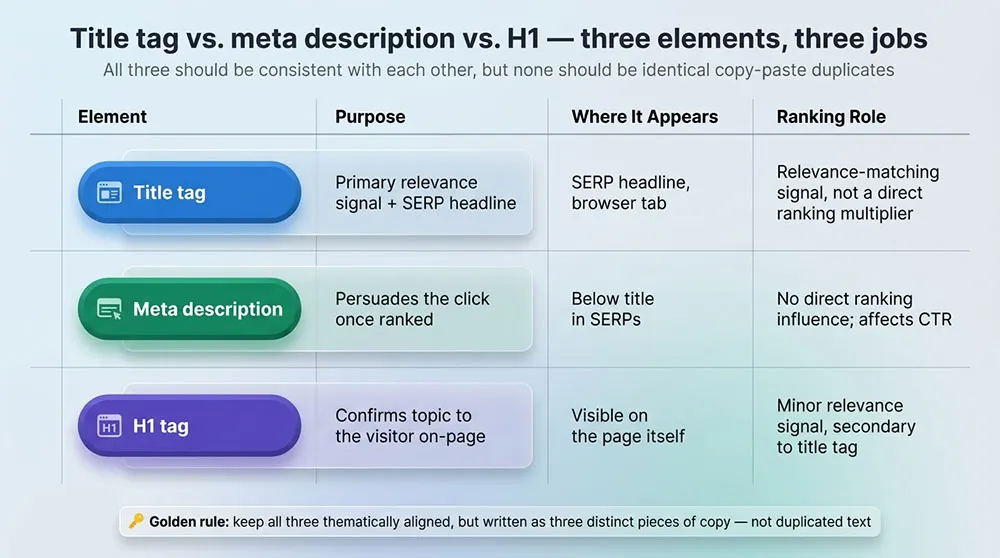
Figure 3: Title tag, meta description, and H1 each do a different job. All three should tell a consistent story about the page, but writing them as identical text forfeits the chance to reinforce the message three different ways.
The title tag carries relevance-matching weight and functions as the clickable SERP headline. The meta description carries no direct ranking influence but does the persuasive work of converting an impression into a click once the page is already visible. The H1 confirms to a visitor, once they've arrived, that they're in the right place a secondary relevance signal, but one whose primary audience is the reader, not the crawler.
Auditing Title Tags at Scale
Manually checking title tags one page at a time is realistic for a handful of pages and impractical for anything larger. A site with hundreds or thousands of URLs needs a bulk approach that scans many pages in a single pass to surface missing titles, duplicates, and length violations across the whole site.
This matters most in a few specific situations: a full SEO audit of an existing site, a migration where titles risk being lost or altered in the process, and ongoing monitoring after a CMS update, since template changes and plugin updates can silently alter titles across many pages simultaneously without anyone noticing until traffic drops.
Bulk results are most useful when exported for systematic review; a spreadsheet of flagged issues is easier to prioritize and delegate than a list of individual tool outputs checked one at a time.
Common Title Tag Mistakes
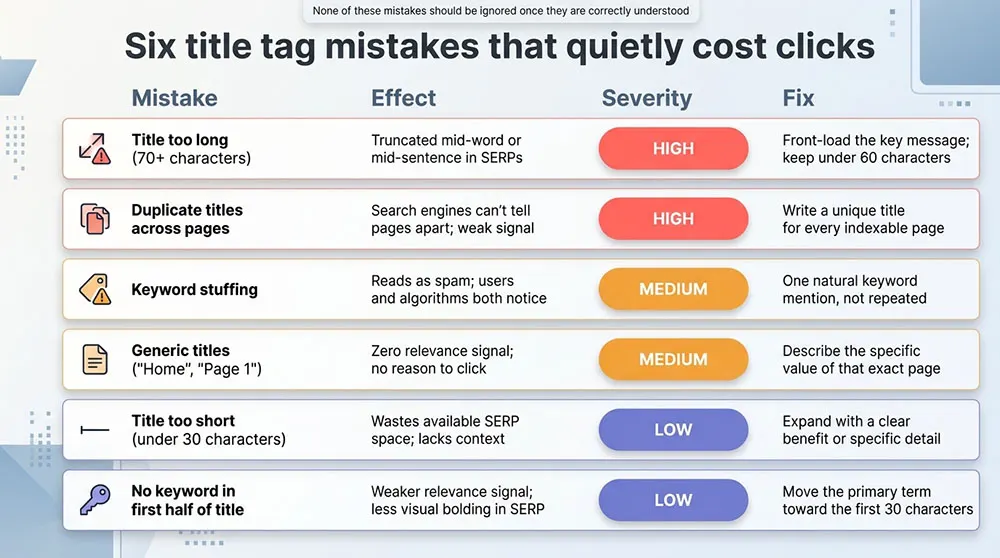
Figure 4: The mistakes that appear most consistently in title tag audits, ranked by how much they typically cost in clicks or clarity.
- Titles that are too long get truncated mid-word in search results, which reads as unfinished and undermines the clarity the title was supposed to provide.
- Duplicate titles across pages give search engines a weak signal about what distinguishes one page from another, a common problem on templated pages where a title was never customized per page.
- Keyword stuffing is repeating a term multiple times inside a short title reads as spam to both algorithms and human readers, and does not produce the relevance benefit that a single, well-placed keyword mention does.
- Generic titles like "Home" or "Page 1" carry no relevance signal whatsoever and give a searcher no reason to choose that result over any other.
- Titles that are too short waste the available SERP space and typically lack the context needed to differentiate the page from similar results.
Frequently Asked Questions
What does a title tag analyzer check?
Character length and rendered pixel width, keyword placement and presence, missing or duplicate titles across a site, and general structural quality, typically summarized into a score alongside a specific, prioritized list of issues to fix.
What is the ideal title tag length?
Roughly 50 to 60 characters, or under approximately 580 to 600 pixels on desktop. Character count is a useful approximation; pixel width is the actual constraint search engines apply, since different characters occupy different amounts of horizontal space.
Does the title tag directly affect search rankings?
Title tags function as a relevance-matching signal rather than a direct ranking factor in the way backlinks or content depth do. They help search engines assess how well a page matches a query, and they have a substantial indirect effect on rankings through click-through rate; a title that earns more clicks than its ranking position would predict is a signal search engines can factor into future ranking decisions over time.
Can a title tag analyzer detect duplicate titles?
Yes, this is one of the more valuable capabilities of a bulk analyzer specifically, since duplicate titles across many pages are difficult to catch by checking pages individually but are immediately visible when a whole site is scanned in one pass.
Should the primary keyword go at the beginning of the title?
Generally yes. Placement in the first 3 to 5 words improves both the visual prominence of the match search engines bold matching query terms and the relevance weight the term carries in how the title is evaluated.
Why does Google sometimes rewrite a title tag in search results?
Google generates its own title for a result when the existing tag is judged too long, insufficiently relevant to the specific query, or structured in a way that doesn't clearly communicate the page's content, often pulling text from the page's H1 or body content instead. A title that's specific, appropriately sized, and clearly aligned with the page's actual content and intent is less likely to be overridden.
How often should title tags be reviewed?
Whenever the underlying page content changes meaningfully, when target keywords shift, or when click-through rate data shows a sustained drop for a specific page. For a full site, a periodic quarterly audit is a reasonable baseline that catches drift that accumulates from CMS updates or content changes made without title tags in mind.
What's the difference between the title tag and the HTML title attribute?
These are frequently confused because of the shared name. The title tag <title> in the head section is what appears in search results and browser tabs and carries SEO weight. The title attribute is a separate HTML property that can be applied to links or images to produce a tooltip on hover; it has no direct SEO function.
Conclusion
A title tag analyzer solves a specific, common problem: a page can be well-written, well-linked, and well-ranked, and still underperform simply because its title doesn't communicate value clearly or gets cut off before it finishes making its point. That gap between ranking and clicking is exactly what the tool is built to close.
The technical side staying within the pixel limit, placing the keyword early, avoiding duplicates is mechanical and straightforward to fix once identified. The harder part is writing a title that says something specific enough to be worth clicking among nine other results making a similar claim. An analyzer catches the mechanical problems reliably. It does not write the compelling version for you.
Run an audit, fix what's structurally broken first missing titles, duplicates, severe truncation and then revisit the remaining titles with an eye for specificity over generic labeling. That combination, checked periodically rather than once at launch, is what keeps a site's titles doing the job they're actually there to do.