
How to Create, Structure, and Submit a Sitemap That Search Engines Actually Use
A website with hundreds of pages and weak internal linking has a discovery problem: search engines find pages by following links, and if no internal links point to a page, it's invisible no matter how good the content is. A sitemap solves that by listing every important URL directly, independent of how well the site's navigation happens to connect them.
A sitemap generator automates the process of building that list. Instead of manually tracking every URL on a site, the tool crawls the site like a search engine, organizes what it finds, and outputs a correctly formatted XML file ready to submit to Google Search Console.

This guide covers what a sitemap generator does, how the underlying crawl and structuring process works, the difference between XML, HTML, and visual sitemaps, how to choose a tool, and the errors that most often undermine an otherwise correctly generated file.
What Is a Sitemap Generator
A sitemap generator is a tool typically browser-based and free to use that scans a website, collects its accessible URLs, and converts them into a structured format search engines can read: most commonly an XML sitemap, though HTML and visual sitemap formats serve related but distinct purposes.
The practical value is removing manual effort and the risk of missing pages. Tracking every URL by hand, keeping that list current as pages are added or removed, and formatting it correctly to the sitemap protocol is feasible for a ten-page site but impractical for anything larger. A generator handles all three problems at once: discovery, formatting, and currency automatically.
For developers, the tool helps debug indexing issues, maintain structured data across a team, and manage complex or deeply nested site structures. For non-technical users, it removes the need to understand XML syntax at all: enter a URL, generate the file, download it.
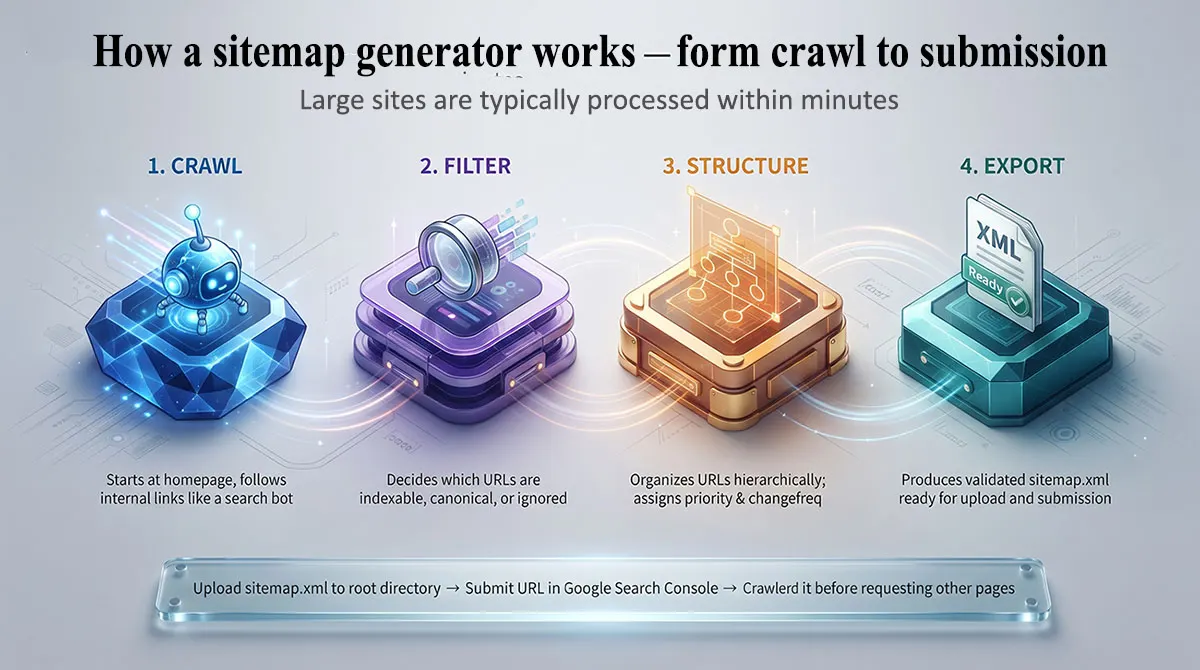
Figure 1: The four-stage process behind a sitemap generator, from initial crawl through to a submitted, search-engine-readable file.
Types of Sitemap Generators
Online, browser-based tools require no installation and work across any modern browser and operating system. Enter a URL, click generate, and download the resulting XML file. This category covers most free sitemap generators and is the right starting point for small to mid-sized sites.
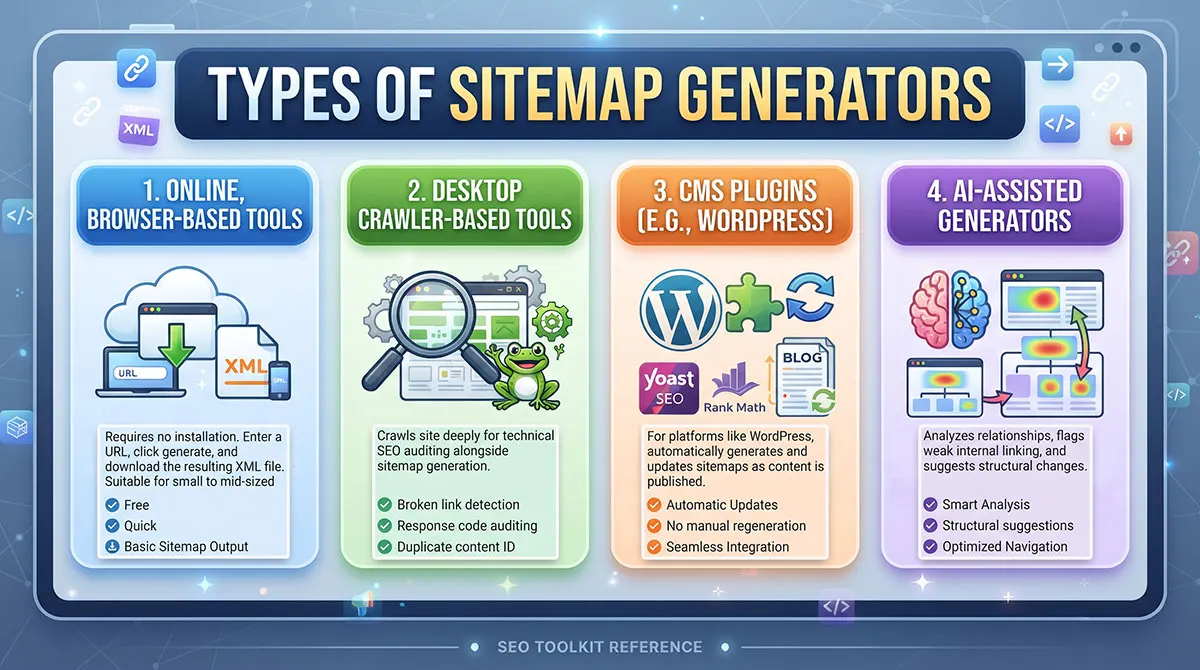
- Desktop crawler-based tools: Screaming Frog is the best-known example; it crawls a site far more deeply and provides broader technical SEO auditing alongside sitemap generation: broken link detection, response code auditing, and duplicate content identification bundled with the sitemap output itself.
- CMS plugins: for WordPress specifically, tools like Yoast SEO and Rank Math generate and automatically update a site's sitemap as content is published, removing the need to regenerate manually after every new page.
- AI-assisted generators: go beyond listing URLs. They analyze the relationships between pages, flag weak internal linking, and in some cases suggest structural changes, for instance, noting that a page buried five clicks deep in navigation would benefit from being linked more prominently.
How a Sitemap Generator Works
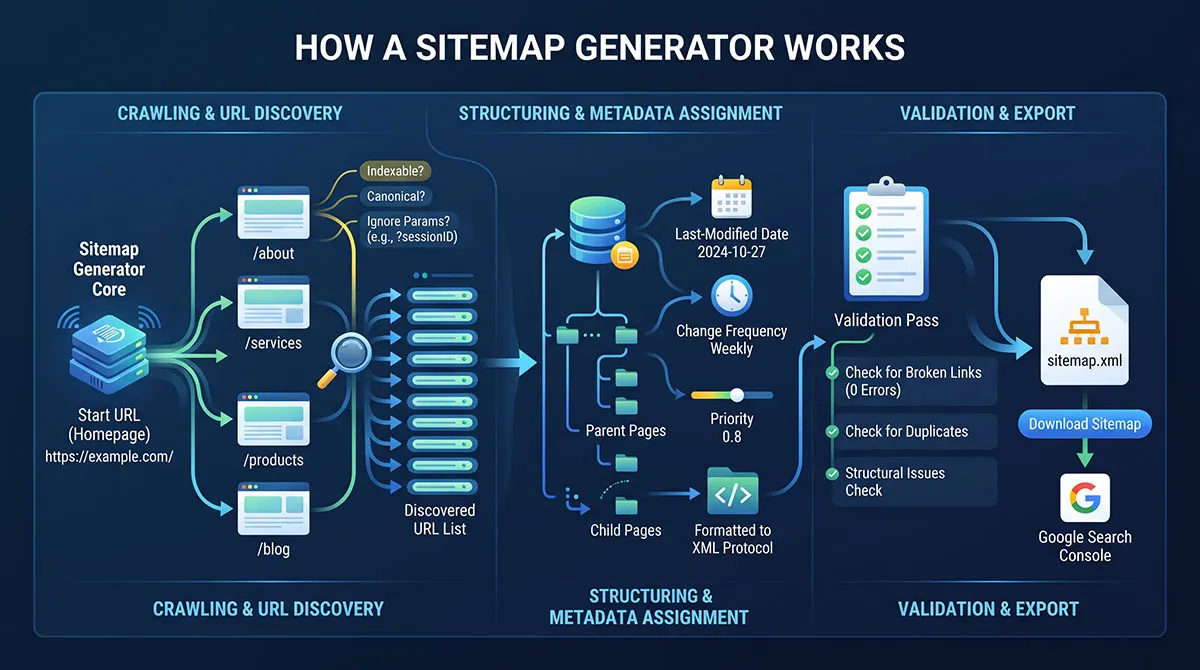
The crawler at the core of a sitemap generator behaves similarly to a search engine's own crawler. It starts at a single URL, typically the homepage, and follows internal links outward, adding each newly discovered page to a growing list. This process, called URL discovery, is more involved than simple link-following: the tool has to decide which pages are indexable, which URLs are canonical when duplicates exist, and which URL parameters should be ignored entirely to avoid generating near-duplicate entries.
Once crawling completes, the tool moves into structuring: organizing the discovered URLs hierarchically, assigning metadata such as last-modified date and change frequency, and formatting the output according to the XML sitemap protocol so it validates correctly against the standard every major search engine expects.
More capable tools add a validation pass before export, checking for broken links, duplicate URLs, and structural issues before the file is ever downloaded, which reduces the chance of submitting an invalid sitemap to Search Console.
XML Sitemap Structure
An XML sitemap entry, once understood, is a straightforward, structured record for each URL with a small set of defined tags.
<?xml version="1.0" encoding="UTF-8"?>
<urlset xmlns="http://www.sitemaps.org/schemas/sitemap/0.9">
<url>
<loc>https://example.com/</loc>
<lastmod>2026-01-01</lastmod>
<changefreq>weekly</changefreq>
<priority>1.0</priority>
</url>
</urlset>
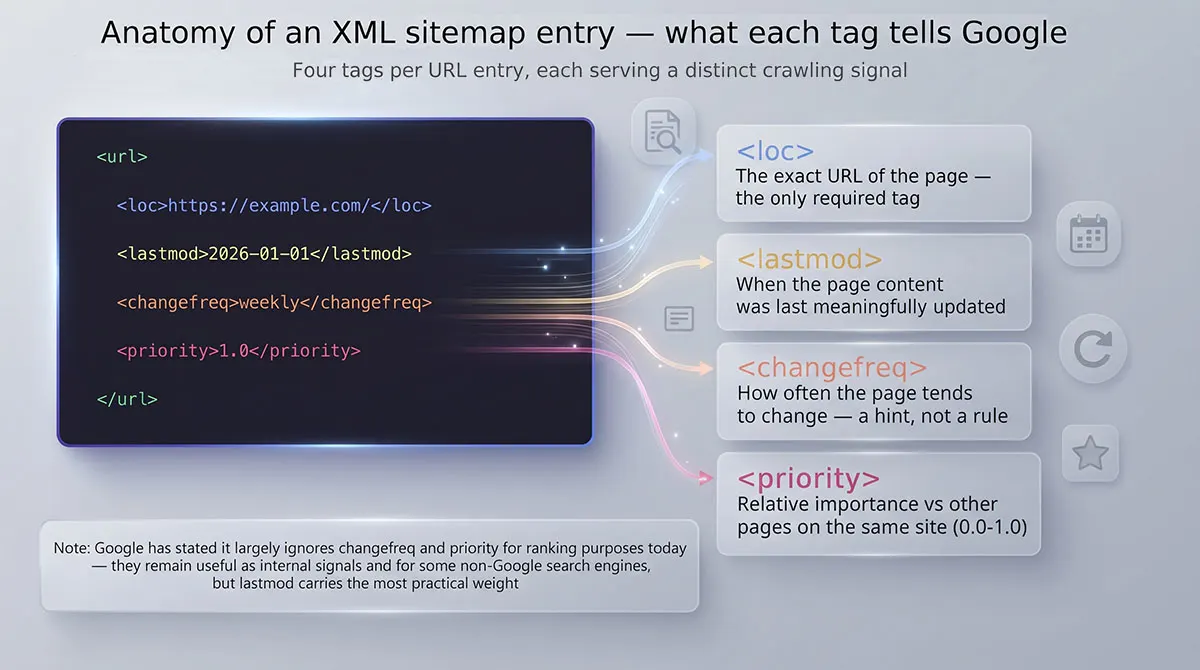
Figure 2: What each tag in a sitemap entry communicates. loc is the only strictly required tag; the others provide crawling hints that Google treats as secondary signals rather than binding instructions.
Why Sitemaps Matter for SEO
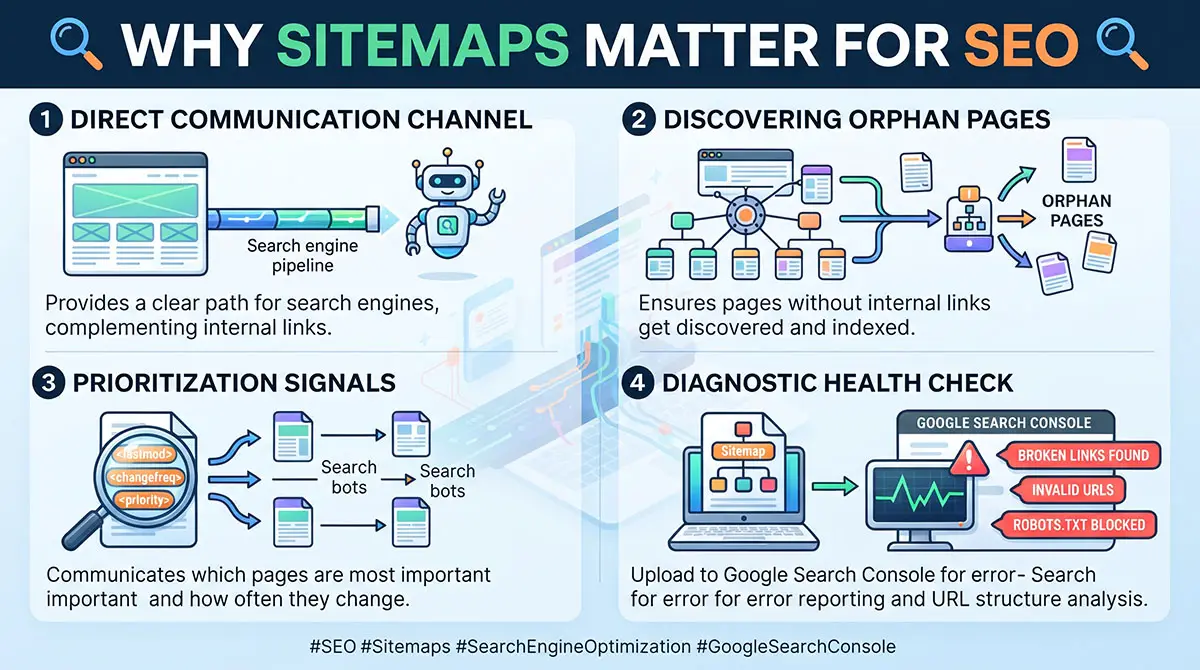
A sitemap functions as a direct communication channel to search engines, distinct from and complementary to internal linking. Crawlers primarily discover pages by following links; a sitemap adds a second discovery path that doesn't depend on internal linking being complete or well-structured, which matters because internal linking on real sites is rarely perfect.
Without a sitemap, orphan pages with content and no internal links pointing to them may never be discovered or indexed at all, regardless of content quality. This is a particular risk for large e-commerce catalogs, newly launched sites without an established link structure yet, and any site where navigation doesn't surface every page.
Submitting a sitemap also communicates prioritization: the lastmod, changefreq, and priority tags collectively suggest which pages matter most and how often they're worth revisiting. Google has stated it weighs changefreq and priority lightly for its own crawling decisions today, but lastmod remains a genuinely useful signal, and the tags retain more relevance for other search engines that respect them more literally.
There is also a diagnostic benefit that's easy to overlook: uploading a sitemap to Google Search Console doesn't just register it; Search Console analyzes it, and will surface broken links, invalid URLs, or pages blocked by robots.txt that were included in error. Treated this way, a sitemap becomes a periodic health check on the site's URL structure, not just a submission file generated once and forgotten.
Sitemaps and Crawl Budget
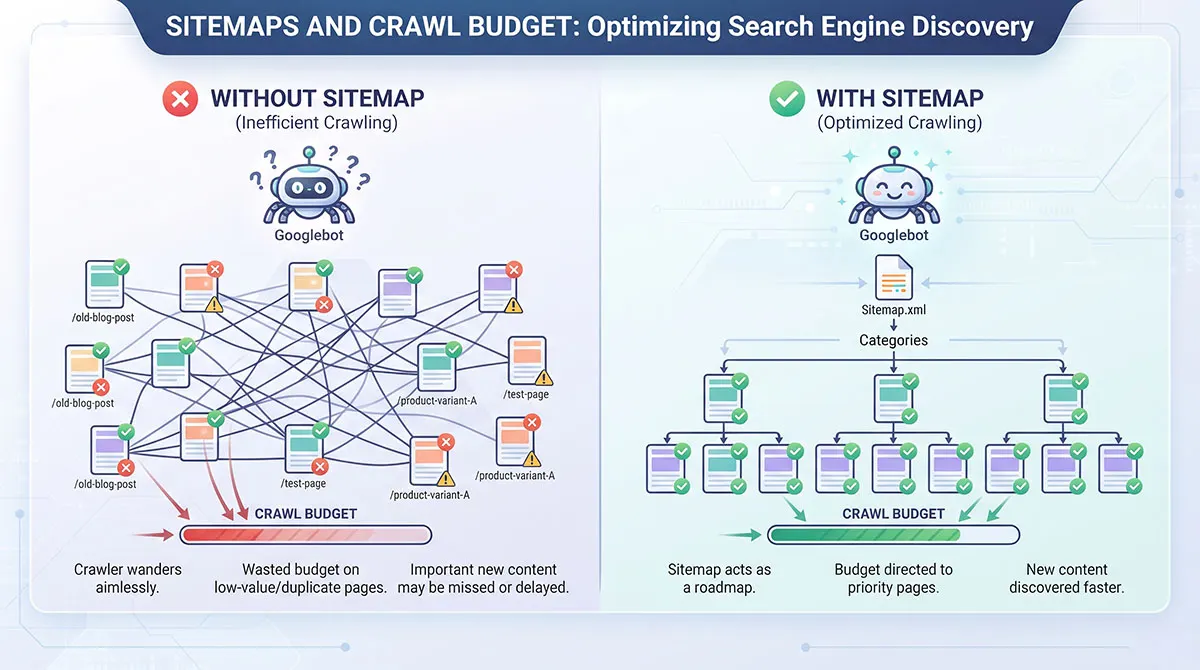
Every site has a finite crawl budget, the number of pages a search engine will crawl within a given period. For small sites, this rarely matters in practice; for large sites, particularly e-commerce catalogs with thousands of product pages or news sites publishing constantly, it becomes a genuine constraint.
A well-structured sitemap helps by directing crawl attention toward pages that matter and away from low-value or duplicate URLs that would otherwise consume budget without benefit. Without one, a crawler may spend a disproportionate share of its allotted crawling on outdated or low-value pages, delaying discovery of genuinely important new content.
How Sitemaps and Robots.txt Work Together
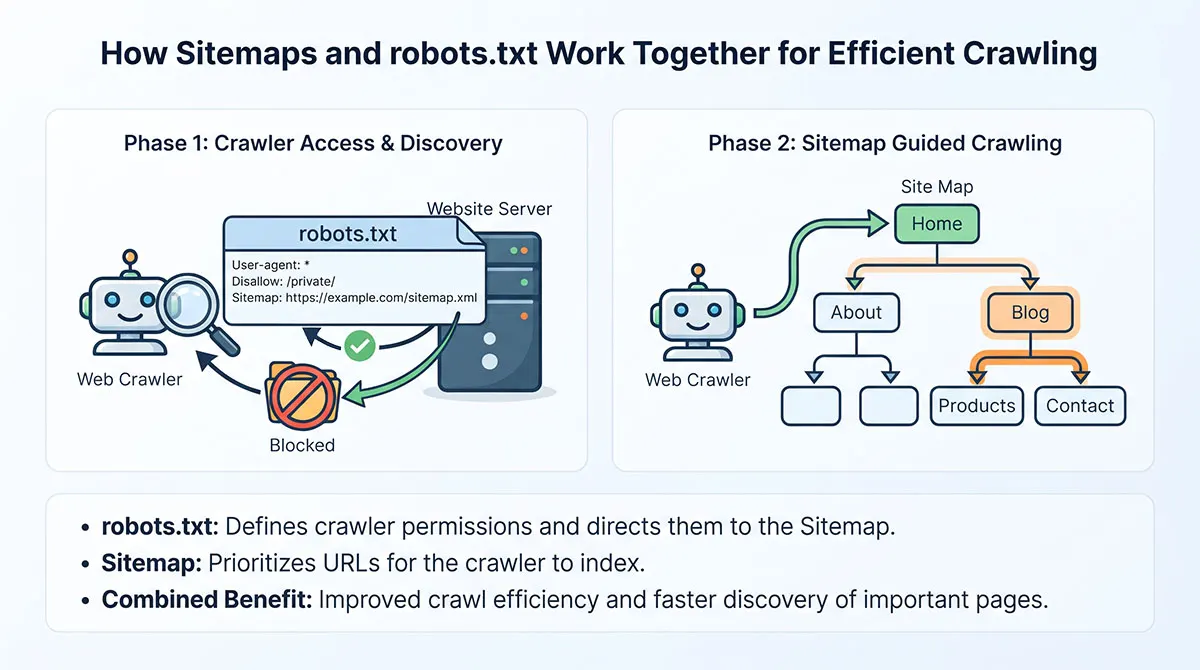
These two files are often treated as unrelated, but they govern adjacent parts of the same process. robots.txt controls whether a crawler is permitted to request a URL at all. The sitemap guides which URLs the crawler should prioritize once it's allowed to request them. Used together correctly, they improve crawl efficiency, keep unwanted pages out of the crawl entirely, and surface the URLs that matter most.
User-agent: *
Disallow:
Sitemap: https://example.com/sitemap.xml
Referencing the sitemap's location directly inside robots.txt is a small addition that meaningfully speeds up discovery; it's one of the first things most crawlers check, and it removes any ambiguity about where the sitemap lives.
XML, HTML, and Visual Sitemaps
XML sitemaps are built for search engines. They list URLs in a structured, machine-readable format, with metadata that helps crawlers prioritize and understand how often pages update. They ensure pages remain discoverable even when internal linking to them is weak.
HTML sitemaps are built for human visitors, a page listing important site links in a simple, browsable format. They serve navigation and, indirectly, SEO: better internal linking and a lower bounce rate for visitors who land on them looking for something specific.
<ul>
<li><a href="/">Home</a></li>
<li><a href="/blog">Blog</a></li>
<li><a href="/contact">Contact</a></li>
</ul>
Visual sitemaps represent the same underlying hierarchy as a diagram rather than a flat list, the format most useful during site planning, redesigns, and team collaboration, since non-technical stakeholders can read a tree diagram without needing to parse code or a URL list.
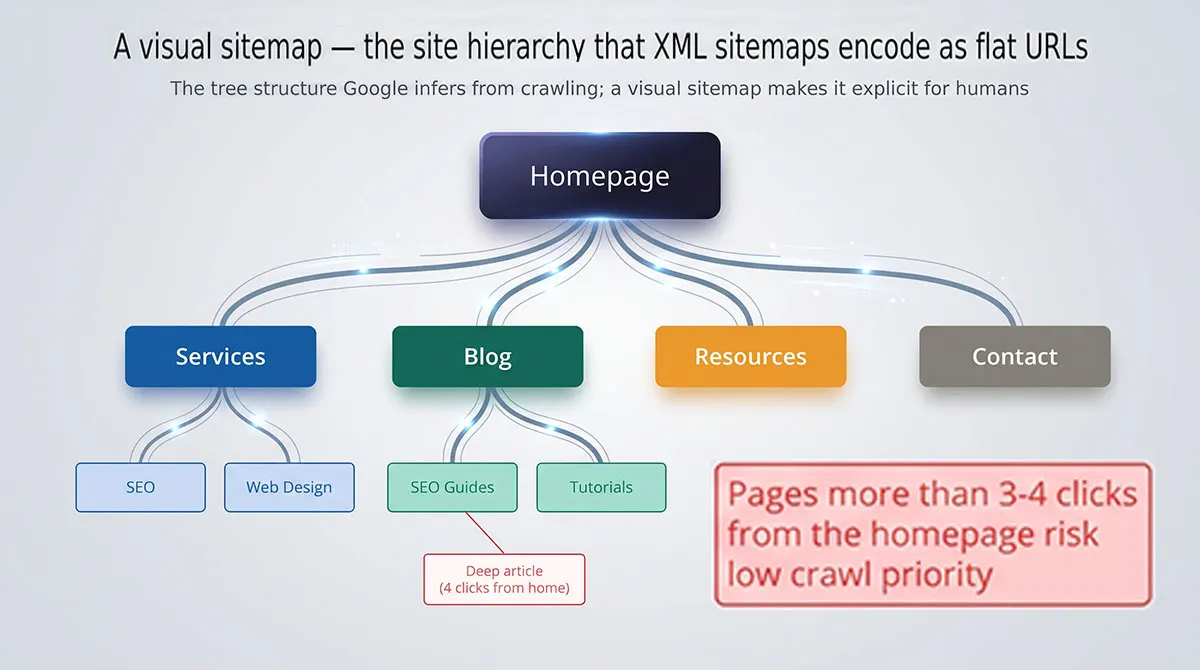
Figure 3: A visual sitemap makes site hierarchy and crawl depth immediately visible. The article's own repeated reliance on ASCII tree sketches to explain this concept is itself the reason a proper diagram is more useful than text — depth problems that are easy to miss in a URL list are obvious at a glance here.
Sitemap Index Files for Large Websites
A single XML sitemap can hold up to 50,000 URLs. Sites larger than that need to split their URLs across multiple sitemap files and reference all of them through a sitemap index file. This file lists other sitemaps rather than individual pages, functioning as a table of contents.
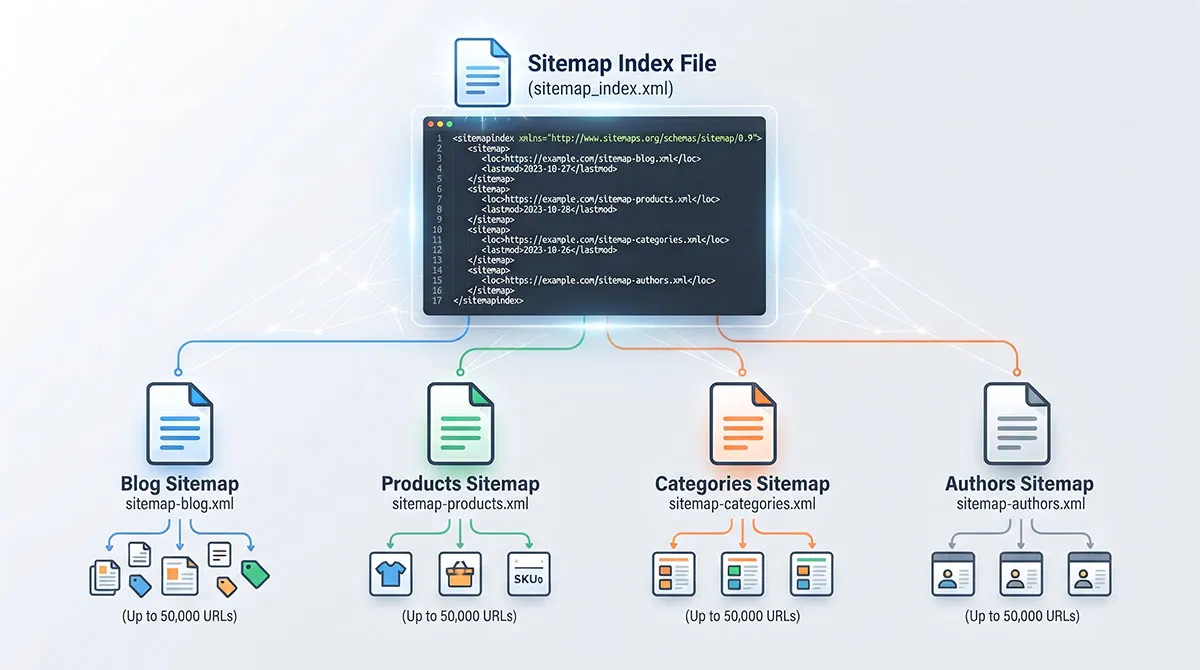
<sitemapindex xmlns="http://www.sitemaps.org/schemas/sitemap/0.9">
<sitemap>
<loc>https://example.com/sitemap-blog.xml</loc>
</sitemap>
<sitemap>
<loc>https://example.com/sitemap-products.xml</loc>
</sitemap>
</sitemapindex>
This structure is standard for large e-commerce platforms, news publishers, and SaaS documentation sites anywhere the URL count genuinely exceeds what a single file can hold cleanly.
Image, Video, and News Sitemaps
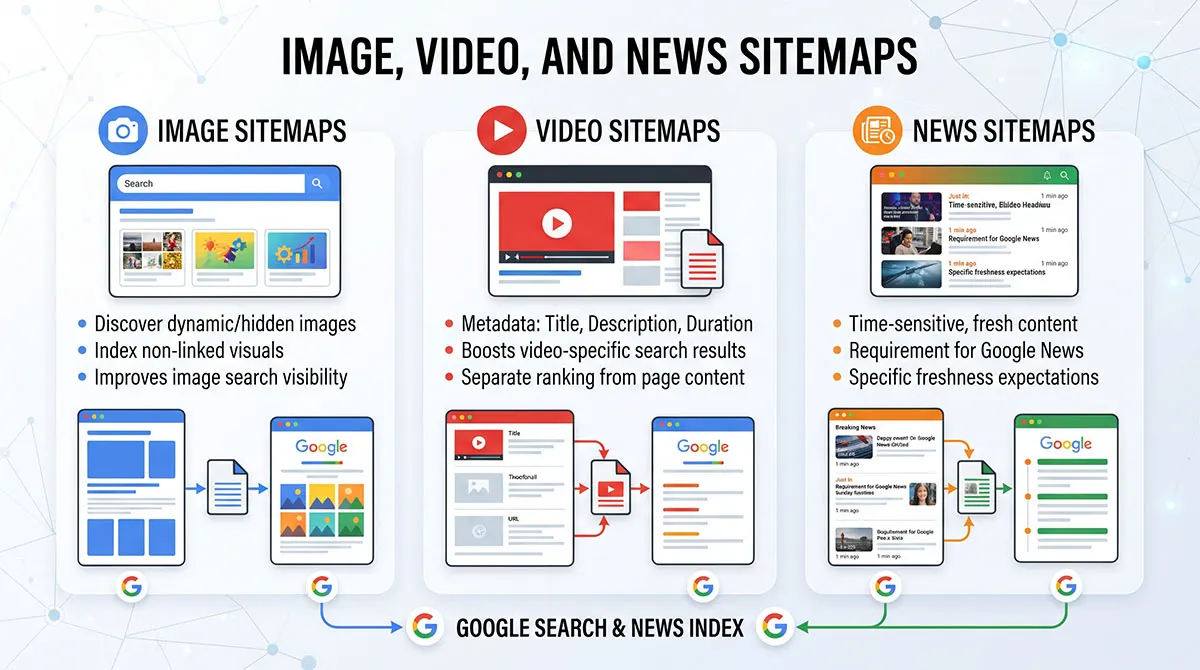
- Image sitemaps help Google discover and index images that might not otherwise be found through standard crawling, particularly relevant for sites where images are loaded dynamically or aren't directly linked.
- Video sitemaps provide metadata title, description, and content location that improves a video's visibility in video-specific search results, separate from how the surrounding page ranks.
- News sitemaps follow a specific, more time-sensitive format and are a requirement for inclusion in Google News, which operates on different discovery and freshness expectations than standard web search.
Choosing the Right Sitemap Generator
The right tool depends on site size, technical comfort, and whether the sitemap needs to support ongoing automatic updates or is closer to a one-time task.
- Small sites or first-time setup — a free online generator is sufficient; the process is quick and requires no ongoing maintenance commitment.
- WordPress blogs — a plugin like Yoast SEO or Rank Math is the standard choice, since it updates the sitemap automatically on publish without any manual regeneration step.
- Large sites or professional SEO work — Screaming Frog or a comparable crawler-based tool provides the depth and auditing capability that simple online generators don't.
- UX planning and team collaboration — a visual sitemap tool serves the planning and communication need better than an XML file would, since the audience is people, not crawlers.
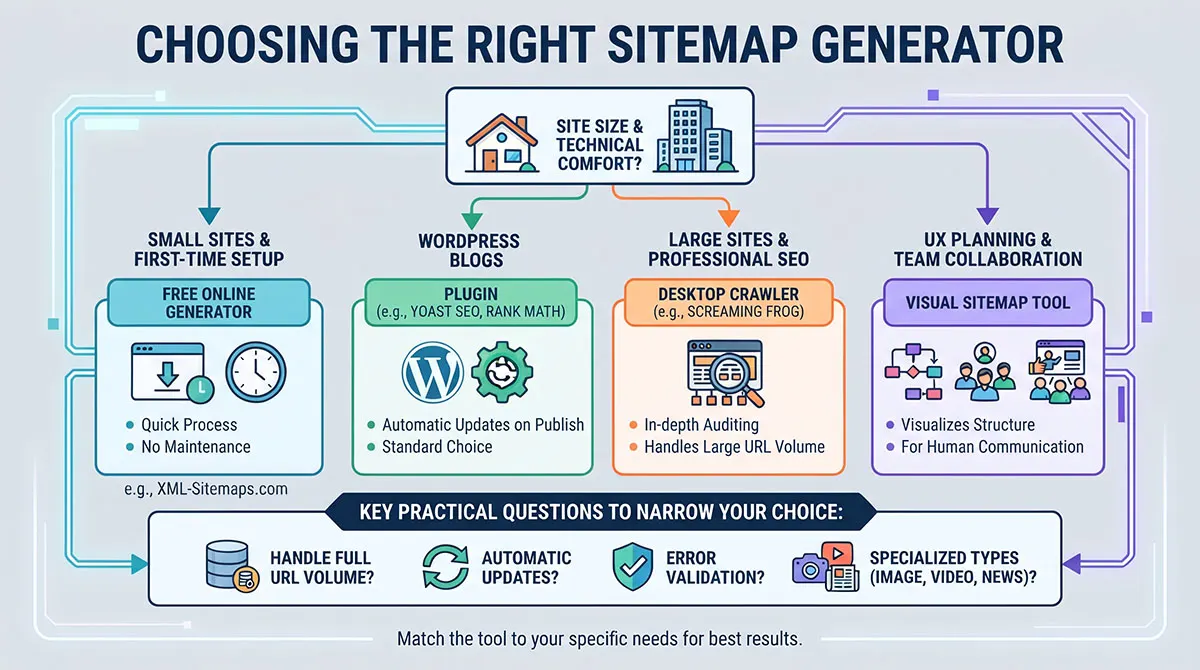
Beyond the site type, a few practical questions narrow the choice further: does the tool handle the site's actual URL volume without truncating or timing out, does it support automatic updates rather than requiring manual regeneration, does it validate for errors before export, and does it support specialized sitemap types image, video, news if the site needs them.
How to Create a Sitemap
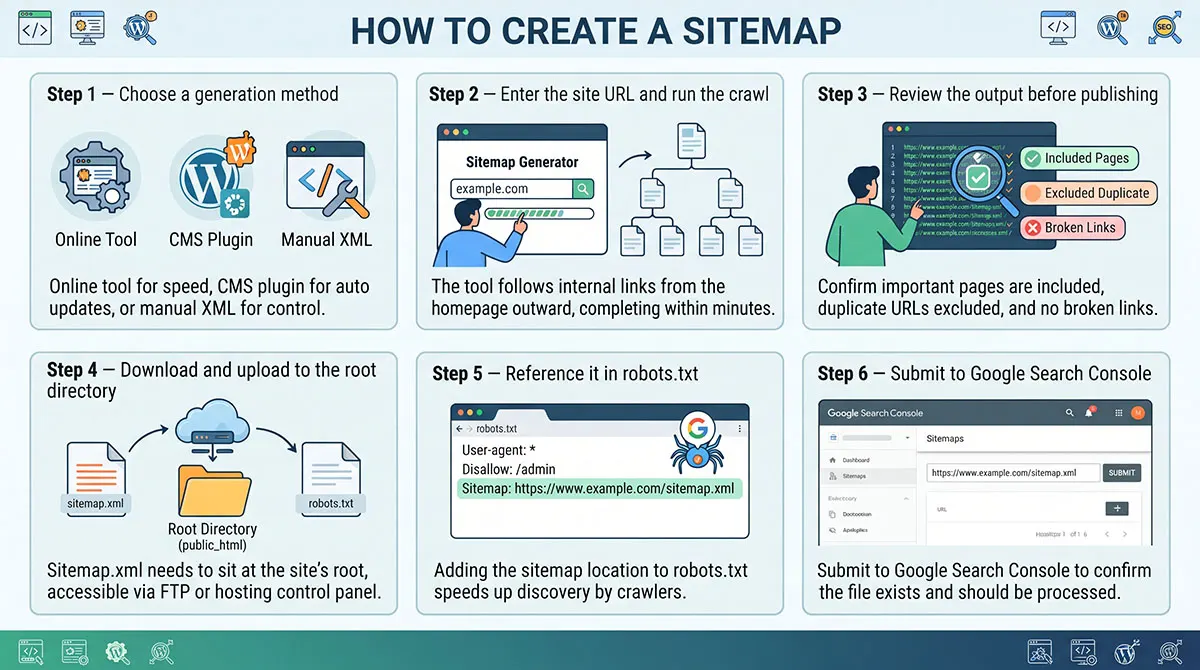
- Step 1 — Choose a generation method. An online tool for speed and simplicity, a CMS plugin for automatic ongoing updates, or manual XML creation for full control on a small, stable site.
- Step 2 — Enter the site URL and run the crawl. The tool follows internal links from the homepage outward, typically completing within minutes even for larger sites.
- Step 3 — Review the output before publishing. Confirm important pages are included, duplicate or unnecessary URLs are excluded, and no broken links made it into the list.
- Step 4 — Download and upload to the root directory. The sitemap.xml file needs to sit at the site's root, in the same directory as robots.txt, accessible via FTP or the hosting control panel.
- Step 5 — Reference it in robots.txt. Adding the sitemap location to robots.txt speeds up discovery, since crawlers check that file early and consistently.
- Step 6 — Submit to Google Search Console. Under the Sitemaps section, enter the sitemap's URL and submit; this confirms to Google that the file exists and should be processed.
Sitemap Best Practices

- Include only indexable, valuable pages. Admin panels, duplicate content, and filtered URL variants waste crawl budget and add no value.
- Update regularly. A sitemap that reflects a site from six months ago is actively misleading. Dynamic sites, blogs, and e-commerce sites benefit from automated updates rather than manual regeneration.
- Maintain a logical hierarchy. A sitemap that mirrors genuine site structure helps search engines understand page relationships, not just their existence.
- Check for broken links before submitting. A single broken URL in a sitemap sends a bad signal about the file's overall reliability; run it through a validator first.
- Respect the 50,000 URL limit. Split larger sites into multiple sitemaps referenced by a sitemap index file rather than attempting to force everything into one.
- Always submit through Google Search Console. Relying solely on the robots.txt reference works, but explicit submission confirms Google is aware of the file immediately rather than waiting for discovery.
Testing and Validating a Sitemap
Generating a sitemap is only half the task; confirming it works as intended is what makes it reliable. Google Search Console's Sitemaps report shows whether a submitted file was processed successfully and flags specific errors. Dedicated sitemap validator tools check formatting compliance directly. Crawler tools like Screaming Frog can cross-reference a sitemap against an actual site crawl to surface discrepancies: missing pages, included pages that shouldn't be there, or broken links.

Figure 4: The errors that most commonly undermine an otherwise correctly generated sitemap, ranked by how much damage each one causes if left unaddressed.
The most consequential of these, by far, is invalid XML formatting: a malformed sitemap can be rejected outright by Google, meaning every URL it contains effectively goes unsubmitted, not just the malformed entry. That is why a validation step before submission is worth the extra few minutes.
Sitemap Generation by Platform

- WordPress — SEO plugins, including Yoast SEO and Rank Math, generate and automatically maintain the sitemap, updating it in real time as content is published without requiring any manual step.
- Shopify — generates a sitemap automatically at /sitemap.xml, covering products, blog posts, and standard pages without additional configuration.
- Custom-built sites — typically rely on either an online generator run periodically or a sitemap generated programmatically as part of the site's own build process, depending on how frequently content changes.
AI and the Future of Sitemap Generation

Sitemap tools are increasingly moving beyond simple URL listing toward structural analysis, flagging weak internal linking, identifying pages buried too deep in navigation, and in some cases suggesting specific restructuring based on established SEO patterns. This shift mirrors a broader trend across SEO tooling generally: less manual auditing, more automated pattern detection.
The practical requirements haven't changed regardless of how automated the tooling becomes; a clear site hierarchy, accurate metadata, and a sitemap that reflects the site's actual current state remain the foundation. What's changing is how much of the analysis and recommendation work a tool can now do without manual review.
The most consequential of these, by far, is invalid XML formatting: a malformed sitemap can be rejected outright by Google, meaning every URL it contains effectively goes unsubmitted, not just the malformed entry. That is why a validation step before submission is worth the extra few minutes.
Frequently Asked Questions
What is the best sitemap generator for a beginner?
A free online sitemap generator is the right starting point for anyone new to this; no technical knowledge is required, and the process is: enter a URL, generate, download.
How do I find an existing website's sitemap?
Most sitemaps live at yourdomain.com/sitemap.xml. If that doesn't resolve, check the site's robots.txt file, which typically references the sitemap's exact location directly.
Do sitemaps directly improve search rankings?
Not directly; a sitemap is not a ranking factor itself. What it improves is discovery and crawl efficiency, which supports better indexing, and better indexing is a prerequisite for ranking at all. A page that's never indexed can't rank regardless of content quality.
How often should a sitemap be updated?
Frequently changing sites, active blogs, and e-commerce catalogs benefit from automated daily or real-time updates via a CMS plugin. Largely static sites can reasonably update monthly or whenever meaningful content changes occur.
What is the maximum size for a single sitemap?
50,000 URLs per file, per the sitemap protocol. Sites exceeding that need to split into multiple sitemap files referenced by a sitemap index file.
Are separate sitemaps needed for images and video?
For sites where image or video content matters for search visibility specifically, yes, dedicated image and video sitemaps provide metadata that a standard XML sitemap doesn't capture, improving discoverability in those specific search verticals.
How can a sitemap be validated?
Google Search Console's Sitemaps report confirms whether a submitted file was processed successfully and surfaces specific errors. Dedicated validator tools check formatting compliance independently of submission.
Are both XML and HTML sitemaps necessary?
They serve different audiences and are both worth having where relevant: XML for search engine crawlers, HTML for human visitors navigating the site directly. Neither substitutes for the other.
Conclusion

A sitemap generator turns a manual, error-prone task of tracking every URL on a site and formatting it correctly into something that takes minutes rather than hours. The output, a correctly structured XML file, becomes a direct discovery channel to search engines that doesn't depend on internal linking being complete.
The distinction that matters most in practice is between generating a sitemap once and treating it as a maintained asset. A sitemap from six months ago that no longer reflects the site's actual structure is worse than mildly outdated; it can actively mislead crawlers about what exists and what's changed. Automated regeneration through a CMS plugin, or a disciplined manual update habit, is what keeps the file useful rather than becoming a stale artifact from launch day.
Generate the sitemap, validate it before submission, reference it in robots.txt, and submit it explicitly through Google Search Console. That sequence, kept current as the site evolves, is what turns a sitemap from a one-time technical checkbox into a genuine, ongoing discovery asset.