How to Create, Test, and Troubleshoot Rich Link Previews on X
A link shared on X without any preview configuration renders as a bare, gray URL no image, no headline, nothing to indicate what the page actually contains. Most people scroll past it. The same link, with a handful of meta tags added to its page, can render as a full image card with a headline and description, which measurably changes whether anyone stops to click.
A Twitter Card generator produces those meta tags without requiring the code to be written by hand. Fill in a title, description, image URL, and handle; the tool outputs the correctly formatted HTML ready to paste into a page's head section.
This guide covers what Twitter Cards are, the four card types and when to use each, how a generator works, the exact image specifications that most implementations get wrong, how to test a card before sharing it, and the mistakes that most often cause a card to fail silently.
What Are Twitter Cards
Twitter introduced Twitter Cards in 2012 to let website owners control exactly what image, title, and description appear when their link is shared on the platform. Before that, a shared link produced nothing but the raw URL no visual context, no preview of what the page actually contained.
The mechanism is a defined set of HTML meta tags, prefixed with twitter:, placed in a page's head section. When Twitter's crawler encounters a shared URL, it reads these tags and constructs the visual card shown in the timeline. Without them, Twitter falls back to guessing, pulling whatever image and text it can find on the page, often with unpredictable results.
The naming has shifted since Twitter rebranded as X, but the underlying meta tag system, property names, and behavior remain unchanged; the tags are still called Twitter Cards, and twitter: remains the correct property prefix.
What Is a Twitter Card Generator
A Twitter Card generator is a free online tool that produces the correct HTML meta tags for a Twitter Card without requiring any coding knowledge. The user fills out a simple form with a title, description, image URL, and site handle, and the tool assembles syntactically correct, ready-to-paste code.
The value is in avoiding the small, easy-to-miss syntax mistakes that come from writing these tags by hand: a missing quotation mark, an incorrect property name, or a relative image path where an absolute URL is required. Any of these can cause a card to fail without producing any visible error message; the link just quietly renders as a plain URL.
The tool is useful for a wide range of people: bloggers wanting each post to stand out in a feed, businesses showcasing products, social media managers optimizing for click-through rate, and developers who'd rather automate the process than write the tags manually for every page.
The Four Twitter Card Types
Twitter defines four distinct card types, each suited to a different kind of content. Choosing the wrong type for a given page produces a technically valid card that simply doesn't showcase the content as effectively as it could.
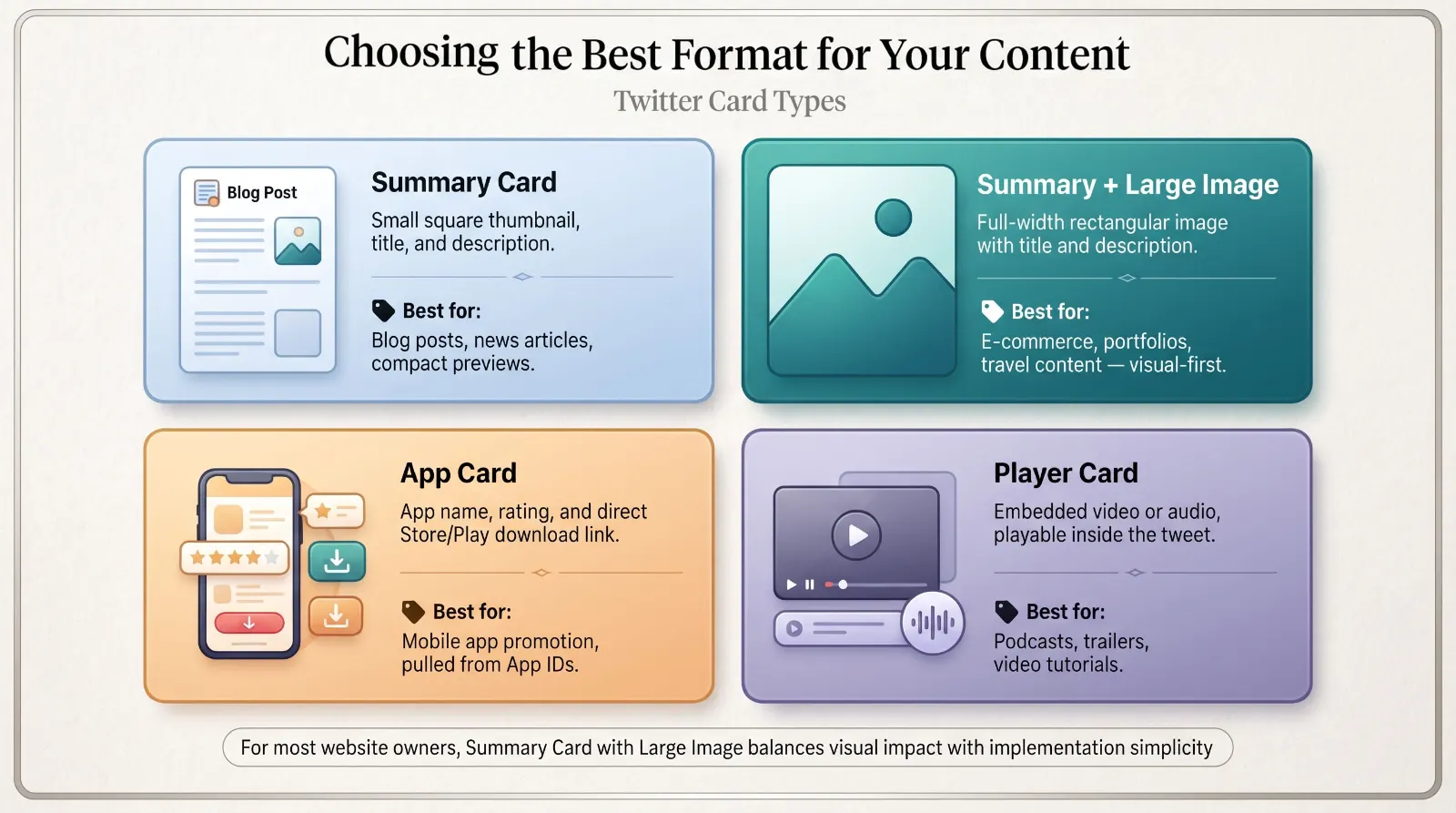
Figure 1: The four Twitter Card types and what each is built for. Summary Card with Large Image is the right default for the majority of general web content.
Summary Card is the standard, compact format: a small square thumbnail alongside a title and short description. It suits blog posts, news articles, and any page where a clean, understated preview is preferable to a dominant image.
Summary Card with Large Image uses the same title-and-description structure but replaces the small thumbnail with a full-width image that dominates the card. This is the stronger choice whenever the visual is central to the content's appeal: product photography, travel content, portfolio pieces.
App Card is purpose-built for promoting a mobile app, pulling the app's name, rating, and a direct download link from the relevant App Store or Google Play listing based on the app IDs provided; no need to manually re-enter details the store listing already has.
Player Card embeds video or audio directly into the tweet, playable without leaving the platform. It's the right choice for podcasts, trailers, and video tutorials where in-feed playback meaningfully increases engagement over a static link.
How to Use a Twitter Card Generator
- Step 1 — Choose the card type. Summary Card with Large Image is the right default for most content unless the page specifically needs an App or Player card.
- Step 2 — Write the title. Keep it under 70 characters; longer titles get truncated in the rendered preview. The title should be specific enough to make someone want to click, not just a generic label.
- Step 3 — Write the description. One or two sentences, under 200 characters, focused on the specific benefit or most compelling detail, not a restatement of the title.
- Step 4 — Provide the image URL. Must be an absolute URL starting with https://. For a Large Image card, use 1200×628 pixels; for a standard Summary card, at least 144×144 pixels. Keep the file under 5MB.
- Step 5 — Add the site handle. The brand or website's @username, provided via the twitter: site tag, attributing the content to its source.
- Step 6 — Add a creator handle if relevant. Optional; attributes the specific content to an individual author via twitter: creator, useful for bylined articles.
- Step 7 — Enter the destination URL. The full canonical URL of the page being shared, provided via twitter:url.
- Step 8 — Generate and copy the code. The tool outputs a complete meta tag block ready to paste.
- Step 9 — Paste into the page's head section. Between <head> and </head> — never inside <body>, where the tags will simply be ignored.
- Step 10 — Test with the Card Validator. Confirms the tags render correctly before the link is ever shared publicly.
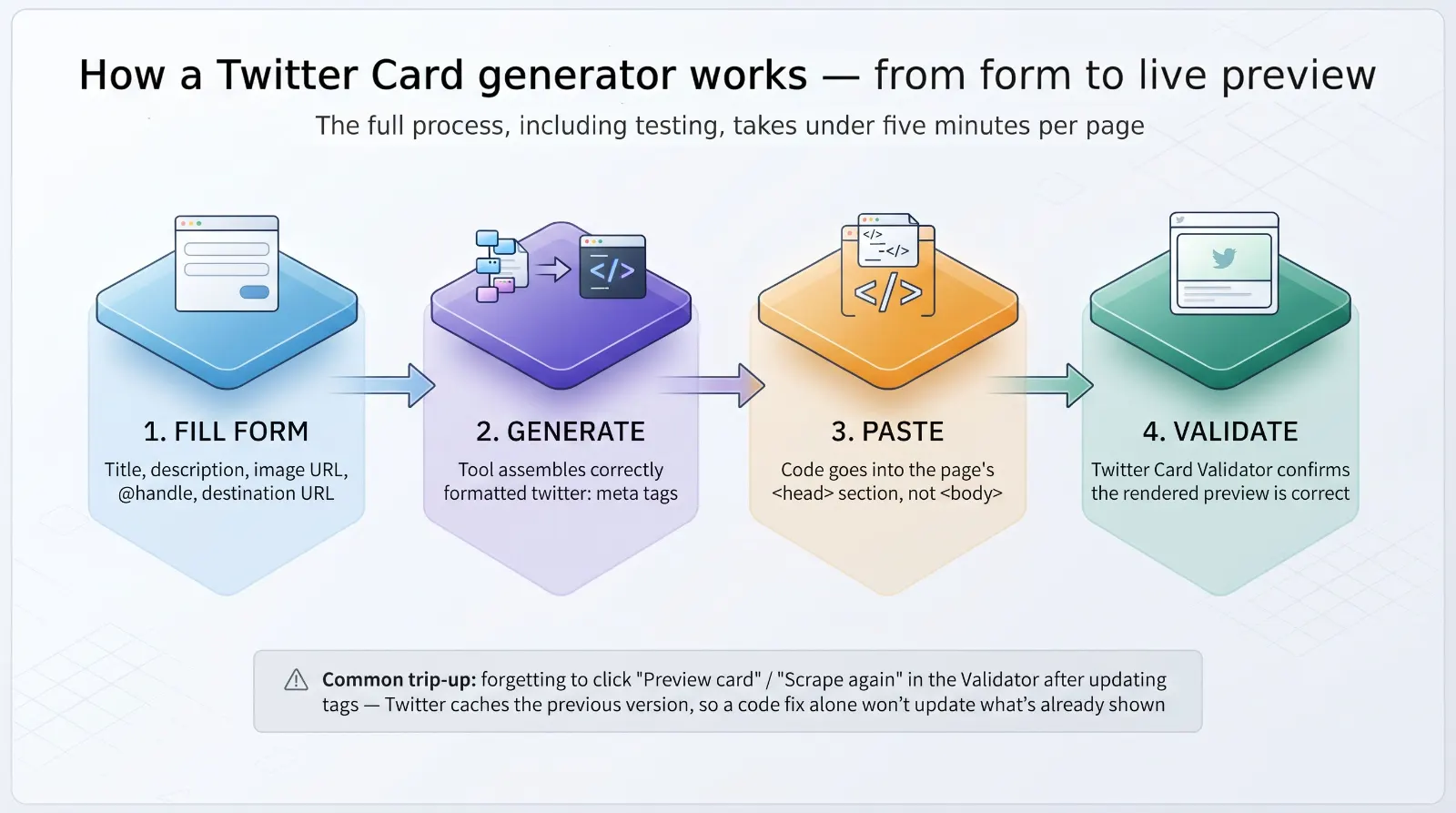
Figure 2: The full generator-to-validation workflow. The most commonly missed step is re-scraping in the Validator after a fix — Twitter caches the previous card, so a corrected tag doesn't update the visible preview until the cache is manually refreshed.
A complete tag block looks like this:
<meta name="twitter:card" content="summary_large_image">
<meta name="twitter:title" content="10 Hidden Hiking Trails You Need to Visit">
<meta name="twitter:description" content="Discover breathtaking views and family-friendly paths.">
<meta name="twitter:image" content="https://www.example.com/images/hiking-trails.jpg">
<meta name="twitter:url" content="https://www.example.com/hiking-guide">
<meta name="twitter:site" content="@ExampleTrails">
App Card Meta Tags — Reference
App Cards require a specific set of properties beyond the base card tags, pulling data directly from the relevant app store listings.
Player Card Meta Tags — Reference
Player Cards embed video or audio directly and require dimensions for the embedded player alongside the media source.
Twitter Card Image Dimensions and Best Practices
Incorrect image dimensions are the single most common reason a Twitter Card fails to render properly, either rejected outright or displayed as a small, blurry thumbnail instead of the intended full-size image.
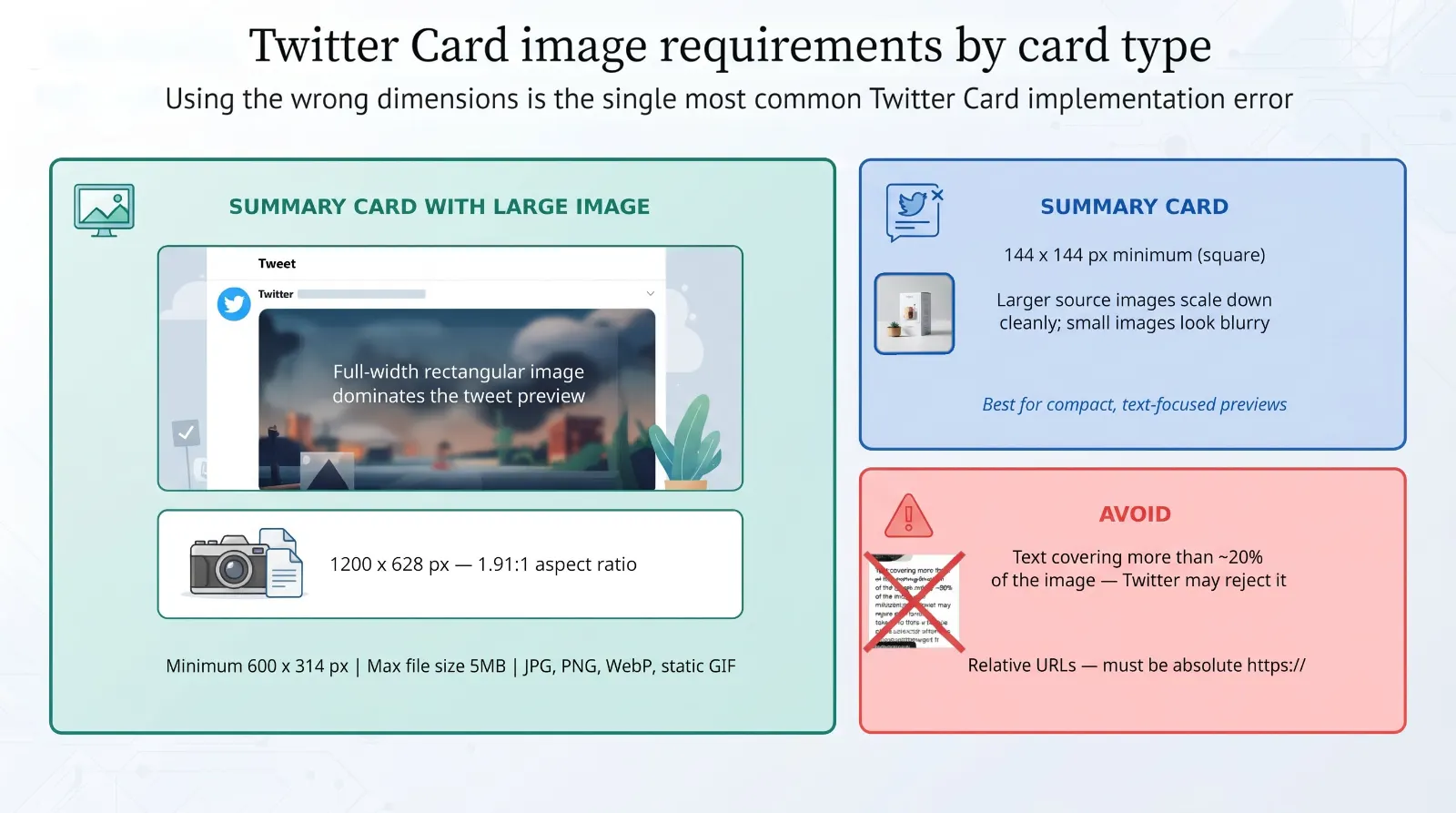
Figure 3: Image requirements by card type. The 1200x628 recommendation for Large Image cards isn't arbitrary — it's the size that renders sharply across both desktop and mobile without requiring Twitter to upscale a smaller source image.
Keep important visual elements centered. Twitter crops differently across desktop and mobile layouts, so content placed near the edges of an image risks being cut off in one context even if it displays fully in another.
Avoid heavy text overlays. Twitter may reject or deprioritize images where text covers a large share of the frame; the platform favors photography and clean visuals over text-heavy graphics.
Use high-contrast, distinctive images. A card competing against dozens of others in a fast-scrolling timeline needs to be visually distinct enough to catch attention in a fraction of a second.
Testing with the Twitter Card Validator
After adding meta tags to a page, confirming they actually render correctly is not optional; it's the step that catches errors before they go live publicly. The official Card Validator fetches a given URL, displays exactly how the card will appear, and lists any errors or warnings: missing required tags, broken image URLs, or dimensions outside the accepted range.
If a card doesn't render as expected, check in this order: is the twitter: card property present at all, is the image URL absolute rather than relative, does the image meet the minimum size requirement, and are the title and description within their character limits.
One frequently missed step: Twitter caches card data after the first scrape. Updating the meta tags on a live page does not automatically refresh what's already cached; the Validator's "Preview card" or "Scrape again" function needs to be used explicitly to force a fresh fetch. Without that step, a corrected tag can still show the old, broken preview for hours.
Twitter Cards vs. Open Graph Tags
Open Graph tags, created by Facebook, are used by Facebook, LinkedIn, and Pinterest for the same general purpose: controlling how a shared link is previewed. Twitter Cards are Twitter's own, separate system. The two are related but not identical, and the practical answer to "which one should I use" is both.
If Open Graph tags already exist on a page, Twitter will fall back to reading them when its own twitter: tags are absent. But Twitter Cards provide finer control over Twitter-specific behavior; the Large Image layout and App Card format have no direct Open Graph equivalent. Implementing both systems, rather than relying on the fallback, gives the most reliable and complete coverage across platforms. Many generators produce both tag sets in a single pass.
Adding Twitter Card Tags by Platform
- WordPress — the most reliable method is an SEO plugin such as Yoast SEO or Rank Math, both of which include dedicated Twitter Card fields in the post editor and generate the tags automatically without any manual code editing. Manual placement, if preferred, goes in the theme's header.php file between <head> and </head>.
- Static HTML sites — open the page file directly, locate the head section, and paste the generated tags before the closing </head> tag.
- Shopify and WooCommerce — most modern themes include built-in Twitter Card support; where that's absent, the tags can be added through the theme's custom code editor or a dedicated SEO plugin.
The tags must sit inside the head section; if they are placed in the body or elsewhere on the page, Twitter's crawler ignores them.
Twitter Card Image Not Showing
Troubleshooting:
This is the most commonly reported Twitter Card problem, and it traces back to a small set of specific, diagnosable causes.
- Conflicting SEO plugins — running more than one SEO plugin simultaneously can generate duplicate, conflicting Twitter Card tags. Deactivate all but one.
- Relative image URLs — WordPress sometimes outputs relative image paths by default. Twitter requires an absolute URL; a filter or plugin setting may be needed to force absolute paths.
- Image below minimum size — Twitter requires at least 600 pixels wide for a Large Image card. A smaller featured image gets rejected outright rather than simply displayed smaller.
- Caching — a caching plugin may be serving a stale version of the page to Twitter's crawler. Clear the cache, then rescrape using the Card Validator.
- Theme configuration — confirm the theme's header.php file correctly includes the wp_head() function immediately before the closing head tag; some themes omit or misplace it, silently breaking plugin-generated meta tags.
Twitter Card Approval Requirements
Whitelisting was required in the early years of Twitter Cards, but that requirement is now gone for Summary Cards, and Summary Cards with Large Image approval is automatic the moment correctly formatted tags are detected.
Player Cards and App Cards still involve a lightweight validation step, since Twitter wants to confirm the embedded content is appropriate and functions correctly. The process: implement the required tags, test with the Validator to confirm no errors, then submit a request through the X Developer portal with basic information about the site and card type. Response typically comes within a few business days.
Common Twitter Card Mistakes
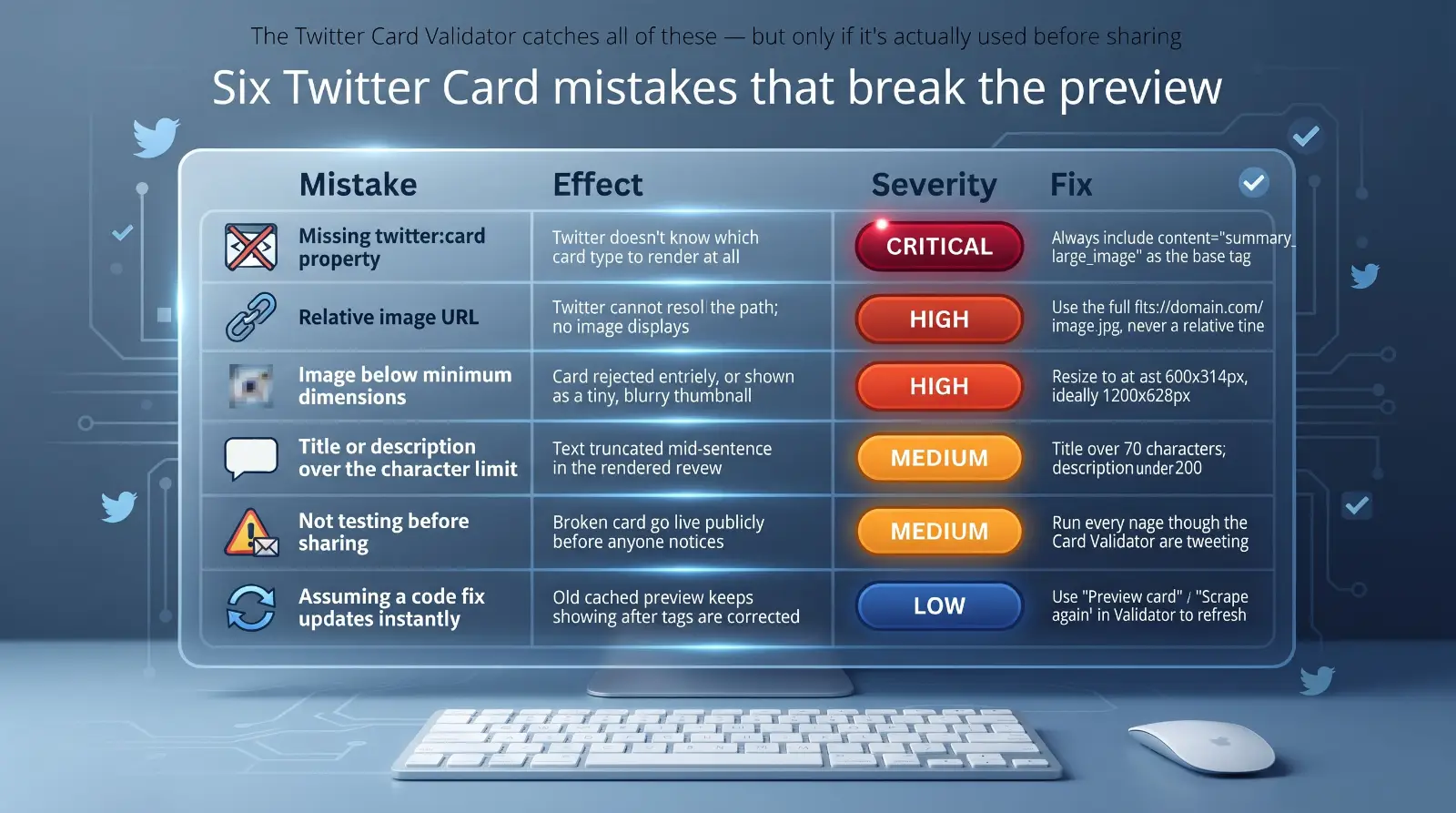
Figure 4: The mistakes that most often break a Twitter Card, ranked by how much of the card's function they undermine.
Missing the twitter:card property is the single most critical omission — without it, Twitter has no basis for deciding which card format to render at all, regardless of what other tags are present.
Relative image URLs cannot be resolved by Twitter's crawler; the path must always be a full, absolute https:// address.
Undersized images get rejected or rendered as a small, low-quality thumbnail rather than the intended full card image.
Skipping validation before sharing is the most avoidable mistake on this list; broken cards go live publicly simply because nobody checked before the tweet was sent.
Do Twitter Cards Affect SEO
Not directly. Google has stated it does not use Twitter Card meta tags as a ranking signal; implementing them has no direct effect on search rankings.
The indirect effect is real, though smaller and harder to measure precisely. Cards with a compelling image and headline generate more clicks than plain-text links, and higher click-through rates translate into more traffic, which can lead to more backlinks and social shares over time signals that do factor into search performance indirectly. There's also a branded-search effect: consistent, professional-looking previews build recognition, and recognition sometimes shows up later as a direct, branded search for the business by name itself, a modest positive signal.
Twitter Cards are worth implementing as part of a broader traffic and engagement strategy. They are not, on their own, an SEO tactic.
Advanced Twitter Card Optimization
Test different titles and images. Twitter's own analytics can show which cards generate the strongest engagement; variation in headline framing and image choice often produces measurably different click-through rates for otherwise identical content.
Include a specific call to action in the description. Rather than only describing the content, tell the reader what to do next; "download the free guide" gives a clearer next step than a passive description alone.
Keep visual branding consistent. Using the same color treatment and logo placement across cards builds recognizability over repeated exposure, which compounds over many shares.
Use emoji sparingly, if at all. One well-placed emoji at the start or end of a title can draw the eye; more than that tends to read as unprofessional and can reduce rather than improve click-through rate.
FAQ's
What is a Twitter Card generator?
A free online tool that produces the correct HTML meta tags for a Twitter Card without requiring any coding. It takes a title, description, image URL, and handle as input and outputs ready-to-paste code.
What image size should be used for a Twitter Card?
1200×628 pixels for Summary Card with Large Image is the recommended default for most content. At least 144×144 pixels, square, for the standard Summary Card. Both should stay under 5MB in file size.
Do Twitter Cards affect Google rankings?
Not directly; Google does not use Twitter Card meta tags as a ranking factor. The indirect benefit comes through higher click-through rates and increased traffic, which can support SEO performance over time without being a ranking signal themselves.
Why is a Twitter Card image not showing?
The most common causes: the image URL is relative rather than absolute, the image is below the minimum size requirement, the file exceeds 5MB, or the page is being served from cache with outdated tags. The Card Validator's rescrape function resolves the caching case specifically.
What's the difference between twitter:site and twitter:creator?
twitter:site identifies the website or brand's handle of the content owner. twitter:creator identifies the specific individual author, when relevant. Both are optional, but twitter:site is generally recommended for attribution.
Is approval required to use Twitter Cards?
No, not for Summary Cards or Summary Cards with Large Image; these display automatically once the correct tags are detected. Player Cards and App Cards require a brief validation request through the X Developer portal, typically approved within a few business days.
Can Twitter Cards be used without owning a website?
No. The meta tags have to be placed in a page's HTML, which requires control over the site's code; there's no way to configure a Twitter Card for a page that isn't under the user's own control.
How long does it take for Twitter to show an updated card?
Twitter caches card data after its first scrape of a URL. Using the Card Validator's rescrape function forces an immediate update; without it, an updated card can take several hours to reflect the change.
Conclusion
A Twitter Card generator solves a narrow, specific problem: turning a bare, easily-ignored URL into a visual preview that gives a shared link a real chance of being noticed in a fast-moving timeline. The mechanism is a small set of HTML meta tags, and the generator's value is producing them correctly on the first attempt rather than risking a silent syntax error.
The technical requirements are consistent regardless of card type: an absolute image URL at the right dimensions, a title and description within their character limits, and the twitter:card property present as the foundational tag. Testing with the Card Validator before sharing, and re-scraping after any fix, is what closes the gap between tags that look correct in the code editor and a card that actually renders correctly in the timeline.
Choosing Summary Card with Large Image as the default for most content, keeping images at 1200×628, and validating every page before it's shared covers the overwhelming majority of real-world use cases. App and Player cards, with their own specific tag requirements, are worth the extra setup only when the content genuinely calls for them.