How to Audit a Website's Search Performance and Fix What's Actually Broken
A site can look finished, load fine in a browser, and still be invisible to Google; a missing canonical tag, a duplicate title across every page, or a blocked resource can each quietly cap a site's visibility without producing any obvious symptoms. Finding those problems by manually reading source code is slow and easy to get wrong.
An SEO analyzer automates that diagnosis. It scans a page the way a search engine crawler would, checks dozens of technical and on-page factors against known ranking-relevant criteria, and returns a prioritized list of what's wrong, not a vague sense that something might be, but a specific, ranked list of fixes.

This guide covers what an SEO analyzer checks, how to read and act on its output, how it compares to tools like Google Search Console and Ahrefs, and which issues appear most often across real audits.
What Is an SEO Analyzer
An SEO analyzer is a tool that audits a webpage's search optimization health by scanning its HTML and evaluating it against a defined set of technical and content criteria: meta tags, heading structure, image alt text, structured data, page speed, and security configuration, among others. The output is typically a score and a categorized list of issues, ranked by how much each one is likely to affect search visibility.
The distinction from a manual audit is speed and consistency. An experienced person can take twenty minutes or more to manually review a page's SEO fundamentals, and consistency across many pages depends on not missing anything. An analyzer runs the same fixed checklist against every page in seconds, with nothing skipped.
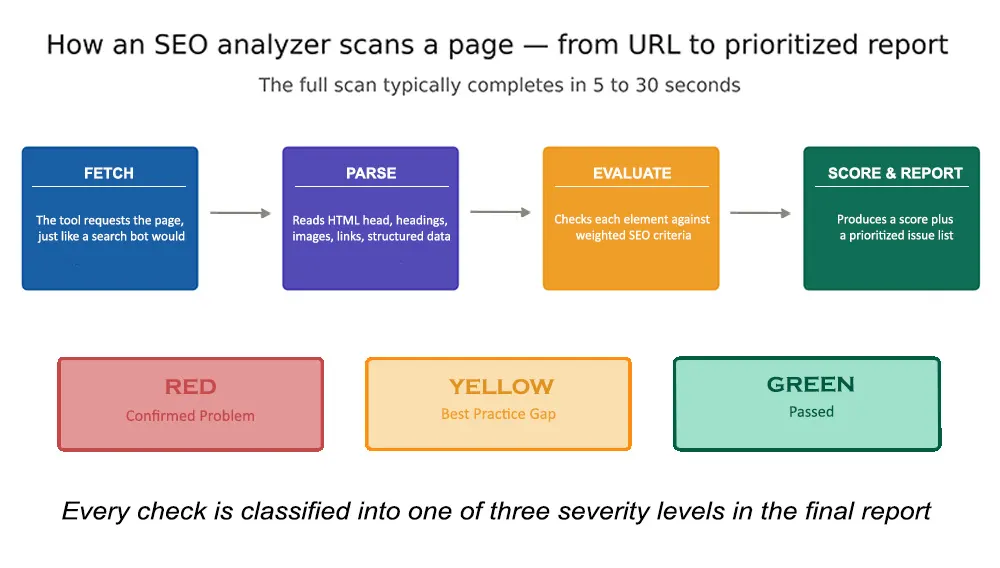
Figure 1: The four-stage scan process behind most SEO analyzers. The severity classification — red, yellow, green — is what turns a long list of findings into something a site owner can actually act on in order of impact.
Why an SEO Analyzer Is Useful
Search engines weigh a large number of signals when deciding how to rank a page, and many of the most consequential ones are invisible during normal browsing. A missing HTTPS certificate, an unintentional noindex tag, or a robots.txt rule blocking a whole section of the site are all things a visitor would never notice, but a crawler notices immediately, and the ranking consequence follows.
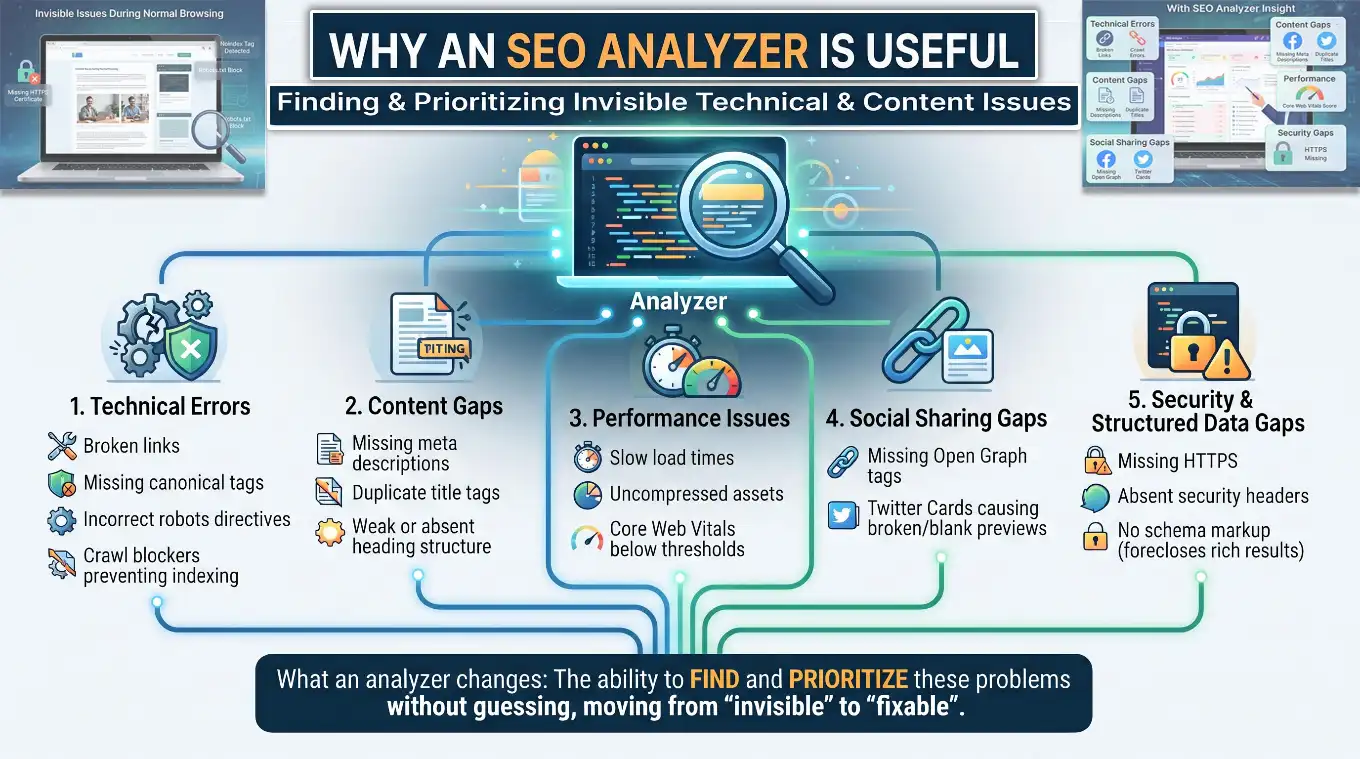
- Technical errors — broken links, missing canonical tags, incorrect robots directives, and crawl blockers that prevent proper indexing.
- Content gaps — missing meta descriptions, duplicate title tags, and weak or absent heading structure.
- Performance issues — slow load times, uncompressed assets, and Core Web Vitals scores below Google's thresholds.
- Social sharing gaps — missing Open Graph tags and Twitter Cards that cause broken or blank previews when links are shared.
- Security and structured data gaps — missing HTTPS, absent security headers, and no schema markup, which forecloses eligibility for rich results entirely.
What an analyzer changes is not the presence of these problems; they exist whether or not anyone looks for them, but the ability to find and prioritize them without guessing.
What a Comprehensive SEO Analyzer Checks
The checks an analyzer runs cluster into a small number of categories, each covering a distinct aspect of how a page is evaluated by search engines.
Each check carries a different weight in the overall score, reflecting its actual impact on rankings. A missing HTTPS certificate or absent canonical tag costs more points than a missing Twitter Card, because the former directly affects crawlability and trust signals while the latter affects social preview quality only.
How to Use an SEO Analyzer
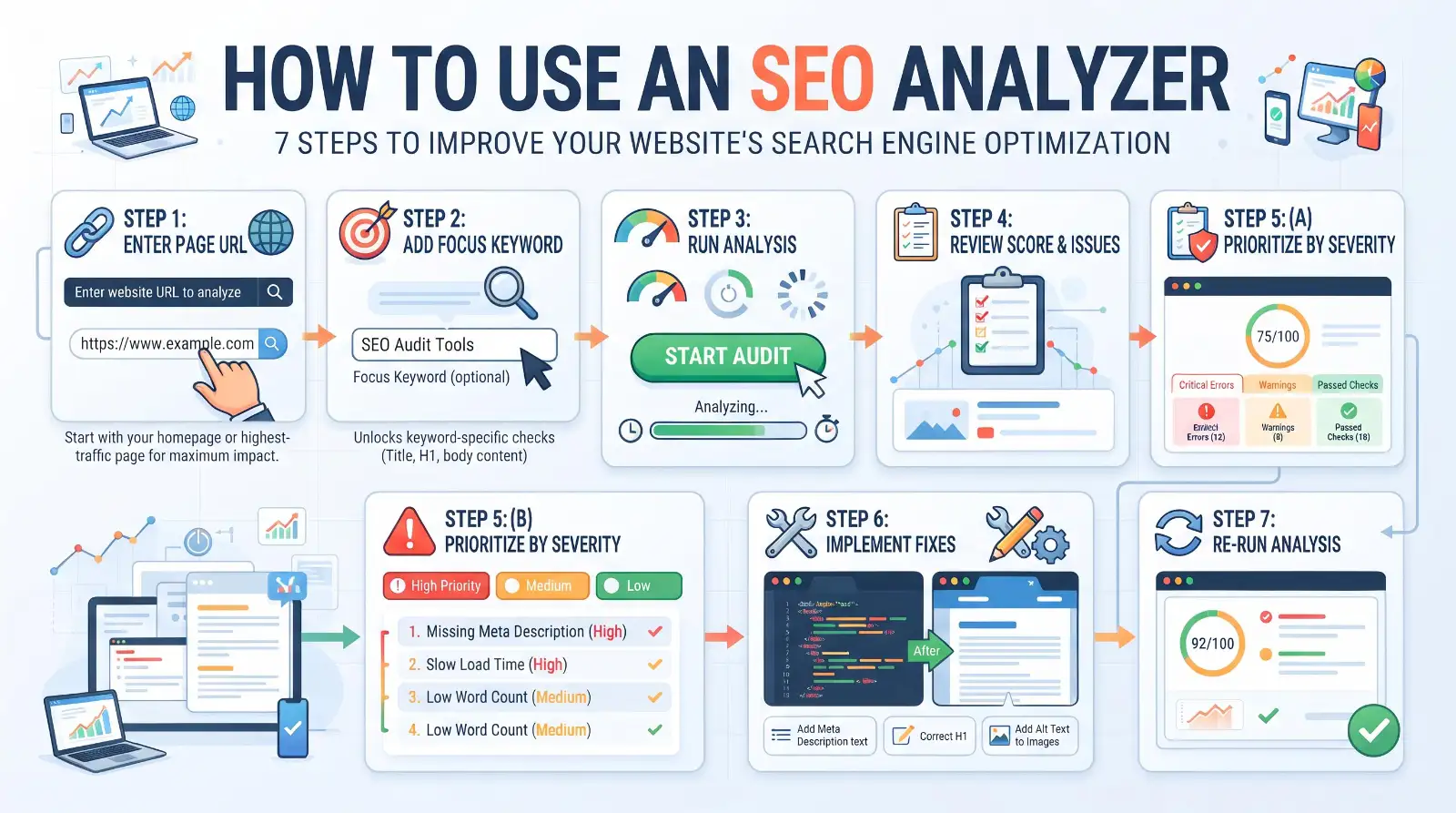
- Step 1 — Enter the page URL. Include the full address with https://. For a first audit, start with the homepage or the single page that drives the most traffic — fixing issues there has more impact than fixing minor issues across many low-traffic pages.
- Step 2 — Add a focus keyword if the tool supports it. This unlocks keyword-specific checks: whether the target term appears in the title, the H1, and the body content in a natural, non-stuffed way.
- Step 3 — Run the analysis. The tool fetches the page and evaluates it against its full checklist, typically completing within 5 to 30 seconds depending on page size.
- Step 4 — Review the score and the issue list. Most tools return a numeric score or letter grade, followed by a detailed breakdown organized by severity — confirmed problems, best-practice gaps, and passed checks.
- Step 5 — Prioritize by severity. Address confirmed problems first, since these have the most direct ranking impact. Best-practice gaps matter but are lower urgency.
- Step 6 — Implement the fixes. Most individual fixes — adding a meta description, correcting a duplicate H1, adding alt text — take only a few minutes each once identified.
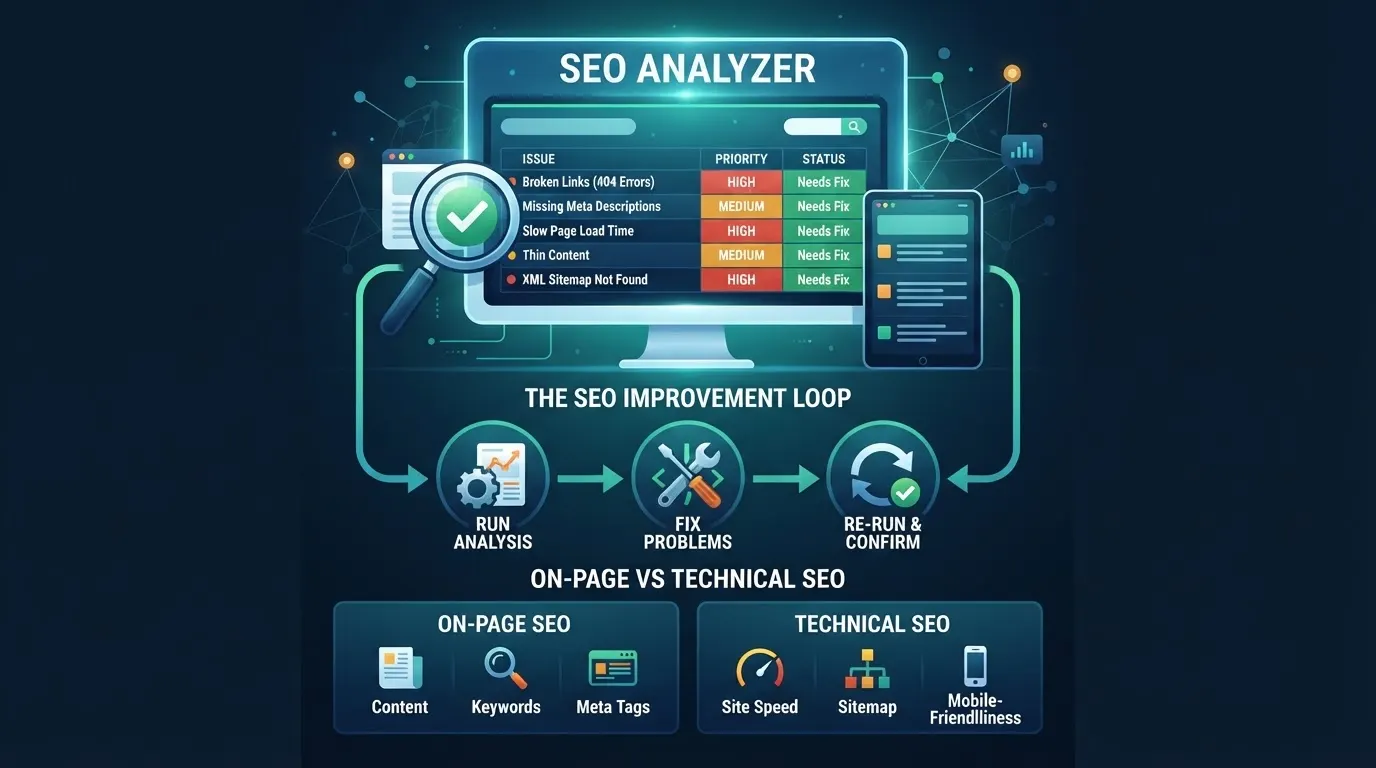
- Step 7 — Re-run the analysis. Confirming the score improved after changes closes the loop and catches anything that wasn't actually fixed.
Understanding an SEO Score
Most analyzers express results as a numeric score out of 100, or an equivalent letter grade. The score is a weighted composite; passing more checks raises it, but not all checks are worth the same number of points, since some issues carry a larger real-world ranking consequence than others.
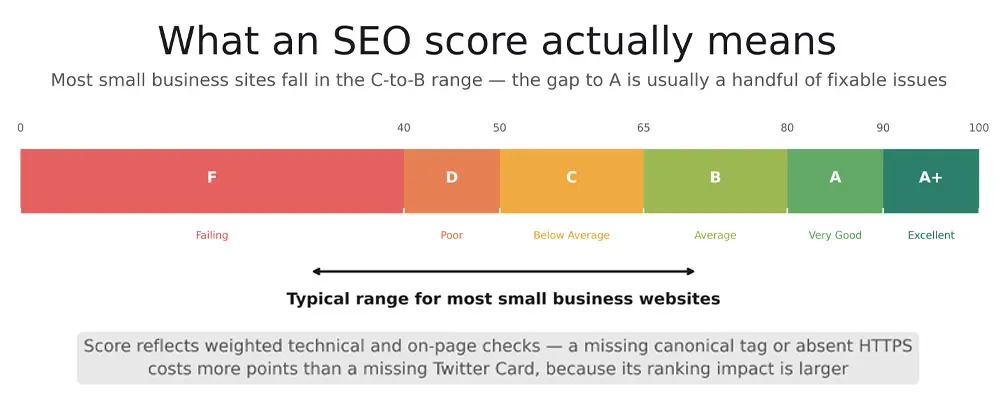
Figure 2: SEO score bands and what they typically indicate. Most small business websites land in the fifty-to-eighty range — the gap to an A grade is usually a specific, identifiable set of fixable issues rather than a fundamental rebuild.
A score in the C-to-B range is common and not alarming on its own; it typically means the basics are present, but structured data, canonical tags, or security headers are missing. A score below 40 signals something more serious: missing HTTPS, absent title tags, or a noindex directive left on the page, any of which can make a site functionally invisible to search regardless of content quality.
Common Issues Analyzers Find
Certain problems appear disproportionately often across real audits not because they are hard to avoid, but because they are easy to overlook during normal site-building work.
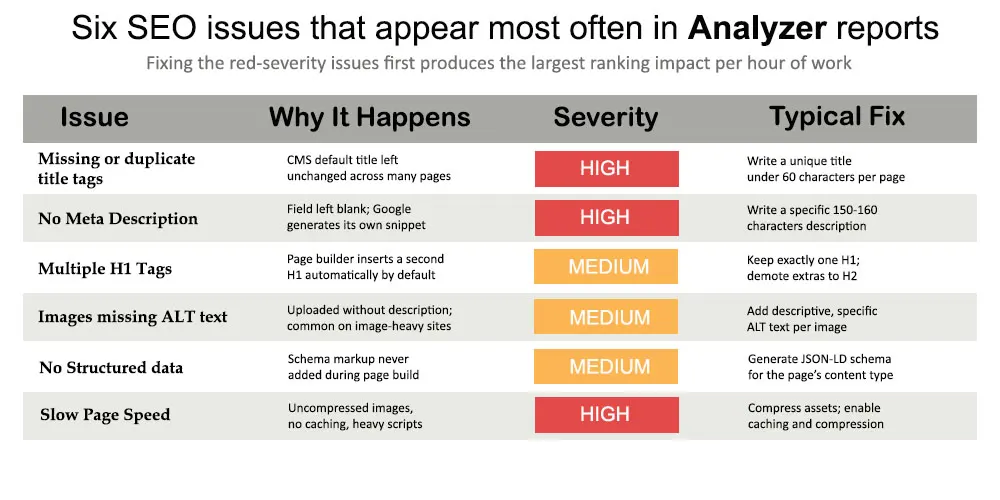
Figure 3: The issues that appear most consistently across SEO analyzer reports, along with why each one typically happens and how severe its ranking impact usually is.
Missing or duplicate title tags are common on sites where a CMS default title was never customized per page. Google treats near-identical titles across many pages as a weak signal about what each page is specifically about.
Missing meta descriptions leave Google to generate its own snippet from page content, which is frequently an awkward or out-of-context excerpt rather than a deliberate, benefit-focused summary written for the searcher.
Multiple H1 tags are a frequent side effect of page builder themes that insert a second H1 automatically, a title block and a hero heading, for instance- both rendering as H1 without the site owner realizing it.
Missing alt text is most common on image-heavy sites where images were uploaded in bulk without individual descriptions. Beyond accessibility, this represents a missed relevance signal for image search specifically.
Absent structured data removes a page's eligibility for rich results entirely star ratings, FAQ dropdowns, business hours- regardless of how good the underlying content is, since these features are driven by schema markup rather than content quality alone.
Slow page speed is confirmed by Google as a direct ranking factor through the Core Web Vitals metrics, and it also affects user behavior independently of ranking; slower pages measurably lose visitors before they finish loading.
On-Page SEO vs. Technical SEO
These two categories are often used loosely as if interchangeable, but they describe genuinely different layers of what determines search visibility.
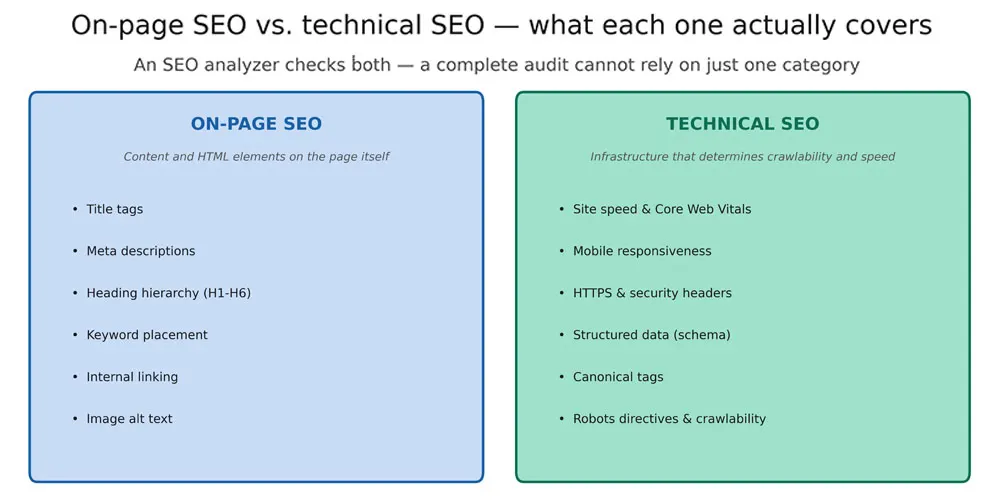
Figure 4: On-page SEO covers what's written and structured within the content itself. Technical SEO covers the infrastructure that determines whether search engines can access, render, and trust the page at all. A page can excel at one and fail the other.
A page with excellent on-page optimization a well-written title, clear headings, natural keyword usage can still fail to rank if it's technically inaccessible: blocked by robots.txt, missing HTTPS, or returning slow response times that cause a crawler to deprioritize it. Conversely, a technically flawless page with thin or poorly structured content won't rank for competitive terms no matter how fast it loads. A complete audit checks both layers, and a comprehensive SEO analyzer is built to do exactly that.
SEO Analyzer vs. Other SEO Tools
An SEO analyzer, Google Search Console, and platforms like SEMrush or Ahrefs are often confused because they all relate to search performance, but they serve distinct purposes and are not interchangeable.
For most small and mid-sized sites, fixing the issues an SEO analyzer surfaces produces the fastest visible improvement, since these are typically foundational problems rather than competitive positioning questions. Search Console remains the authoritative source for how Google specifically is treating the site, and platforms like SEMrush or Ahrefs become more valuable once the fundamentals are solid and the remaining questions are about competitive strategy rather than basic technical health.
Technical SEO Parameters an Analyzer Evaluates
Technical SEO covers the infrastructure layer elements that affect visibility independent of the content itself.
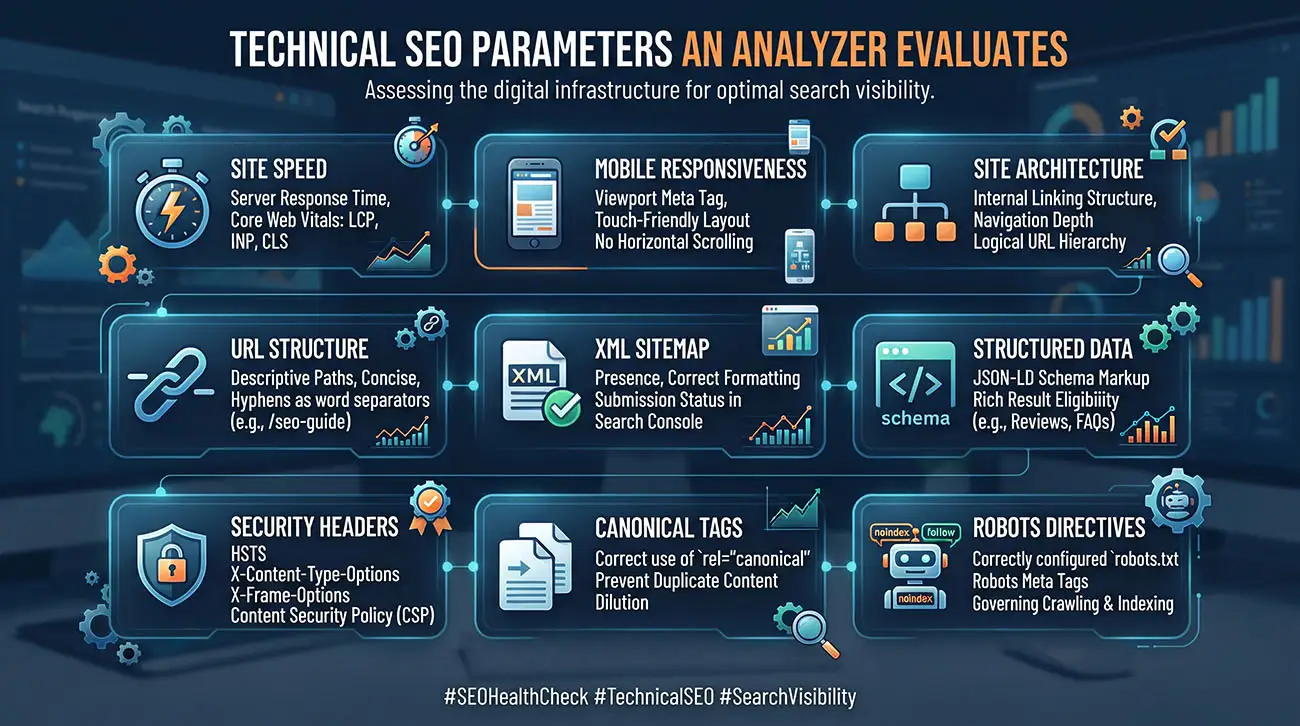
- Site speed — server response time and Core Web Vitals: Largest Contentful Paint, Interaction to Next Paint, Cumulative Layout Shift.
- Mobile responsiveness — a correctly configured viewport meta tag and touch-friendly layout without horizontal scrolling.
- Site architecture — internal linking structure, navigation depth, and a logical URL hierarchy.
- URL structure — descriptive, concise paths using hyphens rather than underscores as word separators.
- XML sitemap — presence, correct formatting, and submission status in Search Console.
- Structured data — JSON-LD schema markup enabling rich result eligibility.
- Security headers — HSTS, X-Content-Type-Options, X-Frame-Options, and Content Security Policy.
- Canonical tags — correct use of rel="canonical" to prevent duplicate content dilution across URL variants.
- Robots directives — correctly configured robots.txt and robots meta tags governing crawling and indexing.
How Often to Run an SEO Analysis
SEO health is not a one-time state; sites change, plugins update, and content gets added, any of which can silently introduce a new issue that wasn't present at the last check.
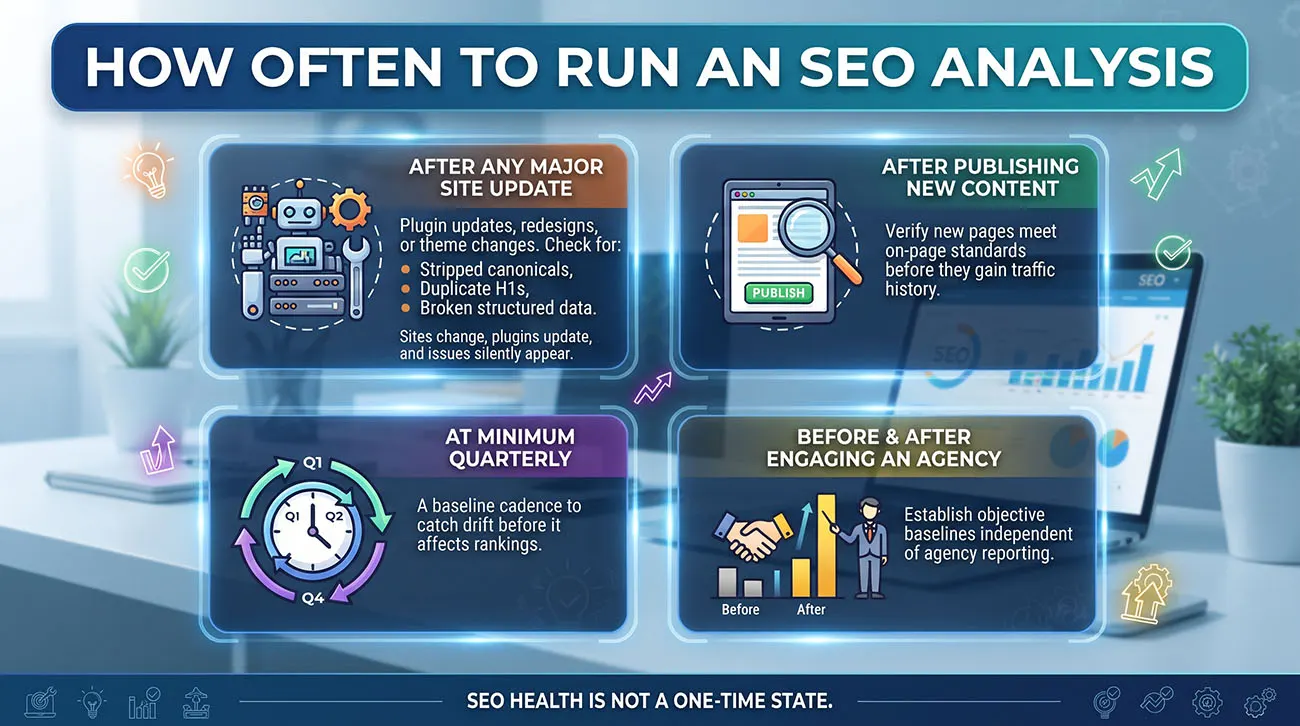
- After any major site update — a redesign, new plugin, or theme change. These frequently and silently strip canonical tags, introduce duplicate H1s, or break existing structured data without any visible symptom.
- After publishing new content — confirming new pages follow the same on-page standards as the rest of the site before they accumulate traffic history.
- At minimum quarterly — a baseline cadence that catches drift before it meaningfully affects rankings.
- Before and after engaging an SEO agency or consultant — establishing an objective before-and-after baseline independent of the agency's own reporting.
What to Do After Running an Analysis
The report itself changes nothing; the value is entirely in what happens after it's read.
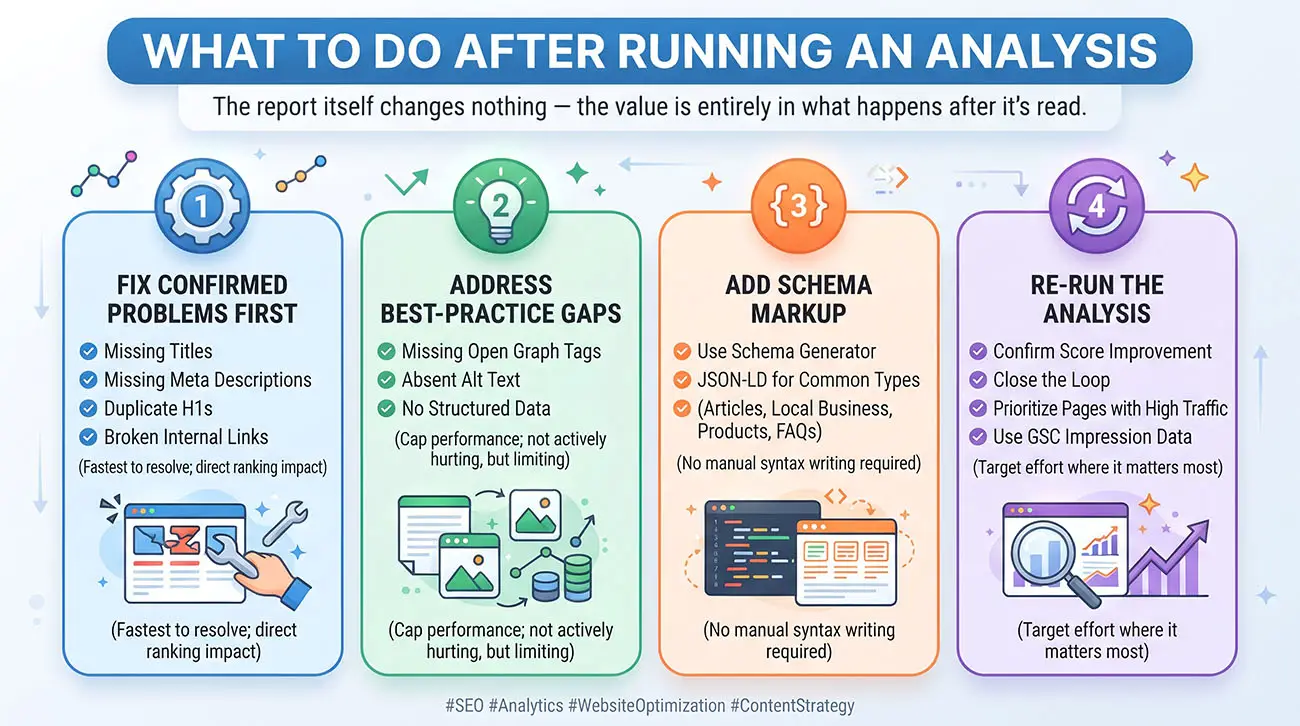
- Fix confirmed problems first. These carry direct ranking impact and are usually the fastest to resolve; missing titles, missing meta descriptions, duplicate H1s, and broken internal links are typically ten-minute fixes per page in any modern CMS.
- Address best-practice gaps next. These aren't actively hurting the page today, but they cap how well it can perform; missing Open Graph tags, absent alt text, and no structured data fall in this category.
- Add schema markup where it's missing. A schema generator can produce ready-to-use JSON-LD for common content types articles, local business listings, products, FAQs- without requiring the syntax to be written by hand.
- Re-run the analysis after changes. Confirming score improvement closes the loop, and working through pages in order of actual traffic using Google Search Console impression data rather than assumptions targets effort where it matters most.
AI Search Readiness and Evolving SEO Analyzers
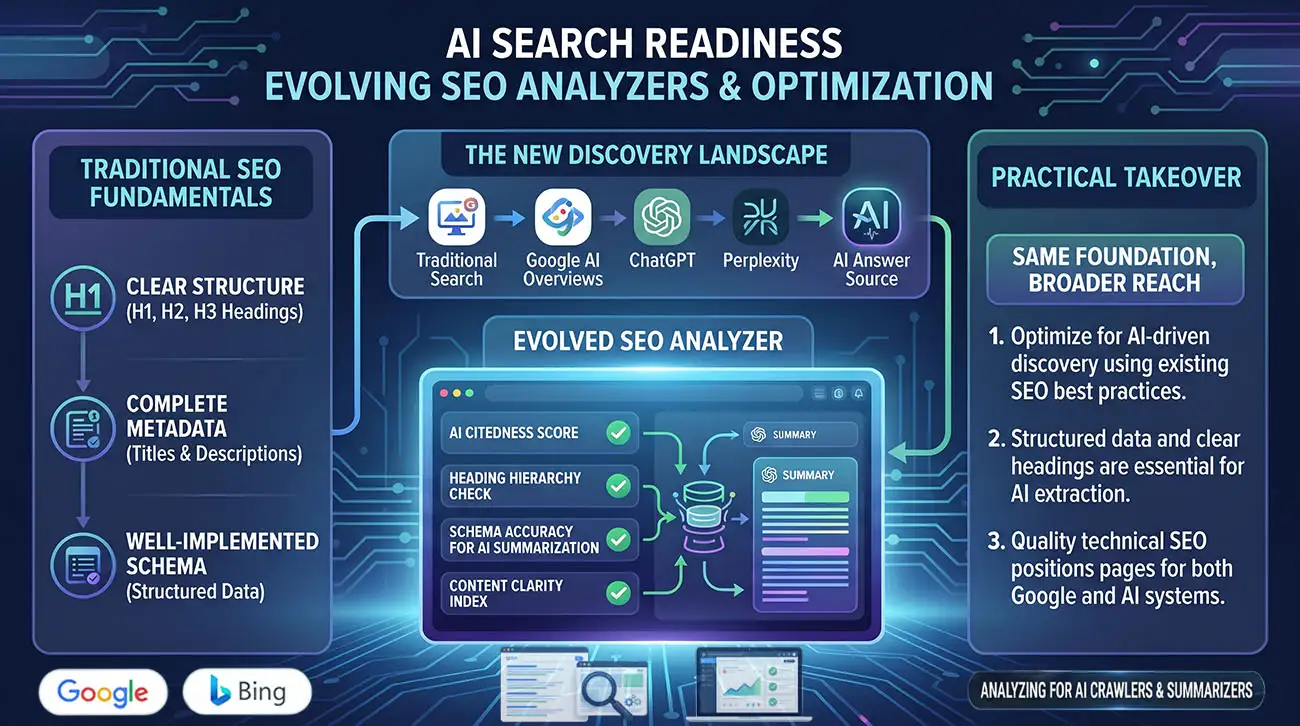
Discovery is no longer limited to traditional search results. Google's AI-generated overviews, ChatGPT, Perplexity, and similar platforms are increasingly acting as answer sources in their own right, and the underlying requirements for being cited well by these systems overlap heavily with traditional SEO fundamentals: clear structure, complete metadata, and well-implemented schema.
Some newer analyzers extend their checks specifically toward this context: evaluating whether heading structure and schema are organized clearly enough for an AI system to extract and summarize accurately, rather than only checking for traditional search engine compatibility. The practical takeaway is that optimizing for AI-driven discovery doesn't require a separate strategy; a page that is well-structured and technically sound for Google is, for the most part, already well-positioned for AI summarization systems as well.
Frequently Asked Questions
What does an SEO analyzer actually check?
Title tags, meta descriptions, heading structure, image alt text, canonical tags, HTTPS status, robots directives, structured data, Open Graph and Twitter Card tags, internal linking, page speed, and Core Web Vitals organized into a scored, prioritized report.
How often should an SEO analysis be run?
After any major site update, redesign, plugin change, theme update, and at minimum quarterly as ongoing maintenance. New content should also be checked shortly after publishing, before it accumulates significant traffic.
Which issues should be prioritized first?
Confirmed, high-severity problems: missing title tags, missing meta descriptions, duplicate H1 tags, broken internal links, absent HTTPS, and missing canonical tags. Best-practice gaps, missing alt text, and no structured data are worth addressing next, but carry less immediate impact.
Why does an SEO score differ between tools?
Free analyzers typically focus on on-page and technical factors visible in the page's own HTML. Paid platforms like Ahrefs or SEMrush also track backlink profiles, keyword rankings over time, and competitor data in a broader scope, which naturally produces a different score or grade even when both evaluate the same page fairly.
A site scores well but still doesn't rank why?
Technical and on-page SEO form the foundation, but ranking also depends on factors an on-page analyzer doesn't measure directly: backlink profile, domain authority, content depth relative to competing pages, and, for local businesses, Google Business Profile signals. A technically sound page with no backlinks and thin content can still underperform against better-linked, more substantive competitors.
Does page speed genuinely affect rankings?
Yes, Google has confirmed Core Web Vitals as a ranking factor. Beyond the direct ranking effect, slower pages also measurably lose visitors during load, which compounds the impact through lower engagement and conversion independent of ranking position.
What is structured data and why does it matter?
Structured data JSON-LD schema markup helps search engines understand a page's content type and enables rich results: star ratings, FAQ dropdowns, business hours, event listings. Pages without it are not eligible for these enhanced result formats regardless of content quality, since the markup itself drives eligibility.
Can a competitor's website be analyzed?
Yes. Most SEO analyzers accept any public URL, making it straightforward to see what a competing page is doing well on the technical and on-page fronts, and where it has gaps that represent an opportunity.
What is a good SEO score to aim for?
A score of 80 or above generally reflects strong technical and on-page fundamentals. Most small business websites fall between 50 and 79; the goal is closing that gap through the specific, identifiable fixes the analysis surfaces, not a full rebuild.
Conclusion
An SEO analyzer turns a vague sense that a site 'should be ranking better' into a specific, prioritized list of what's actually wrong. That shift from guessing to diagnosis is the entire value of the tool. The technical work of fixing what it finds is usually straightforward once identified; the harder part, in most cases, is simply knowing where to look.
The distinction between on-page and technical SEO matters because a page can fail at either: a perfectly written page that's technically inaccessible ranks nowhere, and a technically flawless page with thin content underperforms against better-written competitors. A complete audit checks both, which is what separates a genuine SEO analyzer from a tool that only checks one narrow slice of what actually determines visibility.
Run an analysis, fix the confirmed problems first, and re-run it to confirm the fix worked. Repeat on a reasonable schedule after major changes and, at minimum, quarterly; this simple loop is what keeps a site's technical foundation from quietly degrading between audits.