How to Control Search Engine Indexing at the Page Level
A staging copy of a site, an internal search results page, or an admin login screen showing up in Google search results is not a rare accident. It happens because nothing told the crawler to leave that page out of the index. The default behavior of every crawlable page is to be indexed and to have its links followed unless a specific instruction says otherwise.
That instruction is the robots meta tag, a line of HTML placed in a page's head section that tells search engines exactly how to treat it. A robots meta tag generator produces that line correctly formatted, without requiring anyone to memorize directive syntax or risk a typo that breaks the tag silently.
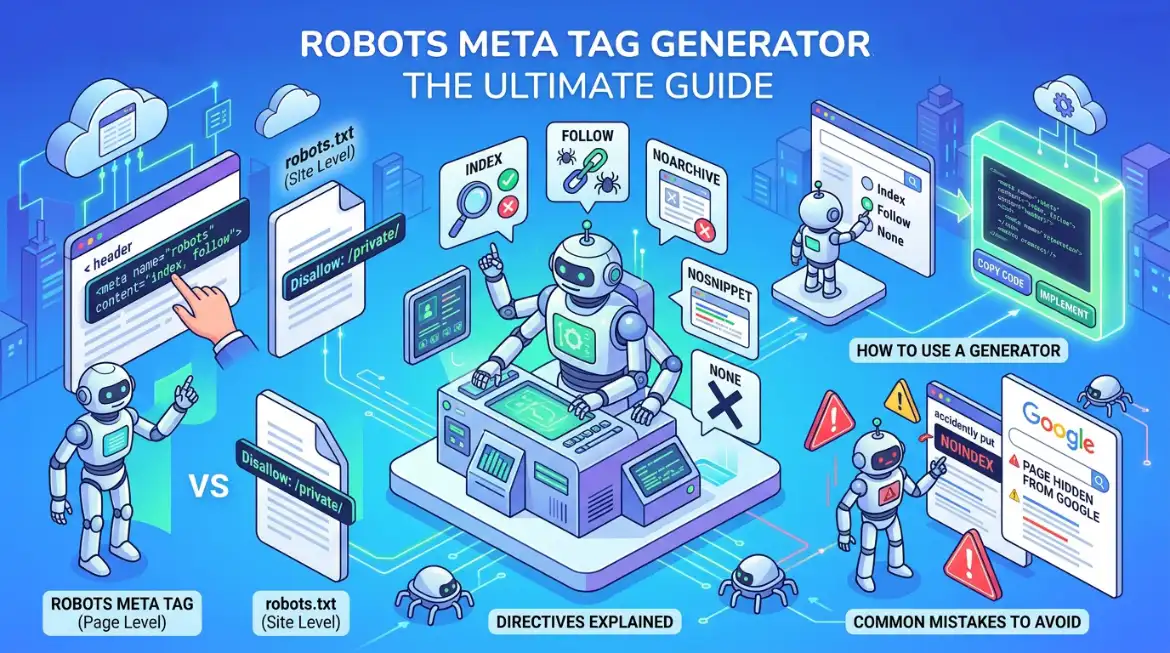
This guide covers what the robots meta tag does, how it differs from robots.txt, which directives exist and what each one controls, how to use a generator effectively, and the mistakes that most often cause pages to disappear from search results by accident.
What Is a Robots Meta Tag
A robots meta tag is an HTML element placed inside a page's head section that gives search engines explicit instructions about that specific page. Unlike robots.txt, which controls whether a crawler is allowed to visit a URL at all, the robots meta tag controls what happens after the crawler has already arrived.
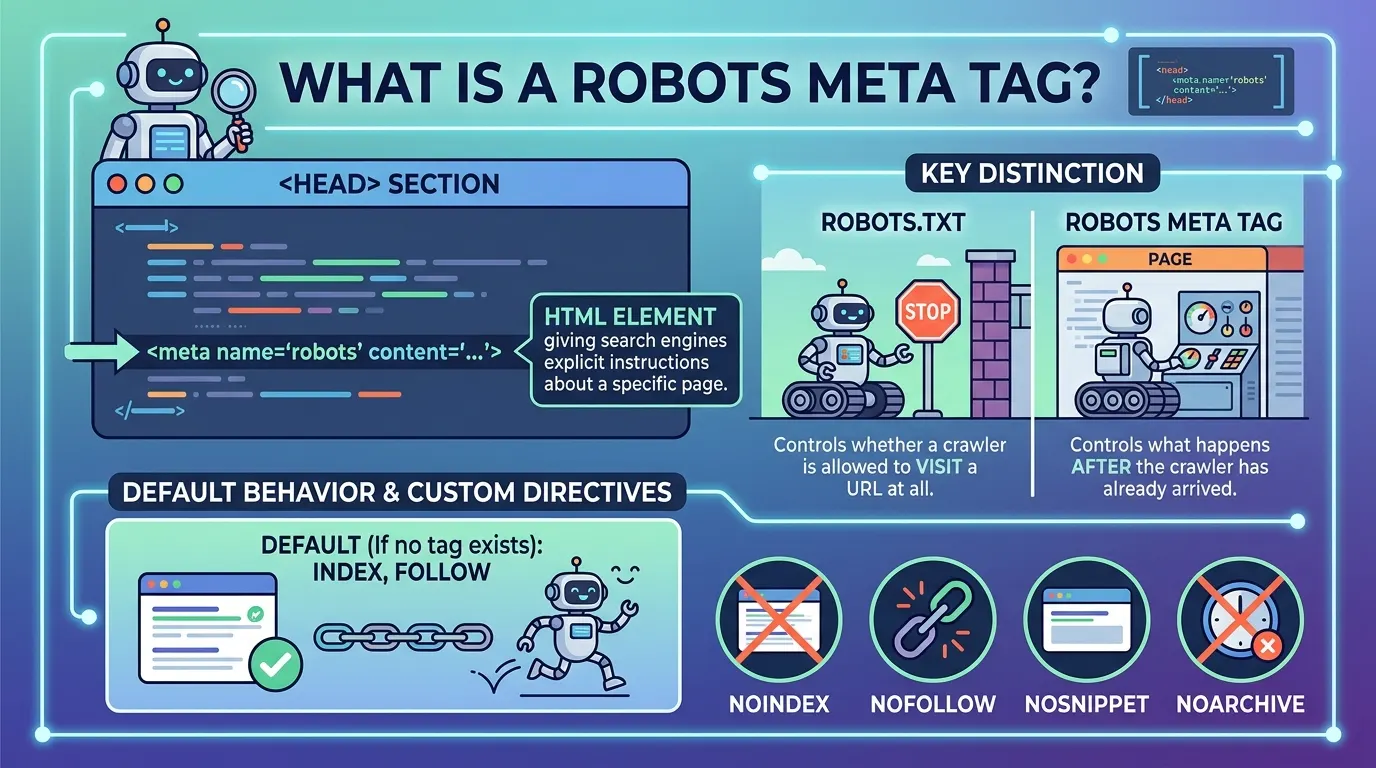
The default behavior when no robots meta tag exists is index, follow: search engines will show the page in results and follow every link on it; adding a custom tag overrides that default with directives such as noindex, nofollow, nosnippet, or noarchive.
<meta name="robots" content="noindex, follow">
That example tells every compliant crawler: do not show this page in search results, but do follow the links it contains. Google supports both the generic robots name, which every compliant crawler reads, and crawler-specific names such as googlebot or googlebot-news, which let a site give different instructions to different search engines.
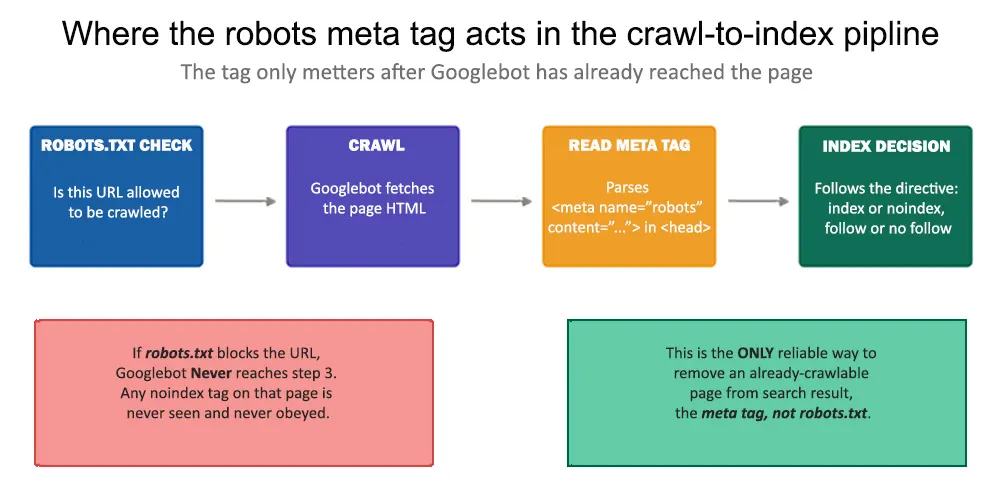
Figure 1: The robots meta tag only matters after a crawler has already reached a page. If robots.txt blocks the URL first, the crawler never gets far enough to read any meta tag on it — a distinction that causes a significant share of indexing errors in practice.
When Directives Conflict
A page can end up with more than one robots directive from a theme, a plugin, or a manually added tag. When directives conflict, the more restrictive rule applies. A page carrying both max-snippet:50 and nosnippet will have nosnippet enforced, since it is the stricter instruction. This is a safety mechanism, but it doesn't replace keeping a single, intentional source of truth for each page's directives.
What Is a Robots Meta Tag Generator
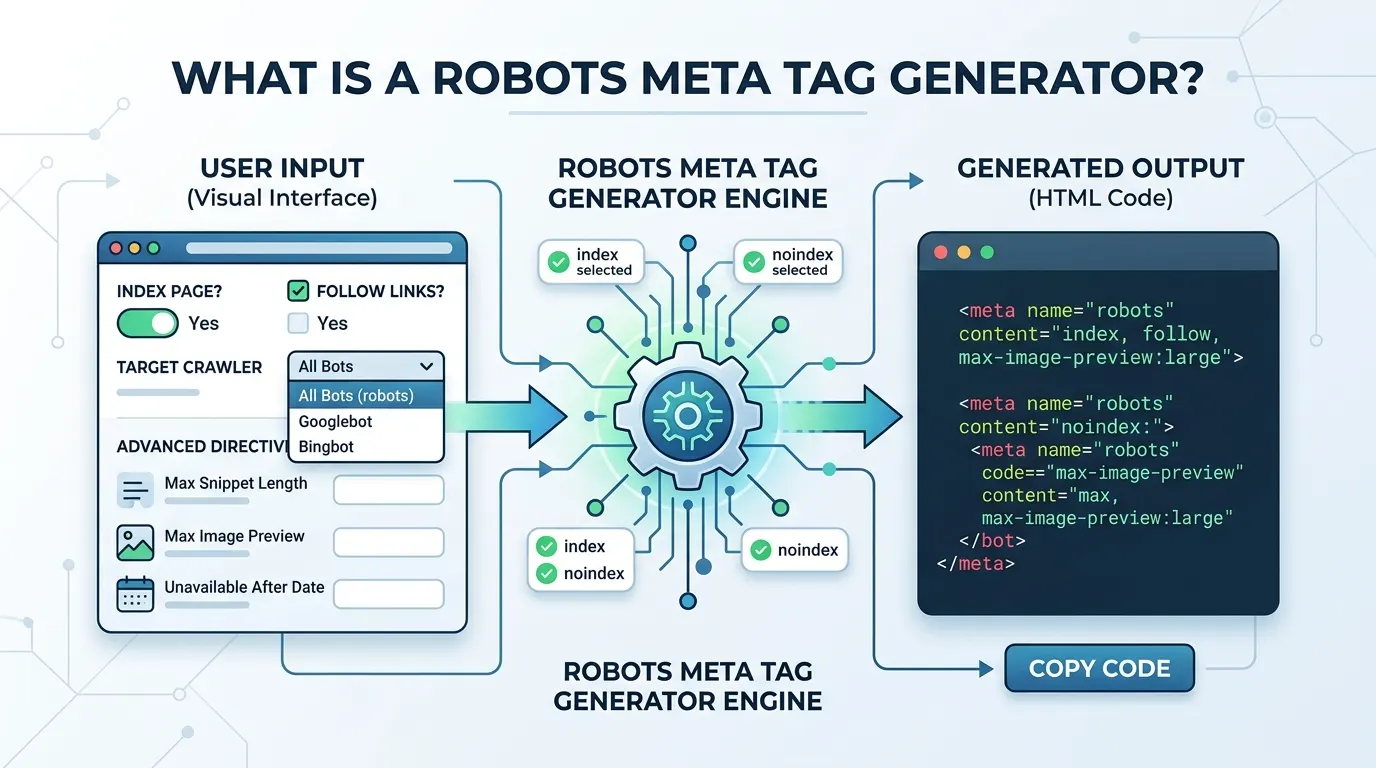
A robots meta tag generator is a tool that produces correctly formatted robots meta tags without requiring the user to write HTML directly. Instead of recalling exact attribute names, comma placement, or valid directive combinations, the user selects options from an interface, and the tool assembles the complete, validated meta tag.
The generator typically validates the combination before output, for instance, refusing to produce index and noindex together, since that combination is self-contradictory. Most generators also support targeting specific crawlers, such as Googlebot for Google-only rules, and expose advanced directives like max-snippet, max-image-preview, and unavailable_after through simple form fields rather than requiring manual syntax.
For a single page, writing the tag by hand takes only a moment. The generator's real value appears at scale: an SEO professional or developer managing hundreds of pages benefits from a tool that guarantees every generated tag is syntactically correct and free of contradictory directives, especially when several team members are making changes independently.
Robots Meta Tag Directives
What Each One Controls:
The robots meta tag supports a defined set of directives, and each one controls a distinct aspect of how a page is treated in search. Combining them precisely is what separates a correctly configured page from one that behaves unpredictably.
Reading a Combined Directive
Most real implementations combine two or more directives in a single tag. A page that should stay indexed and pass link equity but withhold a search snippet common for paywalled content would carry:
<meta name="robots" content="index, follow, nosnippet">
A page that should be entirely excluded, indexing and link-following both disabled, appropriate for a staging environment, would carry:
<meta name="robots" content="noindex, nofollow">
robots.txt vs. Robots Meta Tag
Which One to Use:
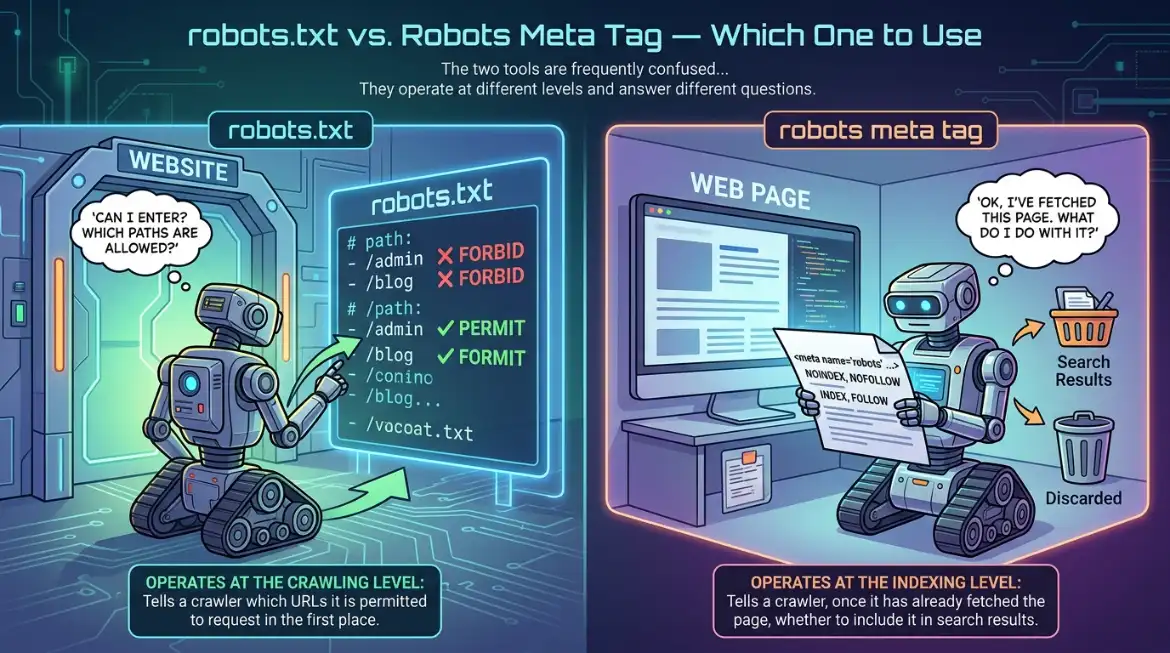
The two tools are frequently confused because they sound similar and both influence what Google does with a page. They operate at different levels and answer different questions, and using the wrong one for a given goal produces no effect at all.
robots.txt operates at the crawling level; it tells a crawler which URLs it is permitted to request in the first place. The robots meta tag operates at the indexing level; it tells a crawler, once it has already fetched the page, whether to include it in search results.
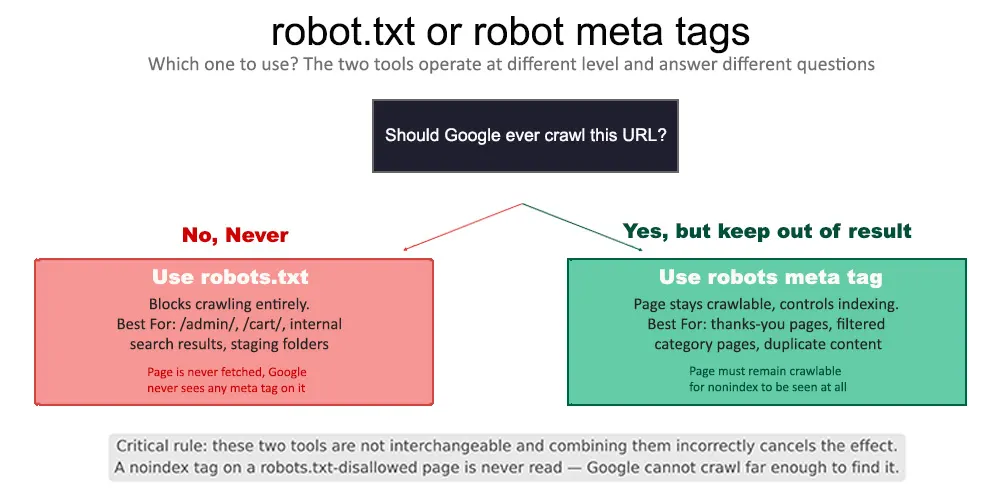
Figure 2: The deciding question is whether Google should ever crawl the URL at all. If the answer is no, robots.txt is correct. If the answer is yes — but the page should stay out of search results — the robots meta tag is the right tool, and the page must remain crawlable for the tag to be seen.
The critical caveat, and the single most common technical error involving robots meta tags: if robots.txt disallows a URL, Google never crawls it and therefore never sees any meta tag placed on it. A noindex directive on a robots. txt-blocked page is silently ignored, not enforced, not an error, simply never read. The fix is straightforward once understood: pages that need a noindex tag to work must remain crawlable in robots.txt.
How to Use a Robots Meta Tag Generator
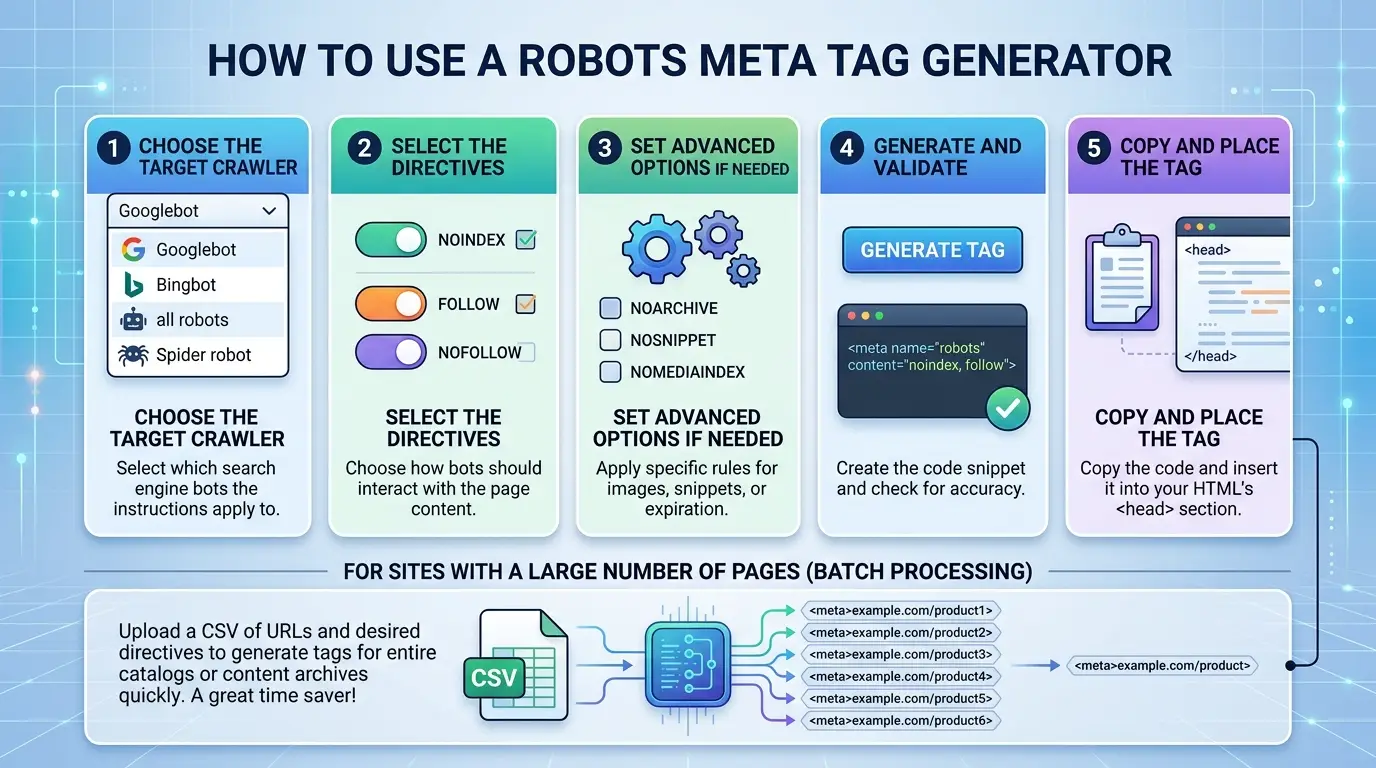
- Step 1 — Choose the target crawler. Most generators default to the generic robots name, which applies to all standards-compliant crawlers. For Google-specific rules, select Googlebot; for Google News specifically, Googlebot-News. Some tools also support blocking non-search crawlers such as AdsBot-Google.
- Step 2 — Select the directives. Check the boxes for the desired behavior: index or noindex, follow or nofollow, nosnippet, noarchive, noimageindex, or unavailable_after, depending on the goal for that page.
- Step 3 — Set advanced options if needed. Enter a snippet character limit, a video preview duration, an image preview size, or a specific unavailable_after date for time-limited content.
- Step 4 — Generate and validate. The tool assembles the tag and checks the combination for contradictions; it will not produce index and noindex together, for example.
- Step 5 — Copy and place the tag. Paste the generated meta tag into the page's head section, before the closing head tag. Google will also read a robots meta tag placed in the body, but the head section remains the standard and most reliable placement.
For sites with a large number of pages needing individual configuration, some generators accept a CSV of URLs and desired directives, producing tags for the entire batch at once, useful for e-commerce catalogs or content archives where manual per-page configuration would not scale.
The X-Robots-Tag HTTP Header for Non-HTML Files
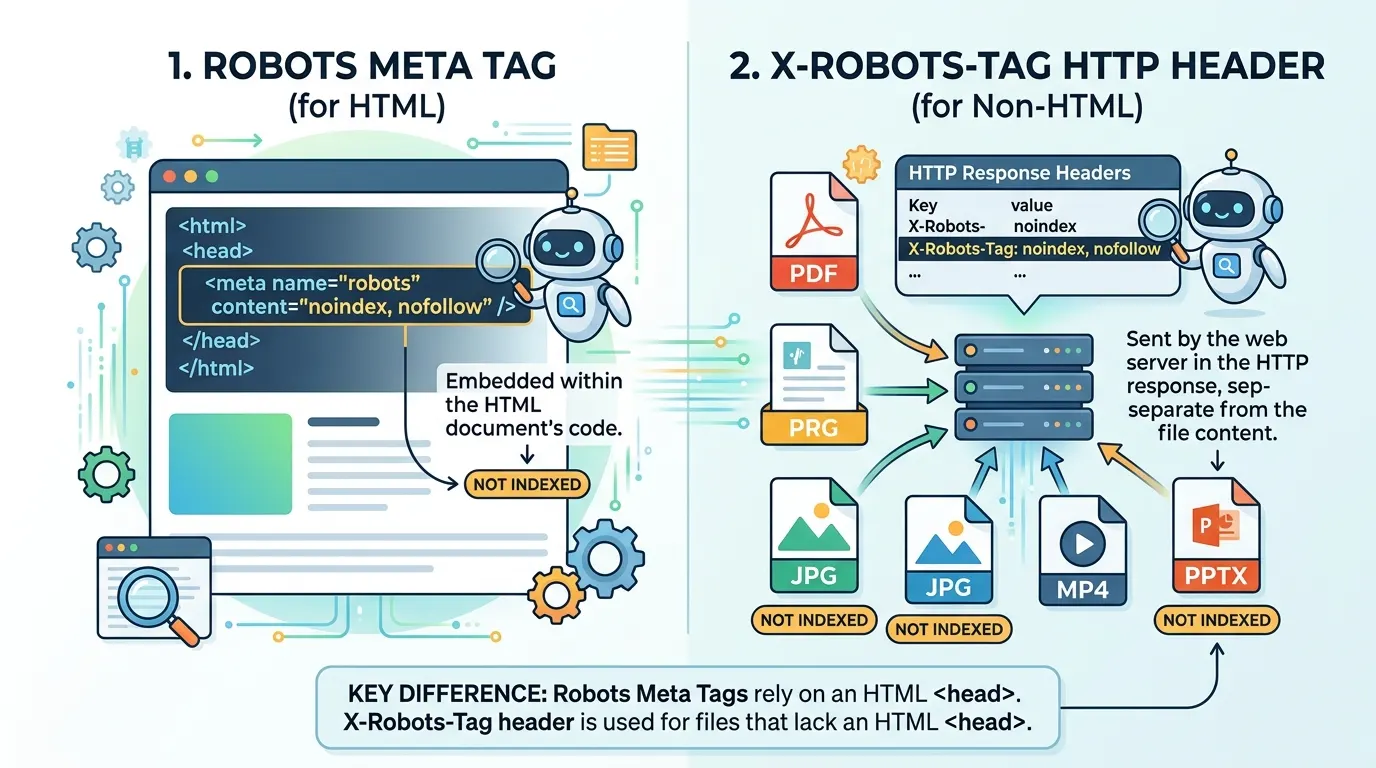
Robots meta tags only work on HTML pages, because they rely on an HTML head element that non-HTML files do not have. For PDFs, images, videos, and other file types, the equivalent control is the X-Robots-Tag HTTP header, sent as part of the server response rather than embedded in a document.
X-Robots-Tag: noindex, nofollow
The same directive vocabulary applies: noindex, nofollow, nosnippet, max-snippet, max-image-preview, and the rest all work identically in an HTTP header as they do in an HTML meta tag. This makes it possible to exclude a directory of PDFs or images from search results without touching any HTML, configured through .htaccess on Apache, server configuration on Nginx, or custom headers within a CMS.
Text-Level Snippet Control with data-nosnippet
Sometimes an entire page should remain indexed, but a specific portion of it a price, a login prompt, promotional copy should never appear in a search snippet. The data-nosnippet HTML attribute provides that granularity.
<div data-nosnippet>Special offer expires tonight!</div>
Google continues to index the page and display a snippet for it, but excludes the tagged element's content from that snippet specifically. This is useful for keeping promotional or time-sensitive text out of search previews without noindexing the surrounding page.
Common Use Cases for Robots Meta Tags
Post-transaction and admin pages. Thank-you pages, checkout confirmations, and admin login screens have no value in search results. A noindex, follow tag keeps them out of the index while still allowing normal site navigation through them.
Thin or duplicate content. Internal search result pages, paginated category listings beyond the first page, and affiliate landing pages frequently duplicate content that exists elsewhere on the site. Noindexing them prevents them from diluting the site's overall quality signals.
Staging and development environments. A staging site that gets accidentally crawled and indexed is a common and avoidable failure. Applying noindex, nofollow across every page of a staging environment keeps it fully out of search; this should be one of the first things configured on any new environment, not an afterthought.
Paywalled or subscription content. News sites and membership platforms often want search visibility without giving away full article content in the snippet. nosnippet or max-snippet:0 prevents Google from showing an excerpt, which can encourage a click-through to subscribe rather than reading the snippet as a substitute.
Image-sensitive pages. noimageindex keeps a page in search results while excluding its images from Google Image search, specifically relevant for photographers, artists, or any site where image-search traffic is undesirable for a particular page.
Per-crawler rules. Different search engines can receive different instructions using crawler-specific tag names. Keeping a page out of Google while allowing Bing to index it, for instance, uses a Google-specific tag rather than the generic robots name.
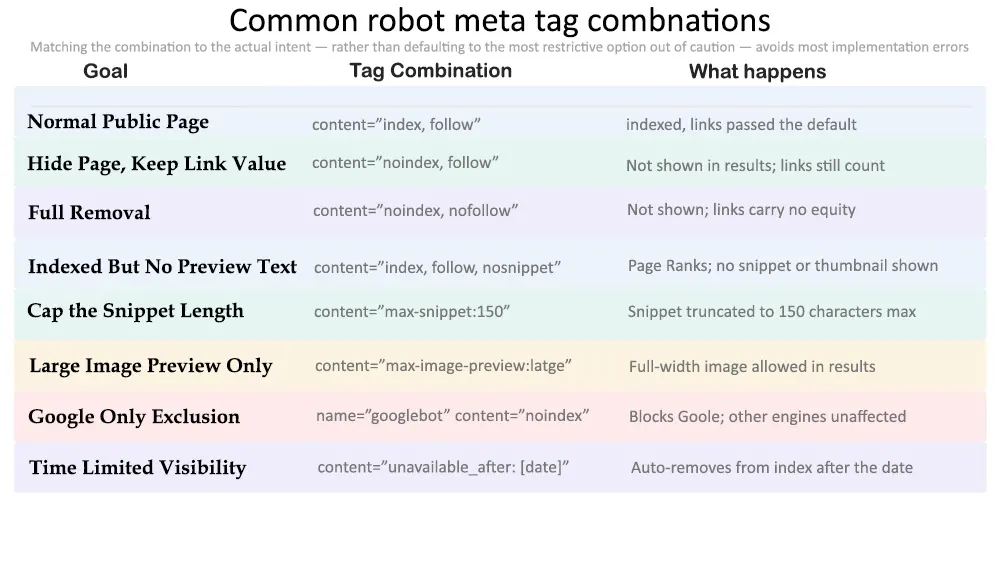
Figure 3: The most common directive combinations mapped to the goal they achieve. Matching the combination to the actual intent — rather than defaulting to the most restrictive option out of caution — avoids most implementation errors.
Common Mistakes and How to Avoid Them
Robots meta tag errors are unusual among technical SEO issues in that they are almost invisible until traffic drops and someone investigates. The tag can be perfectly well-formed HTML and still produce the wrong outcome if the underlying logic is misapplied.
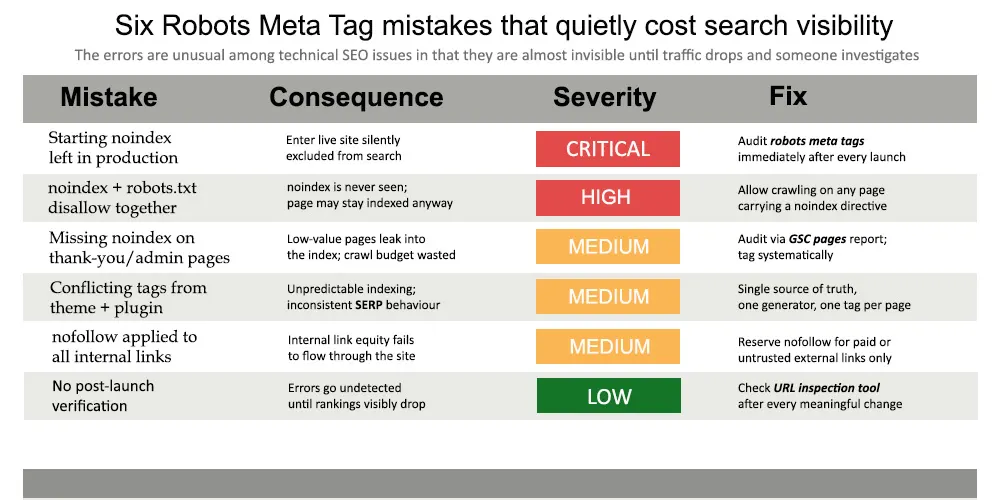
Figure 4: Six mistakes that account for most of the damage caused by robots meta tag misconfiguration, ranked by how much search visibility they typically cost.
The Staging-to-Production Carryover
This is the most damaging and most common error. A staging environment correctly carries a sitewide noindex, nofollow tag during development. When the site launches, that tag is not removed, and the entire live site remains excluded from search sometimes for weeks before anyone notices the traffic has not materialized. Auditing robots meta tags immediately after any launch, migration, or major CMS update is the single highest-value habit in this area.
Combining noindex with a robots.txt Disallow
As covered above, this combination cancels itself: Google never reaches the page to see the noindex directive. The fix is to allow crawling on any page that depends on noindex to stay out of the index, and reserve robots.txt disallow rules for pages that should never be visited at all.
Applying nofollow Too Broadly
Some site owners apply nofollow to every internal link out of a vague concern about link equity, which is counterproductive; internal link flow is how authority moves through a site's own page structure. nofollow is intended for paid links, untrusted third-party links, or unvetted user-generated content, not for a site's own internal navigation.
How to Test and Audit Robots Meta Tags

- View page source — right-click any page, select View Page Source, and search for "robots" to confirm whether a tag exists and what it says. This is the fastest single check available and requires no tools beyond the browser.
- Google Search Console URL Inspection — enter a URL and check the indexing section. If a noindex directive is present, GSC reports it explicitly, along with whether the page is currently excluded because of it.
- Bulk site crawls — tools like Screaming Frog or Sitebulb crawl an entire site and report every page's robots directive in one pass, surfacing pages with unexpected noindex tags, missing tags, or contradictory combinations across the site at once.
Testing after implementation is not optional for any page where getting the directive wrong has real consequences, which, given how silent these errors are, is effectively every page a site actually wants indexed.
Implementing Robots Meta Tags Across Platforms
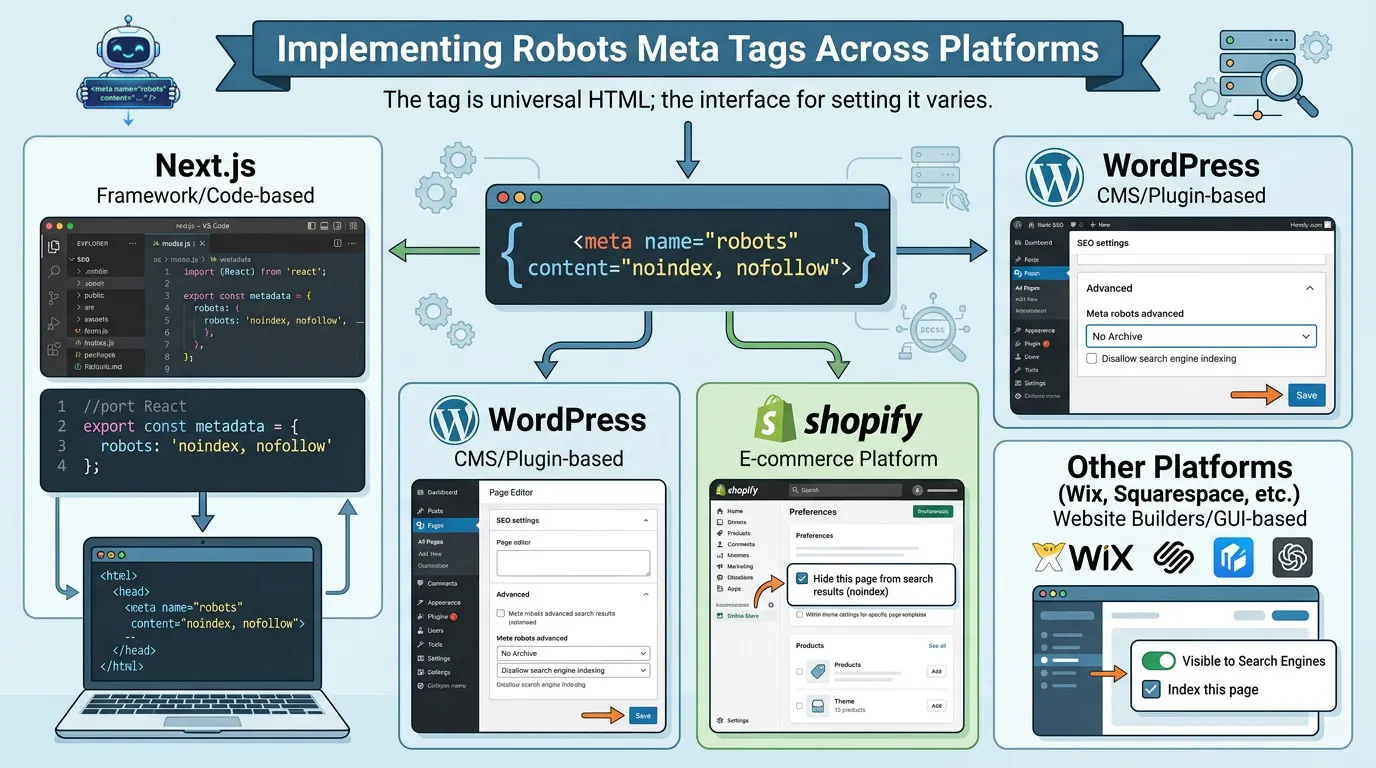
How the tag gets onto a page depends on the platform. The tag itself is universal HTML; the interface for setting it varies.
Next.js
The Metadata API in Next.js provides structured control over robots directives at the page or route level:
export const metadata = {
robots: {
index: false,
follow: true,
googleBot: {
index: false,
follow: true,
'max-image-preview': 'large',
},
},
};
WordPress, Shopify, and Other Platforms
WordPress SEO plugins such as Yoast SEO and Rank Math expose robots meta tag settings directly on each post or page's edit screen, alongside global defaults in the plugin's settings. Shopify handles this through theme Liquid conditional logic, with many themes providing built-in toggles for noindexing collection pages, tag pages, and search results. Wix automatically applies noindex to unpublished pages or pages marked hidden from search in its SEO settings, with advanced controls available for finer configuration.
Regardless of platform, the verification step is the same: after configuring robots directives through any interface, check the live page source to confirm the tag is actually present and correctly formed; plugin and theme settings can be misconfigured or silently fail to apply.
FAQ's
What is the difference between noindex and nofollow?
noindex prevents a page from appearing in search results. nofollow tells search engines not to follow the links on that page or pass link equity through them. The two are independent; a page can carry noindex with follow, or index with nofollow, depending on what's needed.
Does noindex also stop links on the page from being followed?
No. Unless nofollow is also present, search engines will still follow the links on a noindex page. Using noindex, follow together keeps the page itself out of results while preserving link flow to whatever it links to.
How long does noindex take to take effect?
Typically a few days to a week after the page is next crawled. Requesting recrawling through the URL Inspection tool in Google Search Console can speed this up, though it does not guarantee an immediate result.
Can noindex be used on a homepage?
Technically yes, but it is rarely advisable; it removes the site's primary entry point from search entirely. The only reasonable uses are temporary placeholders or genuinely private, members-only sites with no intention of public search visibility.
What is the difference between nosnippet and max-snippet:0?
Both prevent a text snippet from appearing in search results. nosnippet is the simpler, older directive; max-snippet:0 is part of Google's more granular extended directive set. Google supports both, and they produce the same practical outcome for text snippets.
What happens if a page has conflicting index and noindex directives?
Google applies the more restrictive directive in this case, noindex. This typically happens when a theme and a plugin, or two plugins, set conflicting values independently. The conflict itself, even though Google resolves it safely, usually indicates a configuration problem worth fixing at the source.
Can different search engines be given different instructions for the same page?
Yes. Using a crawler-specific tag name. name="googlebot" rather than the generic name="robots" targets only that crawler. A page can be set to noindex for Google specifically while remaining indexable by Bing or other search engines that only read the generic tag.
Is a robots meta tag generator necessary, or can the tag just be written by hand?
For a single page, writing the tag manually is entirely feasible. A generator's value is in preventing errors at scale, validating that directive combinations are not contradictory, ensuring consistent formatting across many pages, and reducing the chance that a manually typed tag has a syntax error that silently fails.
Conclusion
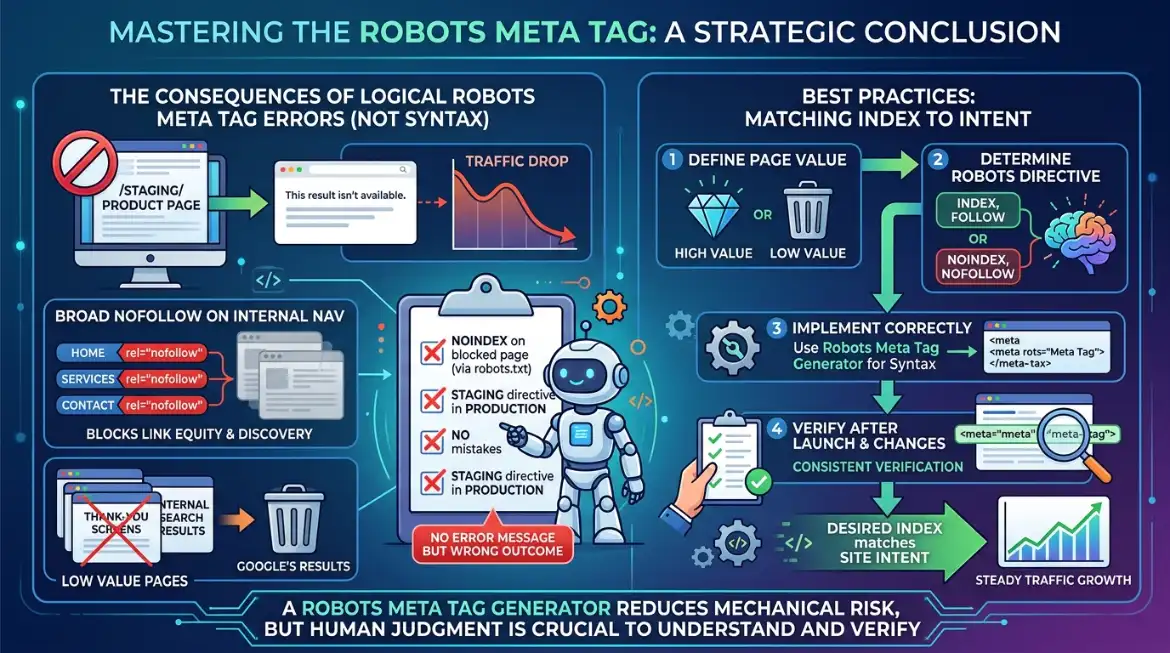
The robots meta tag is a small piece of HTML with an outsized effect on what a site's index actually looks like. Getting it right keeps low-value pages, thank-you screens, staging environments, and internal search results out of Google's results without blocking the crawling that link equity and site structure depend on.
The errors that matter most are not syntax errors. They are logical ones: a noindex tag placed on a page that robots.txt already blocks, a staging directive that survives into production, nofollow applied indiscriminately to internal navigation. None of these produce an error message. They simply produce a wrong outcome that surfaces later as an unexplained drop in traffic.
A robots meta tag generator reduces the risk of mechanical mistakes, malformed syntax, and contradictory directives, but the judgment about which directive belongs on which page still requires understanding what robots.txt and the meta tag each actually do, and verifying the result rather than assuming it. That verification step, done consistently after every launch and major change, is what keeps a site's index matching its intent.