How to Create, Configure, and Test a Robots.txt File Correctly
Before a search engine crawler requests any page on a website, it checks one file first: robots.txt. That file, sitting quietly at the root of the domain, determines which parts of the site the crawler can visit, and a single misplaced character can accidentally block Google from an entire site.
A robots.txt generator removes that risk. Rather than writing the Robots Exclusion Protocol syntax by hand, the tool takes plain selections- which bots, which folders, which sitemap- and produces a correctly formatted file in under a minute.

This guide covers what robots.txt actually does, how a generator works, the directives that make up the file, how to test it properly, and, just as importantly, what robots.txt cannot do, since misunderstanding its limits causes as many problems as misconfiguring the file itself.
What Is a Robots.txt File
A robots.txt file is a plain text file placed in a website's root directory, for example, https://www.example.com/robots.txt, that gives instructions to automated crawlers about which parts of the site they may request. It follows the Robots Exclusion Protocol, a technical standard that reputable crawlers, including Googlebot, Bingbot, and most AI crawlers, respect.

Before requesting any other page, a compliant crawler checks this file first. If it finds a rule disallowing a path, it will not request URLs under that path, assuming the crawler chooses to honor the file, which well-behaved crawlers do and malicious ones do not.
An important distinction worth stating plainly: robots.txt is not a security mechanism. It does not hide content from a determined human visitor or from a crawler that ignores the protocol. It only guides crawlers that choose to follow it. Anything genuinely sensitive needs authentication, not a robots.txt rule.
For SEO purposes, a correctly configured robots.txt file serves three practical functions: it manages crawl budget by keeping crawlers away from low-value URLs, it reduces duplicate content exposure by blocking parameter-based URL variants, and it can moderate server load through crawl-delay for sites on limited hosting.
What Is a Robots.txt Generator
A robots.txt generator is a tool, almost always free and browser-based, that produces a correctly formatted robots.txt file from a set of simple selections rather than requiring the file to be hand-written. The user selects a default rule, adds directories to block, sets an optional crawl delay, and provides a sitemap URL; the tool assembles the syntax and outputs a file ready to upload.
The practical value is in avoiding the syntax errors that hand-written robots.txt files are prone to. The protocol is strict about path formatting, trailing slashes, and directive ordering; a missing character in a Disallow line can change its meaning entirely, and the most damaging version of that error blocks an entire site rather than the single folder that was intended.
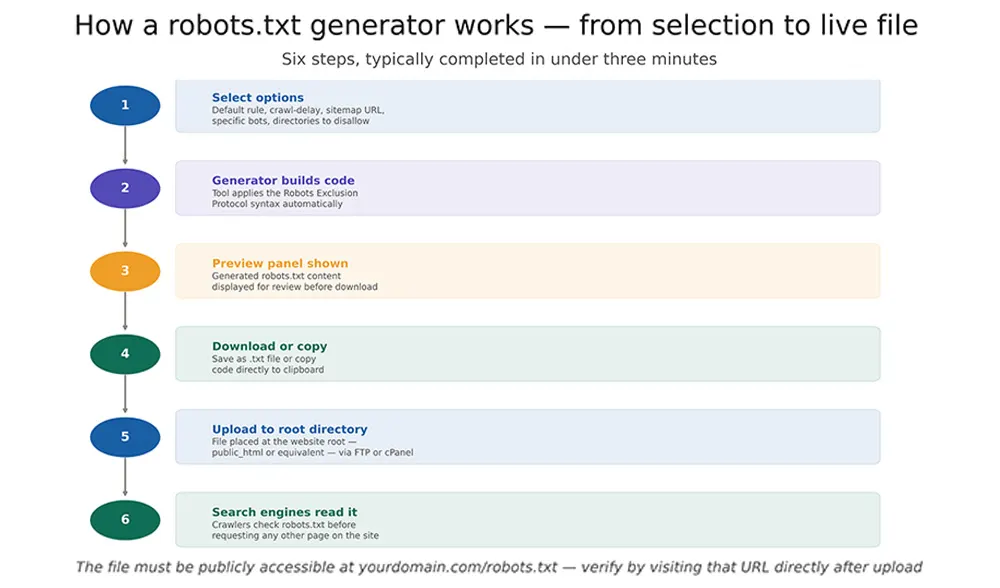
Figure 1: The complete robots.txt generator workflow, from selecting options to the file being read by search engines. Each step is mechanical except the final verification — confirming the file is actually live at the expected URL — which is the step most often skipped.
Understanding Robots.txt Directives
A robots.txt file is built from a small number of directive types, combined into groups. Each group begins with a User-agent line specifying which crawler the following rules apply to.
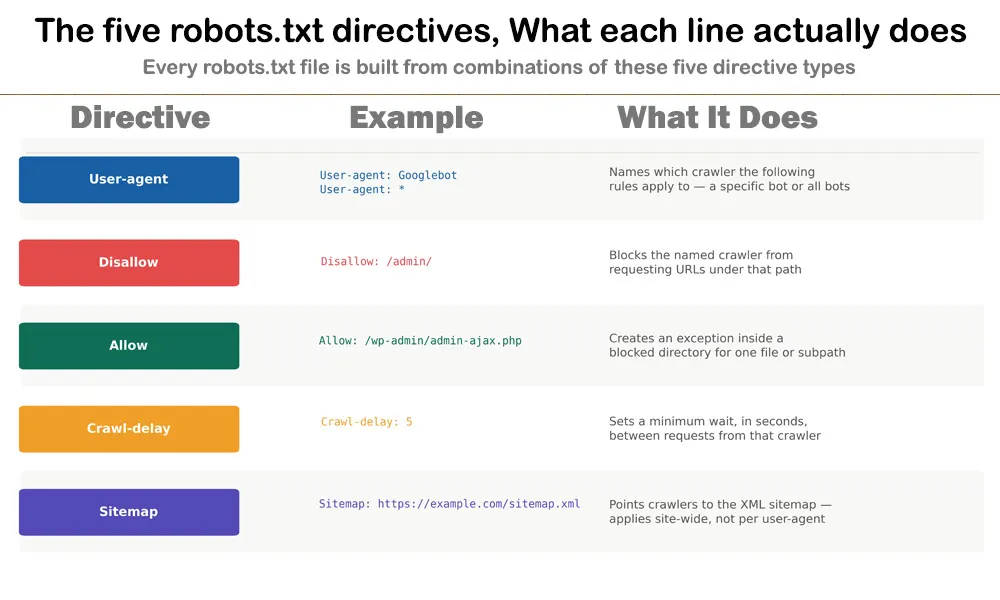
Figure 2: The five directive types that make up every robots.txt file. User-agent and Disallow appear in nearly every file; Allow, Crawl-delay, and Sitemap are used as needed depending on the site's structure.
How the Directives Combine
A typical WordPress configuration illustrates how these directives work together in practice:
User-agent: *
Disallow: /wp-admin/
Allow: /wp-admin/admin-ajax.php
Sitemap: https://www.example.com/sitemap.xml
This blocks all crawlers from the WordPress admin directory as a whole, but creates a specific exception for admin-ajax.php, a file that many plugins rely on to function correctly, even for site visitors who are not logged in. Blocking it entirely would break plugin functionality across the site.
The default assumption, in the absence of any Disallow rule, is that a crawler may request everything. Robots.txt is an exclusion list, not a permission list; nothing needs to be explicitly allowed unless it falls inside a directory that has already been disallowed.
How to Use a Robots.txt Generator
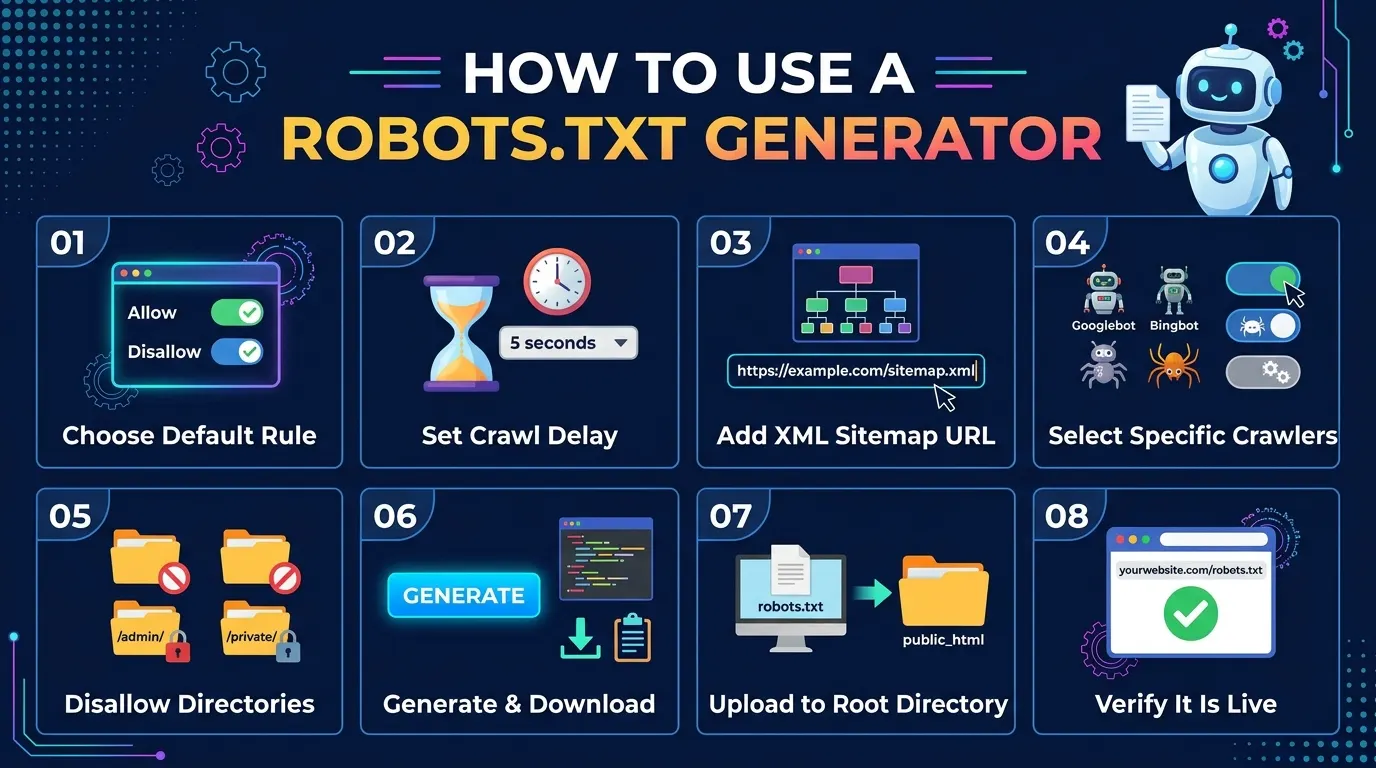
Step 1 — Choose the default rule. Most generators default to Allow, meaning crawlers may request anything not specifically blocked. This is the correct default for the overwhelming majority of public websites.
Step 2 — Set a crawl delay if needed. Not necessary for most sites, but useful on shared or resource-limited hosting to prevent aggressive crawlers from straining server capacity. A delay of 5–10 seconds is a reasonable starting point where this matters.
Step 3 — Add the XML sitemap URL. Providing the full sitemap address gives crawlers a direct path to the site's important content, independent of internal link discovery.
Step 4 — Select specific crawlers if rules need to differ. Most generators list dozens of named bots — Googlebot, Bingbot, Google-Extended for AI training data, and others — each of which can be allowed or blocked independently of the general rule.
Step 5 — Add directories or files to disallow. This is the core configuration step: specifying which paths should be off-limits. Common candidates include admin directories, checkout flows, and internal search result pages.
Step 6 — Generate, then download or copy. The tool produces the file; download it directly or copy the code to paste into a file created manually.
Step 7 — Upload to the website's root directory. The file must be named exactly robots.txt, lowercase, and placed at the root — typically the public_html folder on shared hosting, or the equivalent root path on other server configurations.
Step 8 — Verify the file is live. Visit https://yourdomain.com/robots.txt directly in a browser. The file's contents should display as plain text. This confirms the upload succeeded and the file is in the correct location before relying on it.
What Robots.txt Cannot Do
The noindex Distinction
The single most common misunderstanding about robots.txt is the assumption that disallowing a page removes it from search results. That is not always true, and the exception matters.
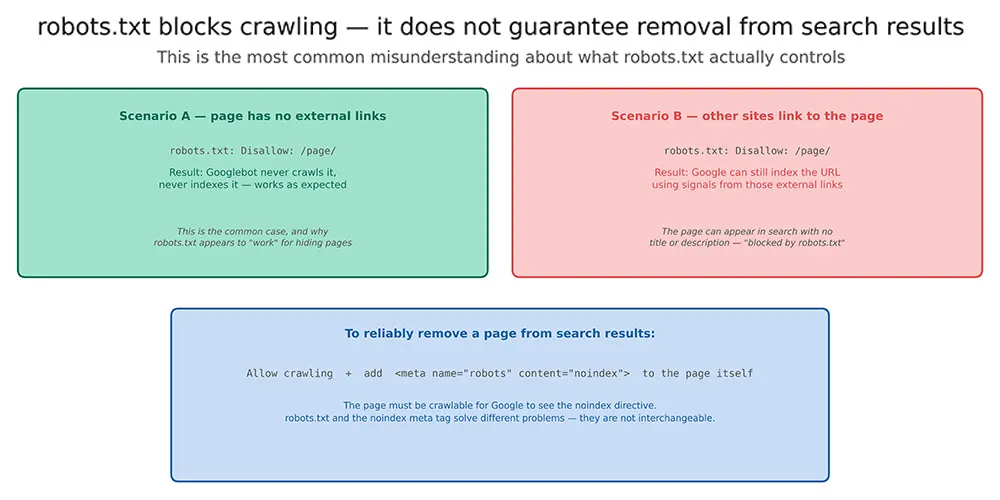
Figure 3: Disallowing a page in robots.txt prevents crawling — but if other websites link to that page, Google can still index the URL using signals from those external links, sometimes displaying it in results with no title or description at all. Reliable removal requires a different mechanism.
A Disallow rule tells a crawler not to request a URL. It does not, by itself, guarantee the URL will never appear in search results. If external sites link to a disallowed page, Google may still index the URL based on that link data, even without ever crawling the page's actual content, which produces the confusing result of a URL appearing in search with no snippet, because Google has never seen what's on it.
To reliably keep a page out of search results, the page must remain crawlable, and a noindex meta tag or X-Robots-Tag HTTP header must be present on it. This is counterintuitive at first: the mechanism that actually controls indexing requires allowing the crawl, not blocking it. robots.txt and noindex solve different problems, and treating them as interchangeable is where this kind of implementation goes wrong.
Common Robots.txt Configurations
A small number of patterns cover the majority of real-world robots.txt needs. These can be used directly as a starting point or adjusted for a specific site's structure.
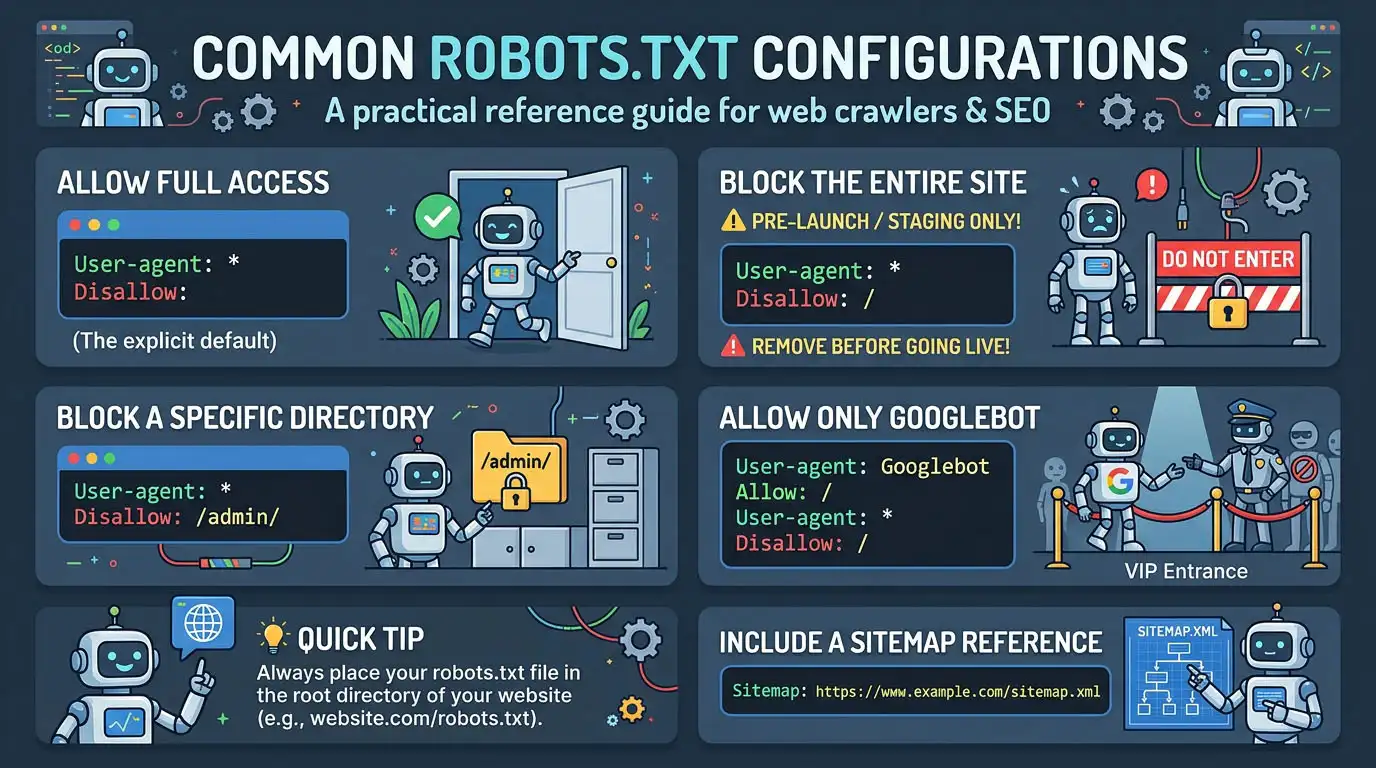
Allow full access (explicit default)
User-agent: *
Disallow:
Block the entire site (pre-launch or staging)
User-agent: *
Disallow: /
This pattern is correct during active development, but it is also the single most common cause of an entire site vanishing from search after launch because the rule is never removed. Any site using this during staging needs a deliberate, verified step to remove it before going live.
Block a specific directory
User-agent: *
Disallow: /admin/
Allow only Googlebot, block everything else
User-agent: Googlebot
Allow: /
User-agent: *
Disallow: /
Include a sitemap reference
Sitemap: https://www.example.com/sitemap.xml
How to Test and Validate a Robots.txt File
Testing matters here more than for most technical SEO elements, because a single error can affect an entire site's crawlability rather than one page.
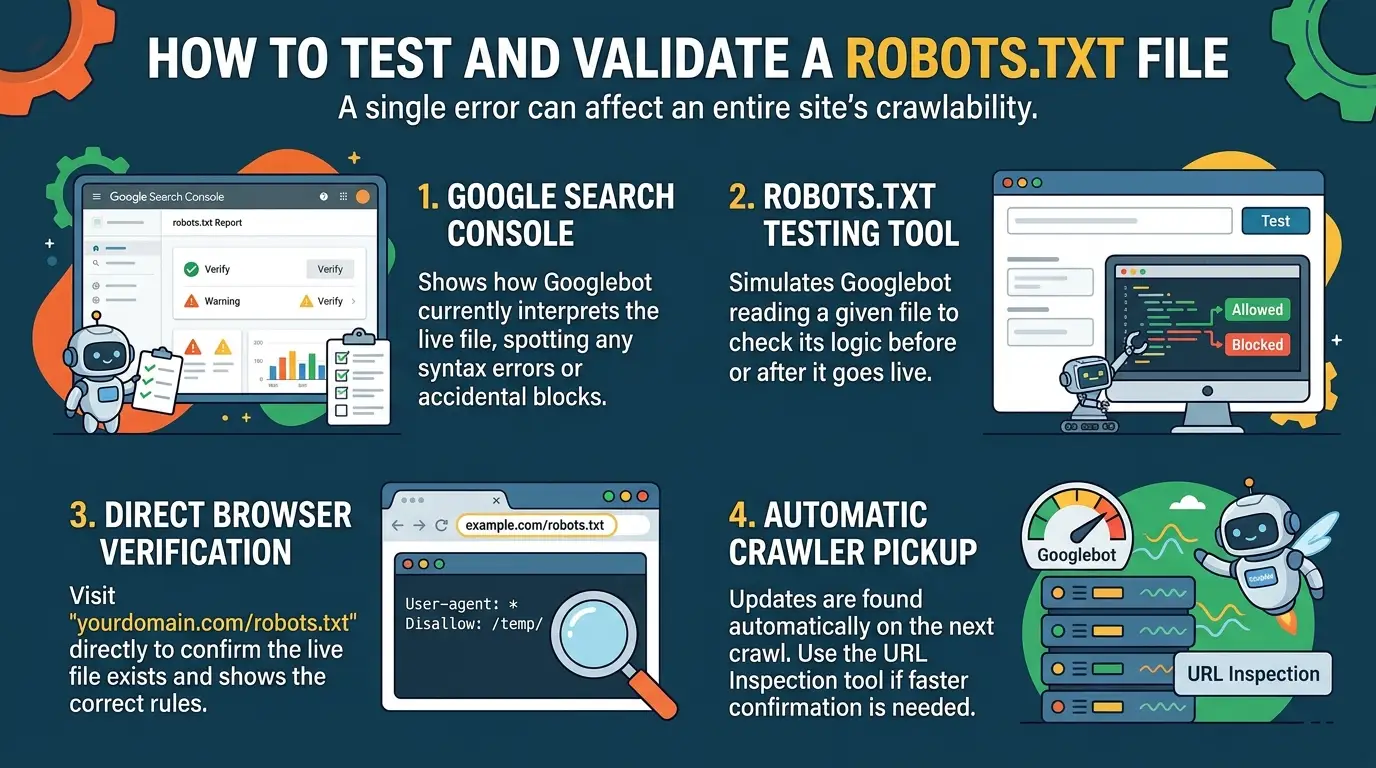
Google Search Console's robots.txt report shows how Googlebot is currently interpreting the live file, including any syntax warnings or unintentional blocks available once site ownership is verified.
Google's official robots.txt testing tool simulates how Googlebot reads a given file, useful for checking a file before it goes live as well as auditing one that's already deployed.
Direct browser verification: visiting the live URL directly is the simplest and fastest check, confirming the file exists at the correct path and displays the expected content.
After any update to the file, Google's crawlers pick up the change automatically on their next visit; there is no separate submission step required, though the URL Inspection tool can be used to request a recrawl if faster confirmation is needed.
Robots.txt Limitations Worth Understanding
Robots.txt is a useful and standard tool, but treating it as capable of more than it actually does leads to predictable problems. Four limitations matter most in practice.
It is a request, not an enforceable rule. Reputable crawlers honor it. Malicious scrapers and bad-faith bots simply ignore it; the file provides no technical barrier against a crawler that chooses not to respect the protocol.
It does not guarantee removal from search results. As covered above, external links can cause a disallowed page to be indexed anyway, just without crawled content.
It does not hide content from humans. Anyone with the direct URL to a disallowed page can visit it normally; the file only instructs automated crawlers, not browsers.
It applies per protocol and subdomain. A robots.txt file at https://example.com/robots.txt does not govern http://example.com or https://blog.example.com; each distinct protocol and subdomain combination needs its own file if different rules are required.
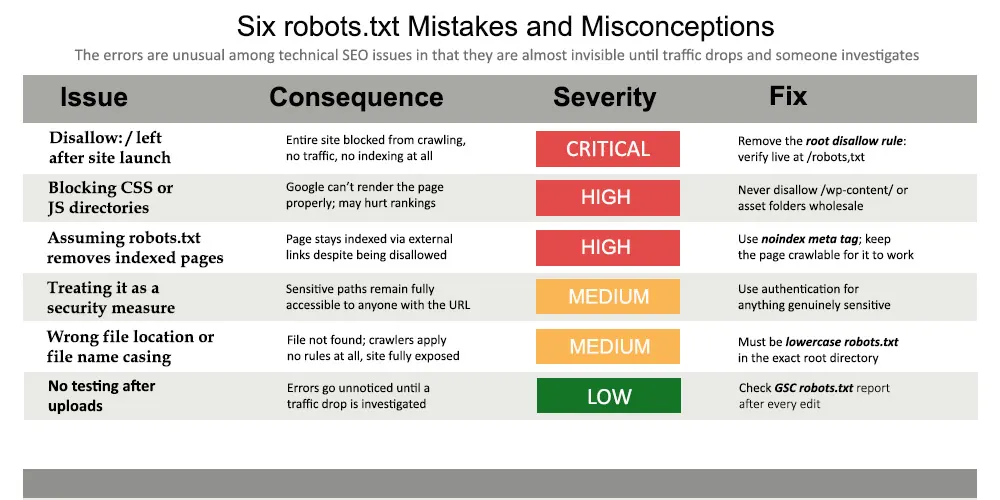
Figure 4: Six mistakes and misconceptions that account for most robots.txt problems in practice — roughly split between technical configuration errors and misunderstandings about what the file is actually capable of controlling.
Uploading Robots.txt to the Correct Location
The file must be named exactly robots.txt all lowercase, no variations and placed in the website's root directory, the same folder that holds the homepage file. On shared hosting with cPanel, this is typically public_html. On a VPS or dedicated server, it's commonly /var/www/html/ or an equivalent configured path. Subdomains require their own robots.txt at their own root; a file at the main domain does not extend to subdomains.
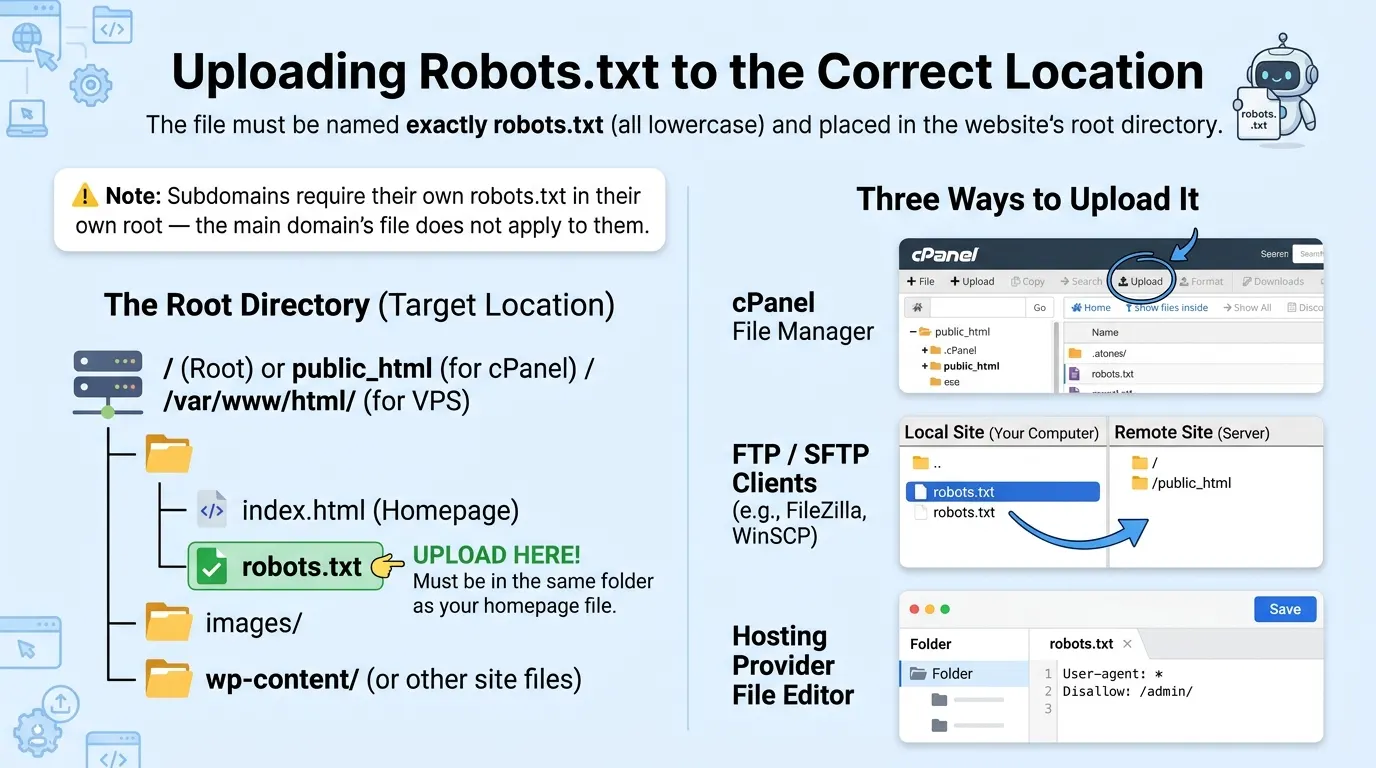
cPanel File Manager — navigate to the root folder, use the upload function, and select the generated file.
FTP or SFTP clients — such as FileZilla or WinSCP connect to the server, navigate to the root, and transfer the file directly, or create it in place and paste the generated code.
Hosting provider file editors — Many hosts include a built-in editor accessible from the control panel, sufficient for creating or editing the file without a separate FTP client.
Alternatives to Using a Generator
A generator is the fastest, lowest-risk path for most site owners, but it is not the only option.
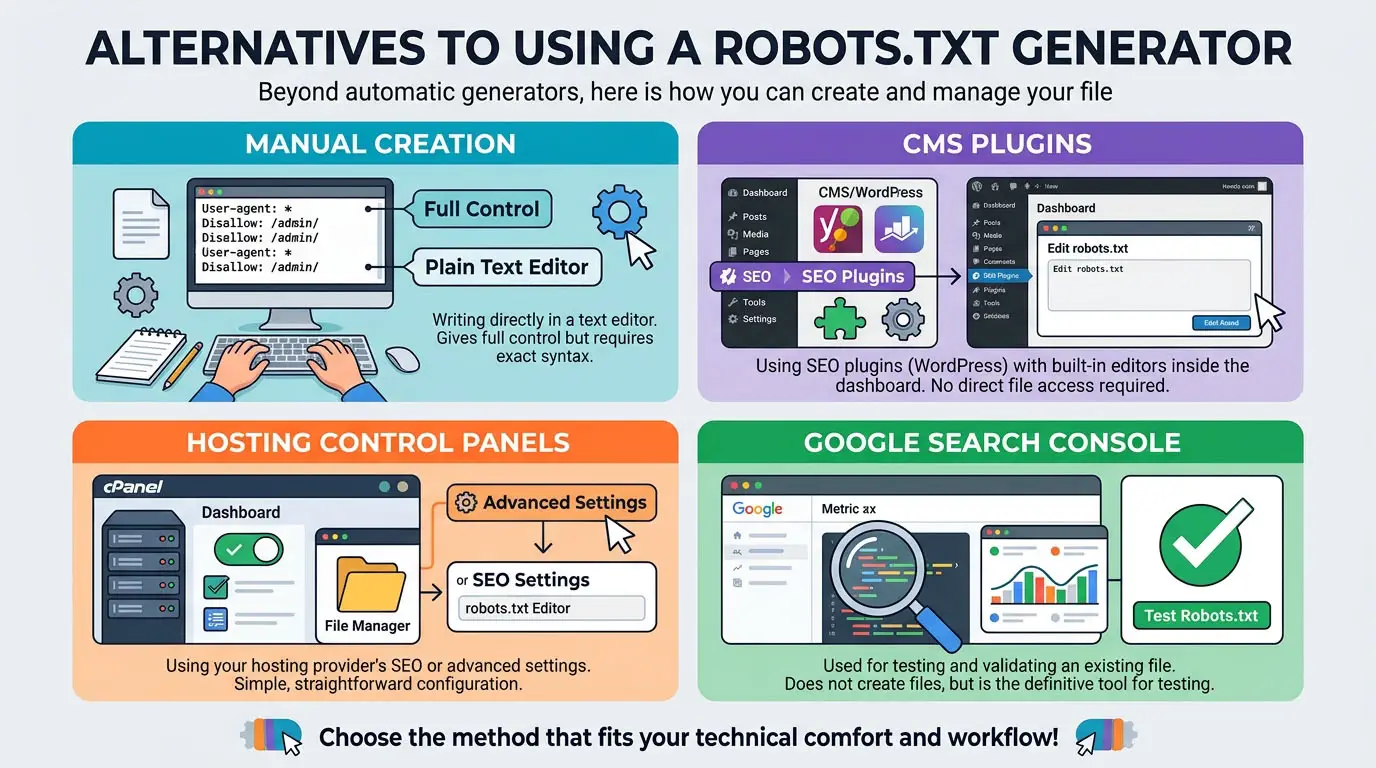
- Manual creation — writing the file directly in a plain text editor gives full control and requires no tool, but demands familiarity with the protocol's exact syntax requirements.
- CMS plugins — WordPress SEO plugins, including Yoast SEO and Rank Math, include a built-in robots.txt editor inside the dashboard, avoiding the need for direct file access entirely.
- Hosting control panels — some hosts expose a basic robots.txt editor under SEO or advanced settings, sufficient for straightforward configurations.
- Google Search Console — does not generate a file, but is the definitive tool for testing one that already exists or is about to be deployed.
For most site owners without a specific reason to write the file by hand, a generator remains the fastest way to produce a correctly formatted result on the first attempt.
Practical Guidance for Using a Robots.txt Generator
Start simple. A first robots.txt file does not need to anticipate every possible rule. Allow all bots, block the admin directory, add the sitemap, and expand from there only as specific needs arise.
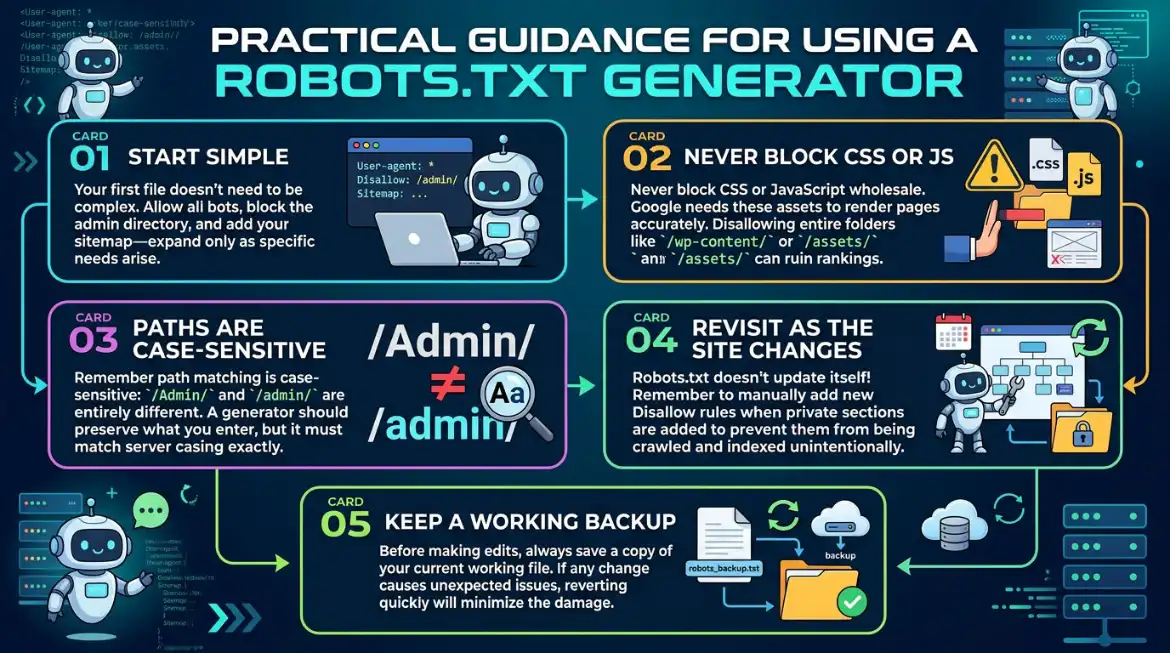
Never block CSS or JavaScript wholesale. Google needs to load these assets to render pages accurately for evaluation. Disallowing an entire /wp-content/ or /assets/ directory can cause Google to see a broken or unstyled version of every page on the site, a mistake that actively harms rankings rather than simply having no effect.
Remember path matching is case-sensitive. /Admin/ and /admin/ are different paths as far as the protocol is concerned. A generator should preserve exactly what's entered, but the input itself needs to match the actual directory casing on the server.
Revisit the file as the site changes. A new private section added to a site needs its own Disallow rule added deliberately. robots.txt does not update itself, and forgetting this step is how new pages end up crawled and indexed unintentionally.
Keep a backup of the working file. Before making changes, save a copy of the current version. If an edit produces an unexpected result, reverting quickly limits the damage.
Frequently Asked Questions
What is a robots.txt generator?
A tool that produces a correctly formatted robots.txt file from simple selections: default rule, blocked directories, sitemap URL, and crawl delay, rather than requiring the file to be written by hand. It removes the risk of syntax errors that can accidentally block an entire site.
Does robots.txt guarantee a page won't appear in search results?
No. It prevents crawling, which usually prevents indexing, but if external sites link to a disallowed page, Google can still index the URL based on those links alone, sometimes displaying it with no title or snippet since the content was never crawled. Reliable removal requires a noindex directive on a page that remains crawlable.
Where does the robots.txt file need to be located?
At the root of the domain https://www.example.com/robots.txt, named exactly robots.txt, all lowercase. A file placed anywhere other than the root, or with different capitalization, will not be recognized by crawlers checking for it.
Can different rules be set for different search engines?
Yes. Using a specific User-agent line for Googlebot, Bingbot, or another named crawler targets rules to that crawler only. Rules under User-agent: * apply to any crawler that doesn't have its own specific group.
Is robots.txt a security measure?
No. It only instructs crawlers that choose to respect the Robots Exclusion Protocol. It provides no actual barrier against a human visitor with the direct URL, or against a bot that ignores the protocol entirely. Genuinely sensitive content requires authentication.
What happens if robots.txt accidentally blocks the entire site?
A line reading Disallow: / under User-agent: * blocks every crawler from every page. This is a common accident during the transition from a staging environment where blocking everything is intentional to production, where the rule is often forgotten and left in place, silently removing the entire site from search.
Should CSS and JavaScript files be blocked in robots.txt?
No, and this is a common and damaging mistake. Google needs to load a page's CSS and JavaScript to render and evaluate it properly. Blocking asset directories can cause Google to see a broken or unstyled version of every page, which can negatively affect how the page is evaluated and ranked.
How is robots.txt different from a noindex meta tag?
robots.txt controls whether a crawler is permitted to request a URL at all. The noindex meta tag controls whether an already-crawled page should appear in search results. A page can only have its noindex tag read if it remains crawlable, meaning it must not be blocked in robots.txt for the tag to have any effect.
Does robots.txt apply to AI crawlers?
Many AI crawlers respect the same protocol, identified by their own user-agent names; GPTBot, Google-Extended, and CCBot are common examples. The same Disallow and Allow syntax works for controlling these crawlers as it does for traditional search engine bots, though not every AI crawler is guaranteed to honor the file.
Conclusion

Robots.txt is a small file with an outsized effect on how a site is crawled and, indirectly, on what ends up indexed. Getting the syntax right matters, but understanding what the file actually controls matters just as much: it governs crawling, not indexing directly, and it is a request that well-behaved crawlers honor rather than an enforceable barrier.
A robots.txt generator removes the mechanical risk of a misplaced slash or malformed directive that can silently block an entire site. It does not remove the need to understand the underlying logic: which directories genuinely need to stay out of search, whether robots.txt or a noindex tag is the correct tool for a given page, and why blocking CSS or JavaScript is a mistake rather than a precaution.
The file is worth verifying after every meaningful site change, not just at initial setup. A staging-only Disallow: / rule that survives into production, or a new private directory that never got its own rule added, are quiet failures the kind that show up as a traffic drop weeks later rather than an immediate error. Testing the live file directly, and treating that verification as a standard step rather than an afterthought, is what keeps the configuration matching the site's actual intent over time.